
Campus Lesson Template PDF
Download a printable campus lesson PDF template to organize class date, lesson activities, objectives, assessment, modifications, and notes. It helps teachers, tutors, homeschool parents, and school staff plan lessons in a clear and structured format.
What is a campus lesson
A campus lesson is a structured PDF used to outline what will happen during a lesson or teaching session. It keeps lesson activities, objectives, assessment, modifications, and notes organized and easy to follow.
Users download this campus lesson because it gives teachers and instructors a simple way to prepare lessons without building a planning layout from scratch.
Daily lesson planning
Organize the class date, activities, and learning flow for one lesson.
Teacher preparation
Keep objectives, assessment, and notes in one easy planning sheet.
Homeschool instruction
Plan learning tasks and adjustments for a home classroom.
Tutoring sessions
Outline lesson activities and follow-up notes for each session.
- Replacing an official school curriculum or district pacing guide
- Serving as a complete attendance or grading system
- Managing long-term academic records or student transcripts
How to use and edit the campus lesson
You can print this template for handwritten completion or fill it out digitally as an editable PDF. Digital editing is useful when you want typed entries, reusable records, clean copies, and easy sharing.
How to customize the PDF
Use this workflow to add lesson details, write objectives, plan activities, define assessment, and note any classroom modifications.
Open the PDF in PDFelement
Open the template, click each fillable field, type the needed details, and save a clean digital copy.
Fill in the date and any lesson planning details at the top of the page.
Enter the lesson activities and learning objectives for the class.
Add assessment details, modifications, and notes before saving or printing the plan.
PDFelement helps teachers type clean lesson entries, adjust labels, add notes, save reusable copies, and keep lesson plans organized for printing and sharing.
| PDFelement Feature | How It Helps |
|---|---|
| Edit PDF | Customize headings, labels, and lesson notes |
| Fill PDF | Type date, activities, objectives, and assessment details |
| Form tools | Use text fields and boxes for structured lesson planning |
| Annotate | Add reminders, comments, or teaching follow-up notes |
| Convert | Export or archive the finished lesson plan for records |
| Organize PDFs | Keep lesson plans by subject, class, date, or term |
What to include in a campus lesson
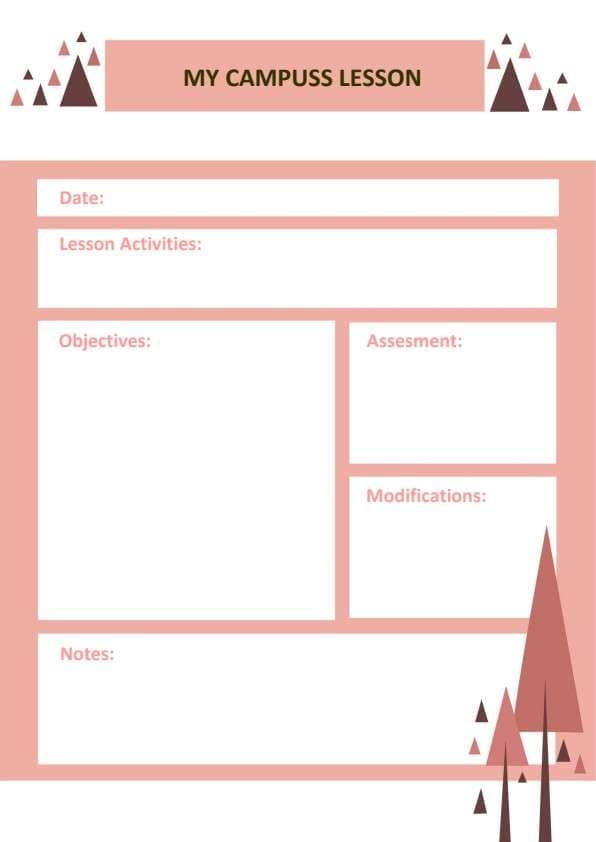
A useful campus lesson PDF should be clear enough for daily use but simple enough to complete quickly. The fields below show what this template is built to capture and why each part matters.
Campus Lesson fields
| Field | What to Fill In | Why It Helps |
|---|---|---|
| Date | Lesson date or teaching day | Shows when the lesson will be taught |
| Lesson activities | Class tasks, teaching steps, or activity sequence | Outlines what will happen during the lesson |
| Objectives | Learning goals or student outcomes | Clarifies what students should learn |
| Assessment | Quiz, observation, worksheet, discussion, or other check | Explains how learning will be measured |
| Modifications | Support, accommodations, or adjustments for students | Helps meet different learning needs |
| Notes | Materials, reminders, reflections, or follow-up points | Keeps extra planning information in one place |
Why users download this template
Users download this campus lesson because it gives them a simple way to organize teaching details in one printable PDF.
 Plan lesson activities clearly Set objectives for each class Document assessment and modifications Keep notes for later teaching review Print a clean lesson sheet for class prep Reuse the same layout for future lessons
Tips for using this template
- Keep activities short so the lesson stays easy to follow.
- Write objectives in clear language that matches the class level.
- Use the notes box for materials, reminders, or follow-up ideas.
- Save one master copy before making weekly edits.
- Adjust the assessment section to fit the lesson format.
FAQs
What is a campus lesson?
It is a form used to organize lesson activities, objectives, assessment, modifications, and notes.
Who should use this template?
Teachers, tutors, homeschool parents, and school staff can use it.
Is the PDF editable?
Yes. You can type lesson details, update the fields, save copies, and print it.
What should I include in a campus lesson?
Common fields include date, lesson activities, objectives, assessment, modifications, and notes.
Can I reuse this template for multiple classes?
Yes. Keep a blank master copy and duplicate it for each lesson or class period.
Can this replace a full curriculum plan?
No. It is a lesson planning tool, not a complete curriculum management system.
Related templates


This template page includes usage guidance, editing steps, review information, and related tools to avoid thin template-page content.