
How to Read Comments on PDF
How do I view comments on a PDF? Here we provide 4 solutions for you to read comments in PDF easily with PDFelement and Chrome.
 100% Secure |
 Powered by AI
 Home
>
Add Comments in PDF
> How to Read Comments on PDF
Home
>
Add Comments in PDF
> How to Read Comments on PDF
How to read comments on PDF is one of the questions that most of the users ask, and it is because the PDF format is not as popular as Word or other processors. The comments are mostly added to the PDF to make sure that the important information stands out. It is an important part of the PDF, but it loses all its credibility if the receiver is unable to read the info. To view comments in PDF the software Wondershare PDFelement - PDF Editor Wondershare PDFelement Wondershare PDFelement is one of the best ones. It is a fast and reliable PDF editor on the market.


 G2 Rating: 4.5/5 |
 100% Secure
Part 1: Two Methods to View Comments in PDF on Windows
With PDFelement, it is easy to make sure that the comments are read. The process that you need to follow is mentioned below. It will let you know how to view comments in PDF.
Method 1. Read Comments in Note Box
Quick list: How to read comments in PDF with PDFelement
In detail: How to read comments in a PDF using PDFelement's Note Box.
-
Step 1. Import PDF
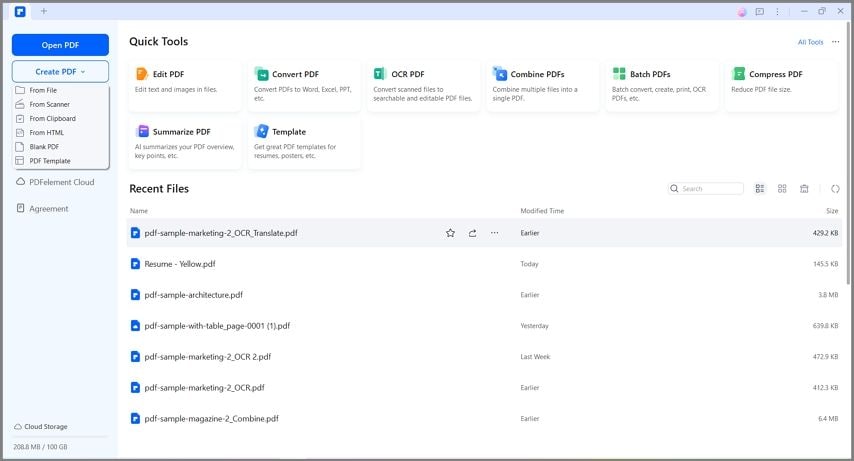
First of all, you need to make sure that the PDF is imported. It can be done by clicking the “Open PDF” on the Home Window. You can also drag and drop the PDF file to open it.
-
Step 2. View Comments in PDF
Just double-click the comments on the PDF page to access the comments toolbar as well as read the content of the comments.
G2 Rating: 4.5/5 |100% Secure
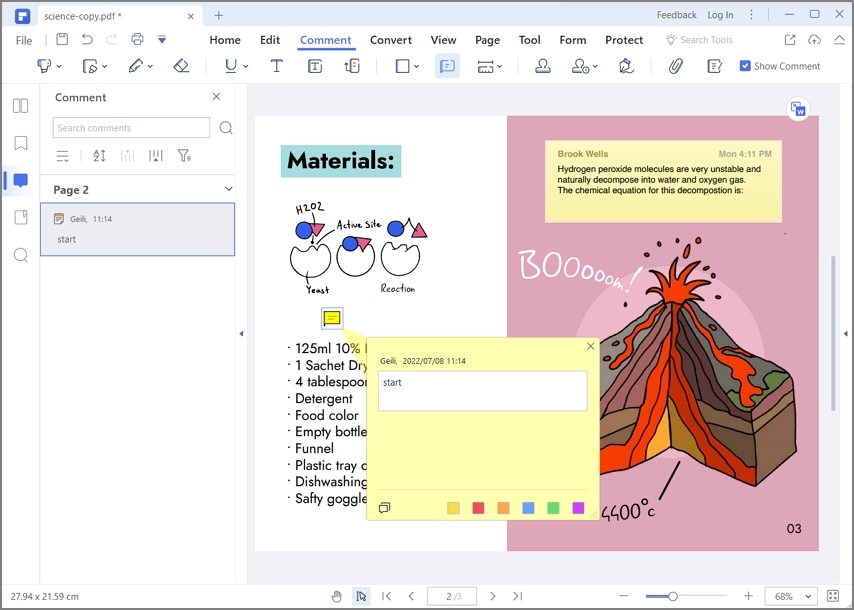
You can then read the reviewer's note or other information attached to the annotation.
If the PDF contains many comments, finding them individually can take time. In this case, the Comments panel provides a more convenient way to review them.
Method 2. Read All Comments in Comment Panel
The Comments panel lets you see multiple comments in one place and quickly navigate to their locations in the PDF.
G2 Rating: 4.5/5 |100% Secure
Quick list: How to read comments in a PDF using PDFelement's Comment Panel
- Open the PDF in PDFelement.
- Access the Comment Panel.
- Filter Comments in the PDF.
- Read Comments in the PDF.
- Expand or Collapse Comments.
-
Step 1. Open PDF
First of all, you need to import the PDF. Click “Open PDF” or simply drag and drop the file onto the interface to import the PDF.
-
Step 2. Access the Comment Panel
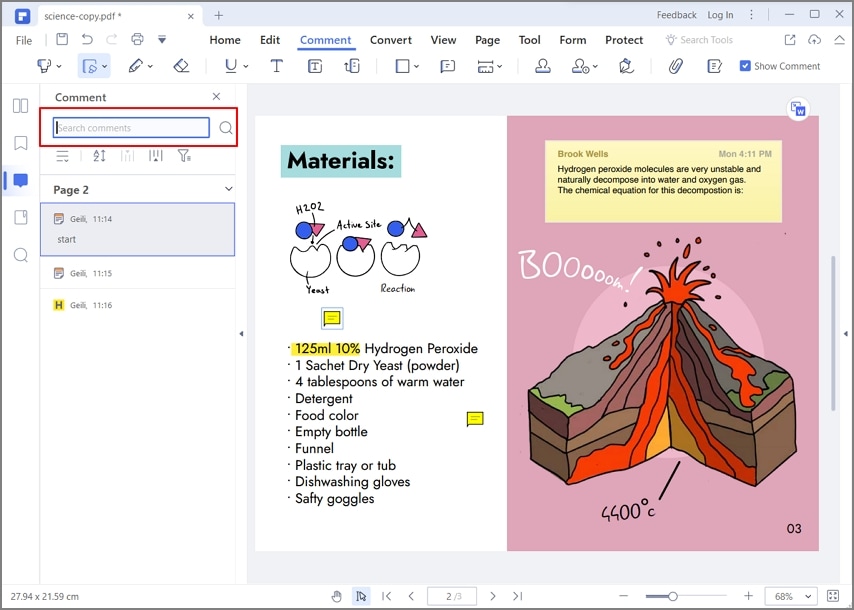
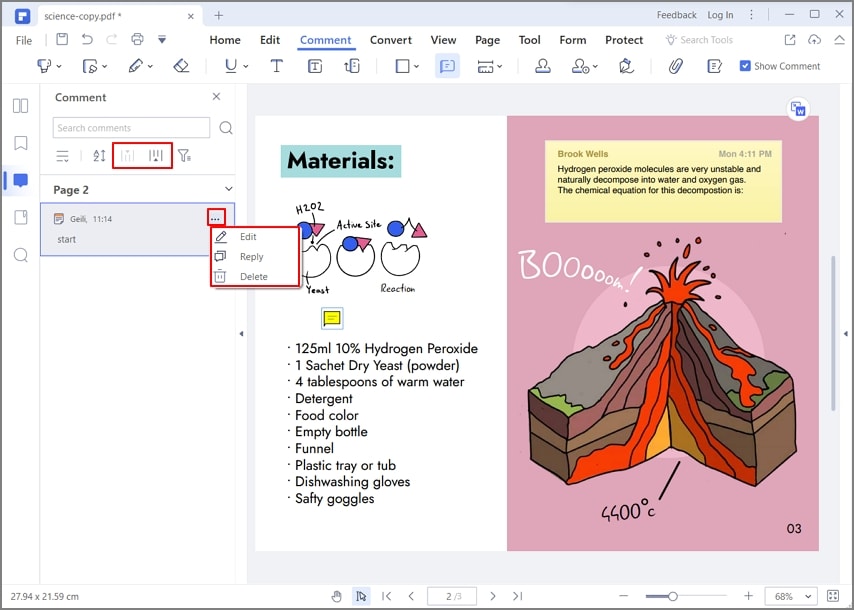
To access the comment panel, make sure that you click the comment tab on the top. The comment panel will pop up at the left of the program's interface. If there are too many comments, you can quickly find the one you need by searching keywords in the search bar.
G2 Rating: 4.5/5 |100% Secure
-
Step 3. Filter Comments on PDF
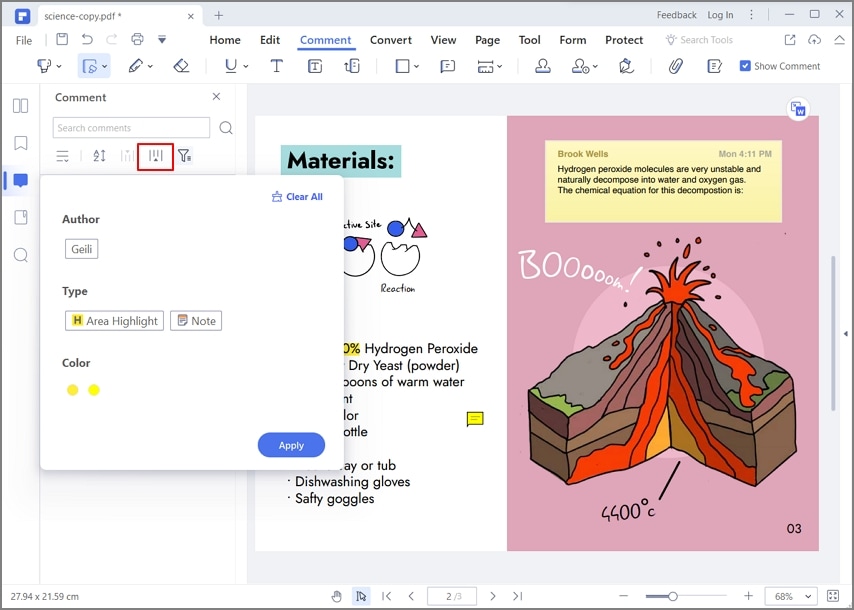
You can also click the filter button to filter comments by Authors, Color, and Type.
-
Step 4. Read Comments on PDF
All the comments can be seen in the form of a list on the left panel. To take a look at the comments just click the one and it will lead you to the comment and the exact page.
-
Step 5. Expand or Collapse Comments
As you look into a specific comment, there is a chance that the content across it is too long. Since the content is long, it may not be visible across the panel. To expand the comment, tap on the "Expand All" icon. Conversely, you should tap on "Collapse All".
G2 Rating: 4.5/5 |100% Secure
This method is particularly useful for documents that have been reviewed by multiple people or contain a large number of comments.
Part 2: How to View Comments on PDF on Mac
PDFelement for Mac is a comprehensive solution to all significant PDF problems you can face across your Mac. Being a PDF editor that offers unique features, users can view comments in PDF using the tool's simple interface. To understand how to read comments on PDF using PDFelement, look into the following steps.
-
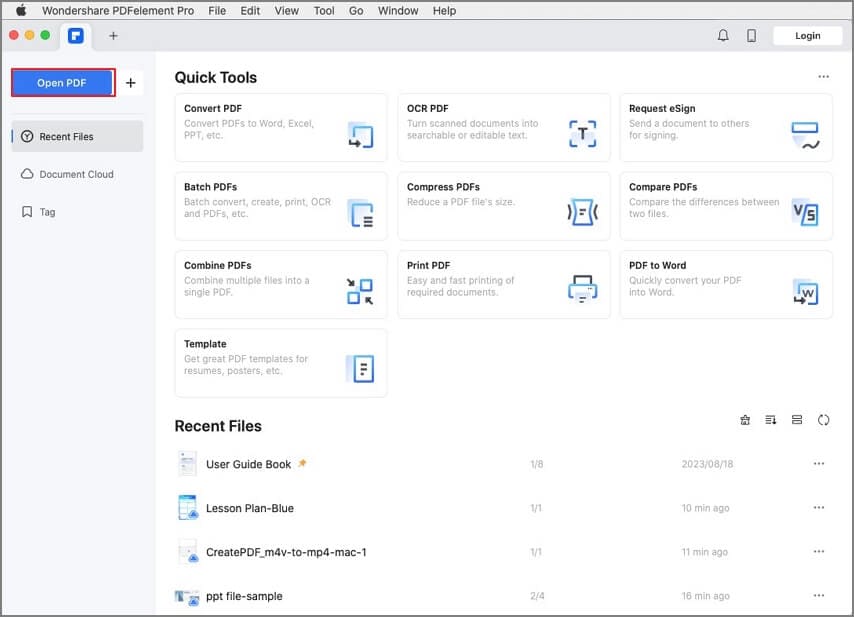
Step 1. Launch and Import Document
You need to download, install, and launch PDFelement on your Mac. Following this, import the document that contains the comments.
-
Step 2. View Comments on PDF
The comments discovered across the PDF document can be easily accessed across the platform. Double-click any comment to open the content that it contains. Go through the content with ease and make edits across it, if required.
G2 Rating: 4.5/5 |100% Secure

Part 3: How to View Comments in Chrome?
Google Chrome is a well-known browser; however, it has several unknown features to many users worldwide. This platform can also be used to view comments across PDF documents. Where users do not have any PDF editing platform as a source to view comments, Google Chrome offers the necessary tools to cover this requirement. The following steps explain how to read comments on a PDF using Chrome.
-
Step 1: You need to open the PDF document in Google Chrome by accessing the appropriate folders.

-
Step 2: Once opened, proceed to the three-dotted icon on the top-right of the screen. Select “Annotations” to display the comments across your PDF, where present.

-
Step 3: Lead your cursor to any of the present comments. The content across it would be displayed, which can be read accordingly.

Part 4: Why PDF Comment Not Showing?
PDF comments are essential in providing readers with some insight into the mentioned pointer. This can either be related to amendments or revision. On the other hand, comments can also lead to a better explanation of the term under discussion. However, in some cases where you cannot open the PDF comments across your device, there are several reasons associated with it.
Comments Are Hidden or Filtered
Comments may not be visible because they have been hidden or filtered in the PDF application.
Open the Comments panel and check the display or filter settings. Clear any active filters and make sure all available comments are being displayed.
Your PDF Viewer Does Not Support the Comments
Not every PDF viewer supports every type of annotation or comment. A basic viewer may open the PDF successfully but fail to display certain interactive elements.
If the comments are missing, try opening the same PDF in a dedicated PDF reader or editor that supports PDF annotations.
The PDF Has Been Flattened
A PDF may be flattened before it is shared or distributed. Flattening can turn comments, markups, and other interactive elements into static content.
As a result, the original comments may no longer be available as separate, editable annotations.
If you need to review or edit the original comments, ask the sender for the original PDF before it was flattened.
The PDF Has Restrictions
Some PDF files have document permissions or security settings that limit certain actions.
If you cannot view or interact with comments as expected, check the document's security settings or ask the file owner for an unrestricted version.
Part 5: The Best Tool to View Comments in PDF
If you need to do more than simply read comments, PDFelement provides tools for reviewing and working with PDF documents in the same application.
G2 Rating: 4.5/5 |100% Secure
It is undoubtedly a one-stop shop for all your PDF tasks, and it makes sure that you are never left behind. No matter what the task is, this editor will make sure that you get the best outcome and the task is completed flawlessly. With seamless operations in this program, you can view comments on PDF with ease and perfection.
Features of the Program
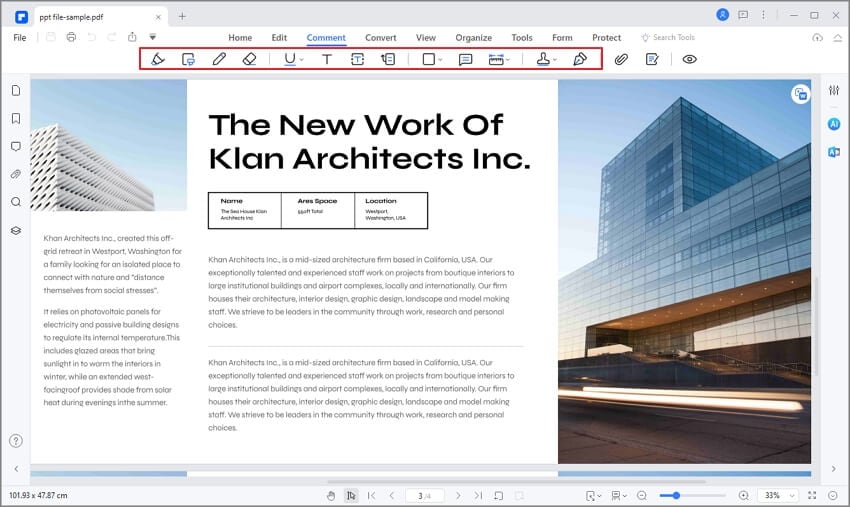
- With this program, you can open, save, print, and mark up PDFs.
- The graphical elements within the PDF can easily be removed, moved, resized, and rotated with perfection.
- A password can be applied to make sure that the PDF is always safe and secure all the time. It also prevents unauthorized access.
- You can easily convert the PDF file to other formats such as Word, HTML, text, and image files with perfection.
- The PDF files can be easily digitally signed with this program.
- The OCR within the program can be used to make sure that the text within the images is unlocked with perfection.
FAQs About Read PDF Comments
Can You Edit or Reply to PDF Comments?
Yes, if your PDF application supports comment editing. Depending on the application, you may be able to edit, reply to, delete, or add comments.
Can I view PDF comments for free?
Yes. Some free PDF readers support viewing comments and annotations. However, the available features vary, so you may need a dedicated PDF editor if you also want to edit or manage comments.
Why can't I see comments in a PDF?
Comments may be hidden or filtered, unsupported by your PDF viewer, or flattened into the document. Try opening the PDF in a dedicated PDF reader or editor and check its Comments panel and display settings.
Free Download or Buy PDFelement right now!
Free Download or Buy PDFelement right now!
Try for Free right now!
Try for Free right now!

Elise Williams
chief Editor