

Table of Contents
A good signature does more than mark a document. It gives your name a recognizable shape. The best name signature style is usually not the most complicated one; it is the one you can write consistently, read when needed, and use confidently on forms, contracts, letters, certificates, and PDF documents.
Many people start by searching for a "signature style for my name" because they want something more polished than plain handwriting. That is a sensible starting point, but a signature should not be copied from a random design. Your name length, initials, writing speed, profession, and the type of documents you sign all affect what will look natural. A short name may need a stronger flourish or underline. A long name may look better with initials and a simplified surname. A typed signature may work well for digital files, while a handwritten version may still be useful for paper forms.
This guide walks through practical signature styles, font choices, design rules, and a PDF workflow for using your finished signature in documents.


 G2 Rating: 4.5/5 |
 100% Secure
How to Choose a Name Signature Style That Fits Your Name
The right name signature style depends on two things: how your name looks on the page and where you plan to use the signature. A signature for casual notes can be expressive. A signature for business forms, contracts, HR files, tax paperwork, or client approvals should be cleaner and easier to verify.
Start with readability
A signature does not have to spell every letter perfectly, but it should still feel connected to your name. If no one can tell whether the signature belongs to you, it may look stylish but become inconvenient later.
For example, if your name is "Daniel Carter," a readable signature might show a clear "D," a flowing middle section, and a recognizable "Carter." You do not need every letter to be obvious. The beginning and ending shapes often matter most.
If you are creating a signature style for my name in English, readability is especially useful when the document may be reviewed by people from different countries. English-name signatures often use Latin letters, and a clear first initial or surname helps avoid confusion on international forms.
Decide how formal it needs to be
A creative signature with stars, hearts, or heavy decorative loops may look interesting in a notebook, but it can feel out of place on a business agreement. For professional documents, aim for controlled personality: a strong initial, a smooth underline, a neat slant, or a compact monogram.
For personal branding, such as a portfolio, author bio, certificate, or creative proposal, you can be more expressive. A photographer, designer, musician, or independent consultant may prefer a signature that feels closer to a logo. Even then, it should remain easy to reproduce.
Use your initials wisely
Initials can make a signature more elegant, especially if your full name is long. Someone named "Alexander Montgomery Richardson" might not want to write the entire name every time. A practical signature could use "A. M. Richardson," "AM Richardson," or a stylized "AMR."
Initial-based signatures also work well when your first name and last name have strong starting letters. Letters like A, D, J, K, L, M, R, S, and T often create distinctive shapes. But any letter can work if you build the style around it.
Keep it repeatable
A signature loses value if you can only write it once after five careful attempts. Before settling on a design, write it at least ten times at normal speed. Do not judge only the best version. Look at the average version. That is the signature people will see most often.
A good test is simple: can you write it smoothly while standing at a counter, using a basic pen, with limited space? If yes, the design is probably practical.
Popular Signature Styles for My Name
There is no single best signature style for every person. The examples below are style directions you can adapt to your own name. Try two or three, then refine the one that feels most natural.
Full-name signature
A full-name signature uses your first and last name, usually with some letters simplified. This style is suitable for formal documents because it clearly connects the signature to your identity.
It works especially well for short and medium-length names, such as "Nora Lee," "James Allen," or "Maya Stone." If your name is long, you can still use this style by making the first name smaller and giving more attention to the surname.
A full-name signature can look polished with a gentle right slant, a slightly larger first letter, and a simple line connecting the first and last name. Avoid turning every letter into a flourish. One or two distinct features are enough.
Initials plus surname
This is one of the most practical options for professional use. Instead of writing the full first name, you sign with an initial and your last name. For example, "R. Thompson" or "J. Alvarez."
This style is useful if your first name is long, commonly misspelled, or less relevant to your professional identity. It is also easier to write quickly. The first initial gives the signature a strong opening shape, while the surname keeps it identifiable.
If you want the best signature style for my name and your surname is distinctive, this is often a safe choice. It balances personality and clarity without feeling too decorative.
First-name emphasis
Some signatures give more visual weight to the first name and simplify the surname. This can work well for people known publicly by their first name or for creative fields where a warmer, more personal tone is useful.
For example, the first name may be written larger, with the surname smaller and more compact. A strong first letter, such as an oversized "S" in "Sophia," can become the signature's main feature.
This style is less ideal for formal legal or financial paperwork if the surname becomes too unclear. If you choose it, make sure the last name is still present enough to identify you.
Minimal signature
A minimal name signature style uses fewer strokes. It may be built from initials, a short line, and a clean final stroke. This style looks modern and works well for digital documents because it stays readable at small sizes.
Minimal signatures are also easier to use across different devices. If you sign with a mouse, trackpad, stylus, or touchscreen, a complicated handwritten design can look shaky. A minimal version is more forgiving.
The risk is making it too simple. A signature that looks like two random marks may not feel personal. Include at least one recognizable letter or repeated feature that belongs to your name.
Underlined signature
An underline gives a signature structure. It can make a simple name look more complete, especially when the letters are narrow or light.
There are several ways to underline a signature. A straight underline looks formal. A rising underline feels energetic. A looped underline can look elegant if it does not overpower the name. A zigzag underline is more casual and should be used carefully on professional documents.
If your signature already has many loops, skip the underline or keep it very short. Too many decorative strokes can make the signature look crowded.
Looped or flourished signature
Loops and flourishes can make a signature memorable. They are common in letters such as L, G, J, Y, H, F, and S because those letters naturally support curves.
The key is restraint. One large loop in the first letter may look refined. Five loops across the entire name may look messy. A flourish should guide the eye, not hide the name.
For formal signatures, keep flourishes close to the name. Wide decorative strokes can overlap text fields, date lines, or nearby form content.
Typed signature style
A typed signature style uses a font instead of handwriting. This is common in online forms, digital approvals, email sign-offs, and PDF workflows. It can look clean and consistent, especially if your handwriting is hard to read or if you are signing many documents.
Typed signatures are not always the same as legally binding digital signatures. Laws and platform rules vary by location and document type. For background on electronic signature concepts in the United States, the FTC's ESIGN Act overview is a useful reference. For important contracts, follow the signing process required by the organization requesting the signature.
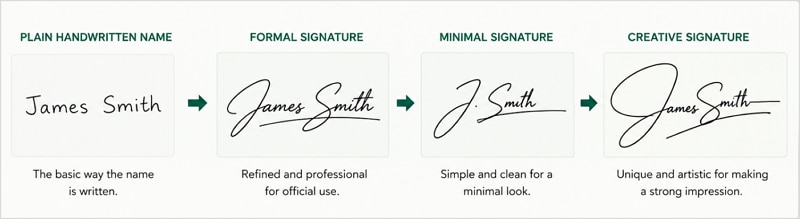
Signature Style Font My Name: How to Pick a Typed Signature Font
People often search "signature style font my name" when they want to type their name and preview it in different signature fonts. This can be useful, but font choice matters. Some fonts look elegant in a sample image and awkward on an actual document.
A typed signature should match the tone of the document. A rental agreement, invoice approval, or employment form usually needs a clean signature font. A wedding card, certificate, or creative portfolio can use something more decorative.
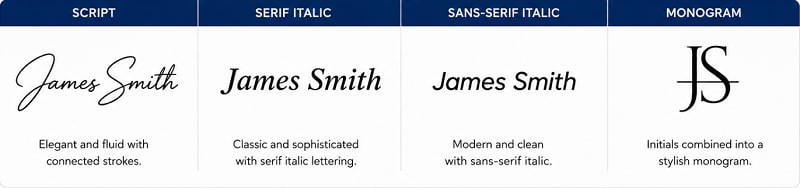
Script fonts
Script fonts imitate handwriting. They are the most common choice for typed signatures because they instantly create a personal look.
Choose a script font with clear capital letters and moderate spacing. If the letters connect too tightly, your name may become hard to read. Names with many narrow letters, such as "William Miller," can blur together in highly decorative scripts. Names with open letters, such as "Ava Stone," often display better.
Script fonts are best for personal documents, certificates, proposals, and light business use. For highly formal documents, select a restrained script rather than a dramatic calligraphy font.
Serif fonts
Serif fonts have small strokes at the ends of letters. They do not imitate handwriting, but they can create a classic signature style when italicized. A name typed in an italic serif font can look refined without being overly decorative.
This option works well if you want a professional appearance but do not like cursive signatures. It is also more readable than most script fonts.
A serif typed signature may suit academic documents, formal letters, editorial approvals, and business correspondence. It feels more like a printed name than a handwritten mark, so consider whether that fits the document.
Sans-serif fonts
Sans-serif fonts are clean and modern. They are not usually the first choice for a personal signature, but they work well for digital approvals where clarity matters more than handwriting style.
A sans-serif signature can be effective for internal business workflows, project approvals, or design documents. Use a medium or light weight rather than a bold weight, unless you want the signature to feel like a brand mark.
For a little personality, try slight letter spacing or an italic version. Keep it subtle. Too much spacing can make the name look like a logo rather than a signature.
Monogram-style fonts
A monogram-style signature uses initials as the main design. This is useful if you want a compact mark for repeated use on documents, cover pages, or branded templates.
For example, someone named "Priya Shah" might use a stylized "PS" above or beside the typed full name. The monogram gives visual identity, while the printed name keeps it clear.
Do not rely only on a decorative monogram for serious documents unless the signing process allows it. Pairing it with your full typed name is usually safer.
What to avoid
Some fonts create problems even if they look attractive in a preview. Avoid fonts with letters that are too distorted, overly thick strokes, excessive swashes, or novelty shapes. If your signature includes symbols, emojis, or decorative icons, save that version for informal use.
A quick rule: shrink the signature to the size it will appear on a PDF form. If it becomes unreadable, choose a simpler style.
How to Make the Best Signature Style for My Name
Creating a signature is easier if you treat it as a small design exercise. You are not trying to invent a perfect mark immediately. You are testing shapes until one version feels natural.
Step 1. Write your name in plain letters first
Start by writing your full name normally. Do this several times without trying to make it stylish. Look for letters that already have a character. Maybe your capital "M" is strong, your "y" has a natural tail, or your "T" creates a good cross-stroke.
These natural habits are valuable. A signature based on your real handwriting will be easier to repeat than one copied from a font or a celebrity signature.
Step 2. Choose the part of the name to highlight
Most strong signatures have a focal point. It might be the first letter, the surname, the initials, or the final stroke.
If your first name is short, highlight it. If your last name is unusual, give it more space. If both names are long, use initials at the beginning and let the surname flow.
For example, a name like "Christopher Williams" may become "C. Williams" or "Chris Williams" with the "W" emphasized. A name like "Zoe Hart" can work beautifully as a full-name signature because it is short and balanced.
Step 3. Add one design feature
Do not add every idea at once. Pick one feature and test it:
- A larger first capital
- A simple underline
- A loop from the final letter
- Joined initials
- A rising baseline
- A shortened middle section
This keeps the design controlled. If the signature still looks too plain, add a second feature later. Starting simple is better than trying to remove clutter from an over-designed signature.
Step 4. Test speed and consistency
Write your signature at three speeds: slow, normal, and fast. The slow version may look best, but the normal version matters most. The fast version shows whether the design falls apart under pressure.
Check whether the signature keeps the same general shape each time. It does not need to be identical. Real signatures naturally vary. But the main letters, slant, and ending stroke should remain recognizable.
If a loop changes size wildly or an underline crosses through the name, simplify it.
Step 5. Digitize the final version
Once you have a handwritten version you like, digitize it for PDF use. Write the signature on clean white paper with a dark pen. Use good lighting and avoid shadows. Scan it or take a high-resolution photo, then crop around the signature.
If possible, save the signature as an image with a transparent background. This helps it sit naturally on PDF forms without a white rectangle around it. If you cannot create transparency, use a clean white background and place it only on white document areas.
Be careful with storage. A signature image is sensitive. Save it in a secure location and avoid uploading it to unknown websites.
Use PDFelement to Add Your Signature Style to PDFs
After you create a name signature style, the next step is often placing it on a PDF. That is where a PDF editor is useful. PDFelement can help you open a PDF form, add a signature image or stamp, position it correctly, and save a signed copy without rebuilding the document from scratch.
This is especially practical if you have already designed your signature on paper or as an image. Instead of printing a PDF, signing it, and scanning it again, you can keep the file digital. That usually produces a cleaner result and avoids quality loss from repeated scanning.
G2 Rating: 4.5/5 |100% Secure
Open the PDF document
Start by opening the file in PDFelement. This could be a contract, consent form, application, internal approval sheet, or any PDF that requires your signature.
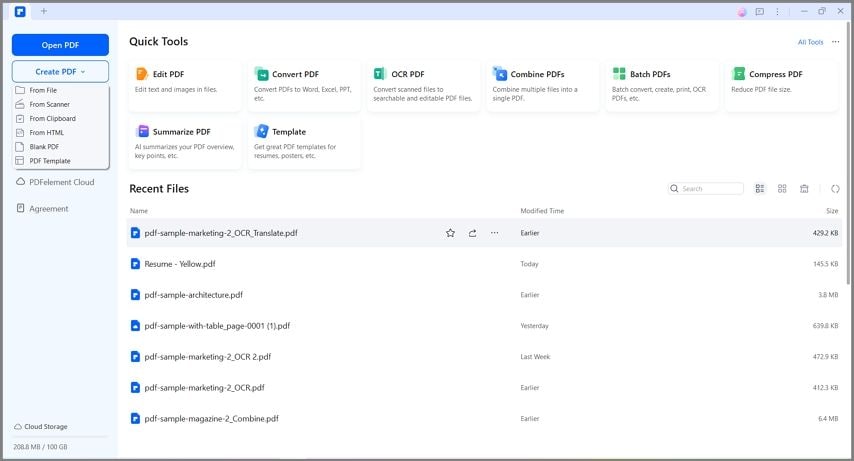
Before adding the signature, check the document layout. Zoom in on the signature field so you can place your signature accurately. If the PDF includes form fields, you may also be able to fill in your name, date, title, or company before signing.
Create or import your signature as a stamp
If your signature is saved as an image, you can add it as a custom stamp. This works well for people who want to reuse the same signature style across multiple PDF documents.
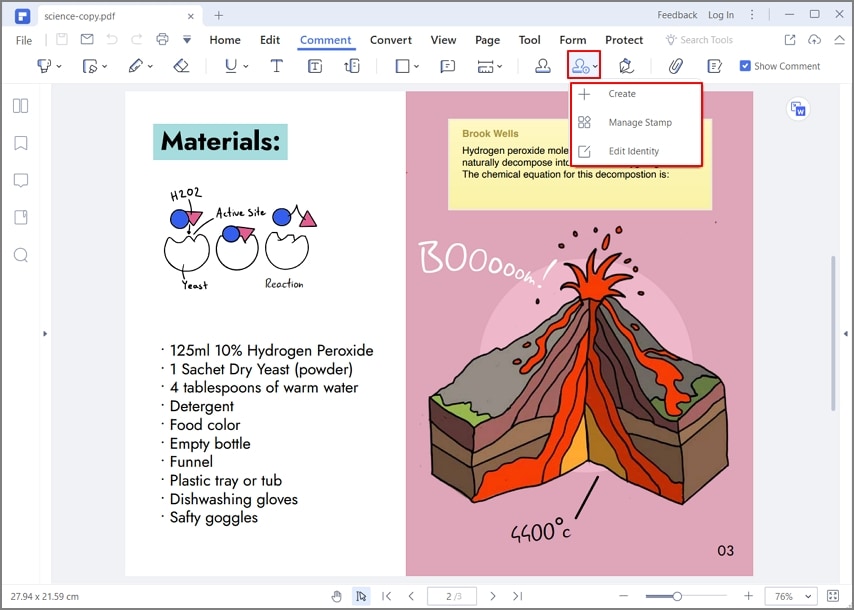
A stamp-style workflow is helpful because you do not need to import the image every time. Once saved, the signature can be selected and placed where needed. For best results, use a neatly cropped image so the signature does not bring extra blank space into the document.
Place the signature on the document
After creating or selecting the signature stamp, place it in the signature field. Resize it so it fits naturally on the line. A signature that is too large can look careless; one that is too small can seem like an accidental mark.
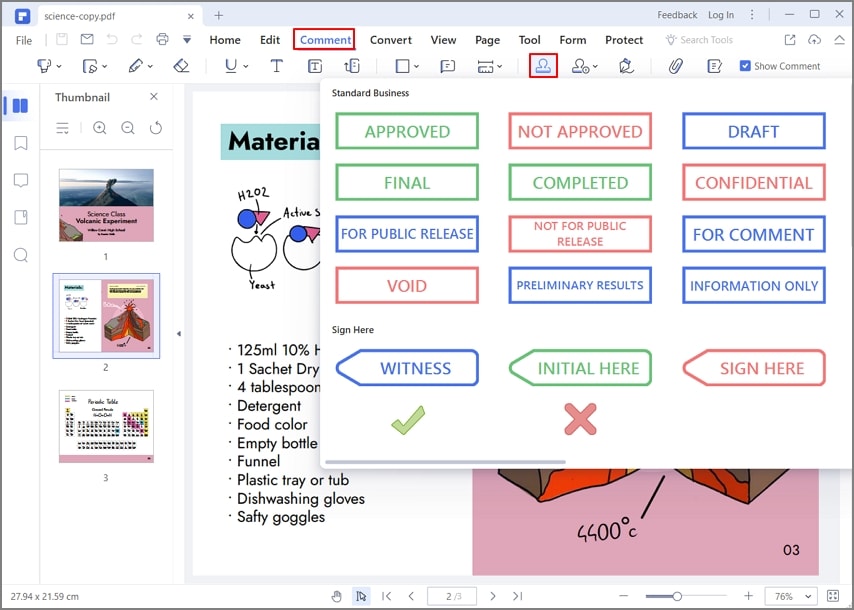
Check the surrounding text before saving. Make sure the signature does not cover dates, printed names, checkboxes, or official wording. If the document requires initials on multiple pages, create a separate initials version rather than shrinking your full signature too aggressively.
Save a signed copy
Save a new copy of the signed document instead of overwriting the original. A simple file name such as Client-Agreement-Signed-Jane-Lee.pdf is easier to track later.
PDFelement can also support nearby PDF tasks that often come with signing: editing text, filling forms, adding comments, converting files, organizing pages, compressing large PDFs, or using OCR on scanned documents. For someone creating a signature style for my name and applying it to real paperwork, these follow-up tools can save time.
Name Signature Style Mistakes to Avoid
A stylish signature should still behave like a signature. If it causes confusion, takes too long to write, or looks wrong on formal documents, it needs adjustment.
One common mistake is making the signature too decorative. Large loops, heavy underlines, and symbols can be fun, but they may distract from the name. If you love a decorative version, keep it for personal use and create a cleaner version for official documents.
Another mistake is copying someone else's signature style too closely. Inspiration is fine. Direct imitation is not. Your signature should grow from your name, your initials, and your natural writing movement. A copied design often feels awkward because it was built around different letters.
Typed signatures can also go wrong when the font is too playful. Some calligraphy fonts look elegant in large previews but become unreadable in a small PDF field. Always test the font at actual signing size.
Be cautious with symbols and numbers. Adding a graduation year, jersey number, star, crown, or personal icon may make the signature feel unique, but it can look unprofessional on contracts or business forms. If you want a personal mark, consider a subtle monogram instead.
Finally, avoid changing your signature too often. It is fine to refine your style while practicing, but once you begin using a signature regularly for important documents, consistency matters. Keep a reference image of the final version so you can return to it when needed.
People Also Ask
-
What is the best signature style for my name?
The best signature style for your name is one you can write consistently and use in the documents you sign most often. For professional use, initials plus surname or a clear full-name signature usually works well. For creative use, you can add a controlled flourish, underline, or monogram. -
How can I create a signature style for my name in English?
Write your English name several times in plain handwriting, then choose a focal point such as the first initial, surname, or final letter. Add one design feature, such as a larger capital or simple underline. Test the signature at normal speed before using it on documents. -
Can I use a typed font as my signature?
Yes, many digital signing workflows allow typed signatures. Choose a readable font that fits the document. A script font can look handwritten, while an italic serif font feels more formal. For important legal or business documents, follow the signing method required by the sender or platform. -
What is the best signature style font for my name?
The best font depends on your name length and document type. Short names often look good in script fonts because the letters have room to breathe. Longer names may look better in a simpler script, italic serif, or clean sans-serif font. Always preview the font at the actual size it will appear on the document. -
Should my signature include my full name?
Not always. A full-name signature is clear and formal, but initials plus surname can be just as practical. If your full name is long, a shortened version may be easier to repeat. The key is making sure the signature still clearly represents you. -
Are symbols or numbers okay in a name signature style?
They can be used for informal or creative signatures, but they are usually not ideal for professional documents. Symbols and numbers may make a signature look less serious. If you want a unique feature, use a subtle underline, joined initials, or a distinctive capital letter instead. -
How do I add my name signature style to a PDF?
Create your signature on paper or digitally, save it as an image, and use a PDF editor such as PDFelement to place it on the document. You can add it as a custom stamp, resize it, position it on the signature line, and save a signed copy. -
Can I have more than one signature style?
Yes. Many people use a formal signature for official documents and a more casual version for personal notes or creative work. Keep the formal version consistent, especially for banking, contracts, employment files, and other important records.


