

In an increasingly visual world, images often convey vast amounts of information. However, analyzing and understanding them efficiently can be challenging. This is where image summarizers step in, a tool designed to extract key details or insights from visual content. It enables users to grasp the essence of an image without diving into intricate details.
An image summarizer leverages advanced algorithms with artificial intelligence to interpret visual elements and generate concise summaries. This article delves into their functionality and provides actionable steps for using them effectively via a powerful tool like PDFelement. Embrace this innovative approach to make complex visuals accessible and manageable.
In this article
Part 1. What Is an Image Summarizer?
Visual information plays a crucial role in communication and analysis across various fields. However, interpreting complex images can be time-consuming and overwhelming. An image summarizer is a tool that extracts key information or highlights from an image using AI. It simplifies complex visuals, allowing users to focus on the most relevant details without manually analyzing the content.
How It Works
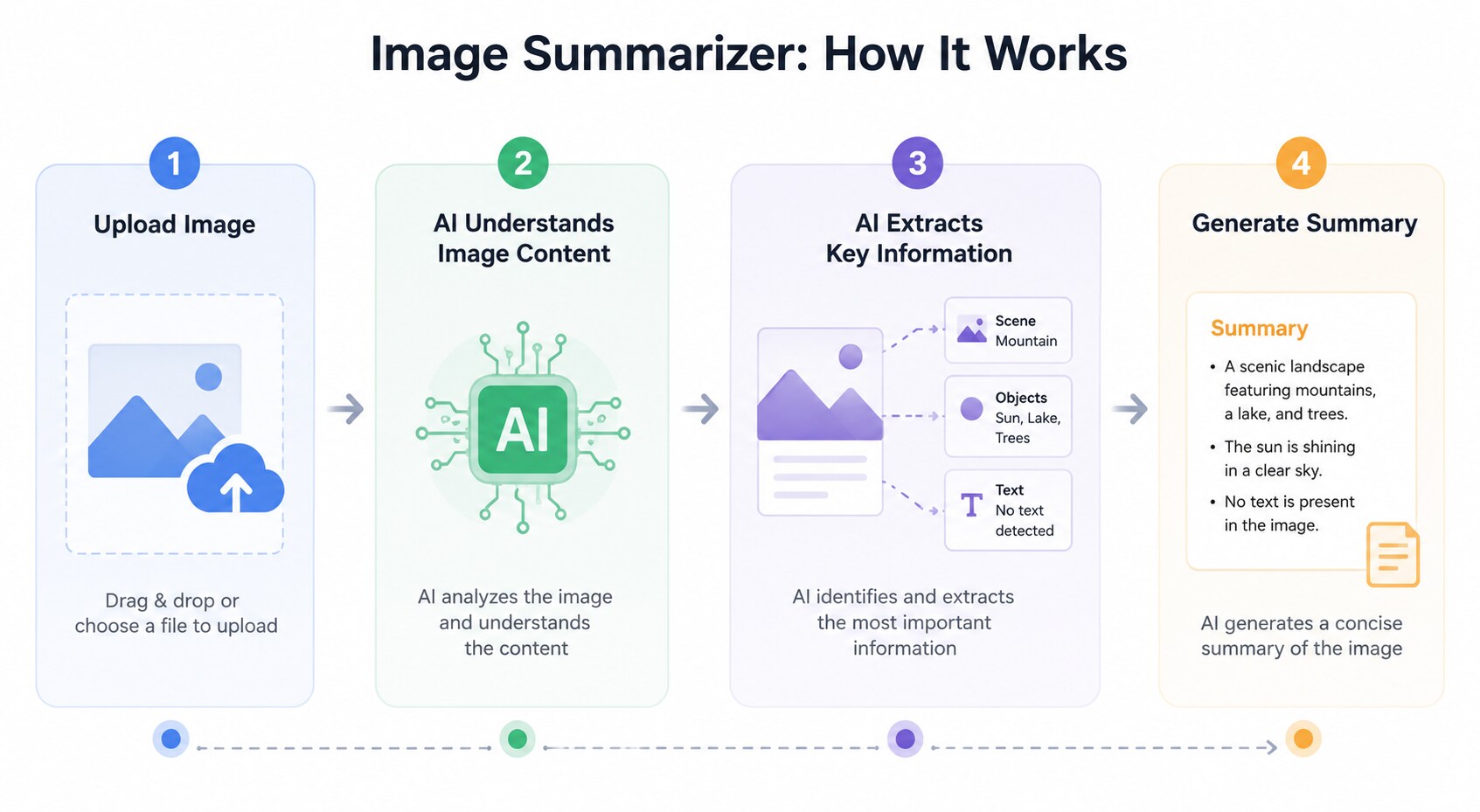
An image summarizer uses AI to understand the content of an image and generate a concise summary of its key information. By analyzing both visual elements and embedded text, it helps you quickly capture the main ideas without manually reviewing the entire image
- Upload Your Image:Upload a photo, screenshot, infographic, chart, presentation slide, or any other image you want to understand.
- AI Understands the Image:AI analyzes both the visual elements and the text in the image to identify the main ideas and important details.
- Extract Key Information:The AI automatically filters out unnecessary content and organizes the most relevant points into a clear structure.
- Generate an Instant Summary:Within seconds, you'll receive a concise, easy-to-read summary that captures the essential information from the image.
Key Applications
- Business Data Collection: Simplifies the interpretation of charts, graphs, and dashboards for faster decision-making.
- Research and Education: Assists in summarizing dense infographics, making them more accessible for study and presentation.
- Content Creation: Speeds up the process of summarizing design mock-ups or visual prototypes for feedback.
- Legal and Compliance: Extracts crucial text from scanned contracts, reports, or legal documents for review.
- Marketing and Advertising: Condenses campaign performance visuals into actionable insights for teams and stakeholders.
Part 2. Benefits of Using an AI Image Summarizer
These tools are indispensable for improving productivity, accuracy, and flexibility in all critical tasks. Summarized below are a few of the advantages of trying to summarize images:
- Efficiency: AI image summarizers save significant time by automating the process of extracting text or key details from images. Instead of manually analyzing visuals, users can quickly access concise summaries to focus on decision-making and execution.
- Accuracy: Using advanced algorithms allows them to minimize the risk of human error to ensure critical details are not overlooked. This is especially valuable in fields where precision is crucial, such as business, research, and legal work.

- Versatility: These tools can handle various file formats, including PNG, PDF, and other image types. This adaptability ensures users can work seamlessly across different kinds of visual content without compatibility issues.
- Accessibility: By simplifying complex visuals, image summarizers make information more accessible to users with varying levels of expertise. For instance, they can help students grasp dense infographics or aid professionals in interpreting technical charts.
- Scalability: They can process large volumes of images effortlessly, making them ideal for projects requiring bulk analysis. Businesses and researchers can analyze and summarize hundreds of visuals efficiently without compromising quality.
Part 3. How to Use an Image Summarizer?
Implementing such a tool into your workflow is straightforward, but making the most of it begins with selecting the right one. By understanding key features and choosing a reliable platform, you can simplify summarizing visual content effectively. Selecting the best image summarizer depends on your specific needs. Look for a tool that ensures the extracted content is precise and reliable.
For maximum flexibility, it should handle various file types, such as PNG, JPG, and PDF. Furthermore, the program should effortlessly connect with your existing applications for streamlined workflows and offer bulk AI to summarize image features. One highly efficient tool for summarizing image content is PDFelement a versatile platform known for its robust functions. It simplifies the process by integrating cutting-edge Optical Character Recognition technology to extract text.

The tool maintains high accuracy while preserving the original structure of image-based files like PNGs and PDFs. PDFelement ensures a hassle-free, efficient workflow, making it an excellent choice for professionals and students alike. Follow these steps to utilize this AI image summarizer to perform the tasks you need:
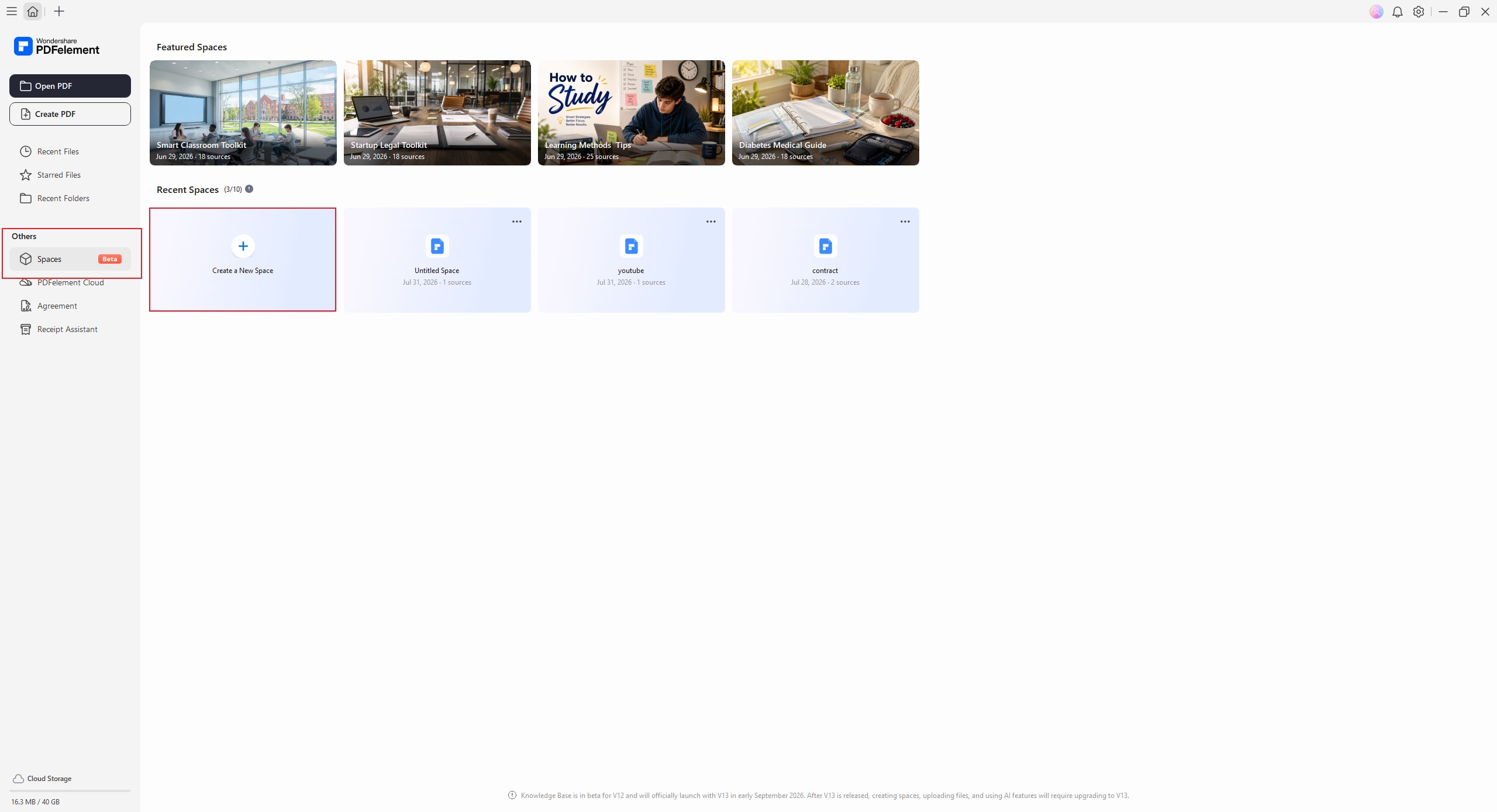
Step 1. Create a New Space
Launch PDFelement and navigate to Spaces from the left sidebar. Click Create a New Space to start a new AI workspace where you can organize and analyze your content.
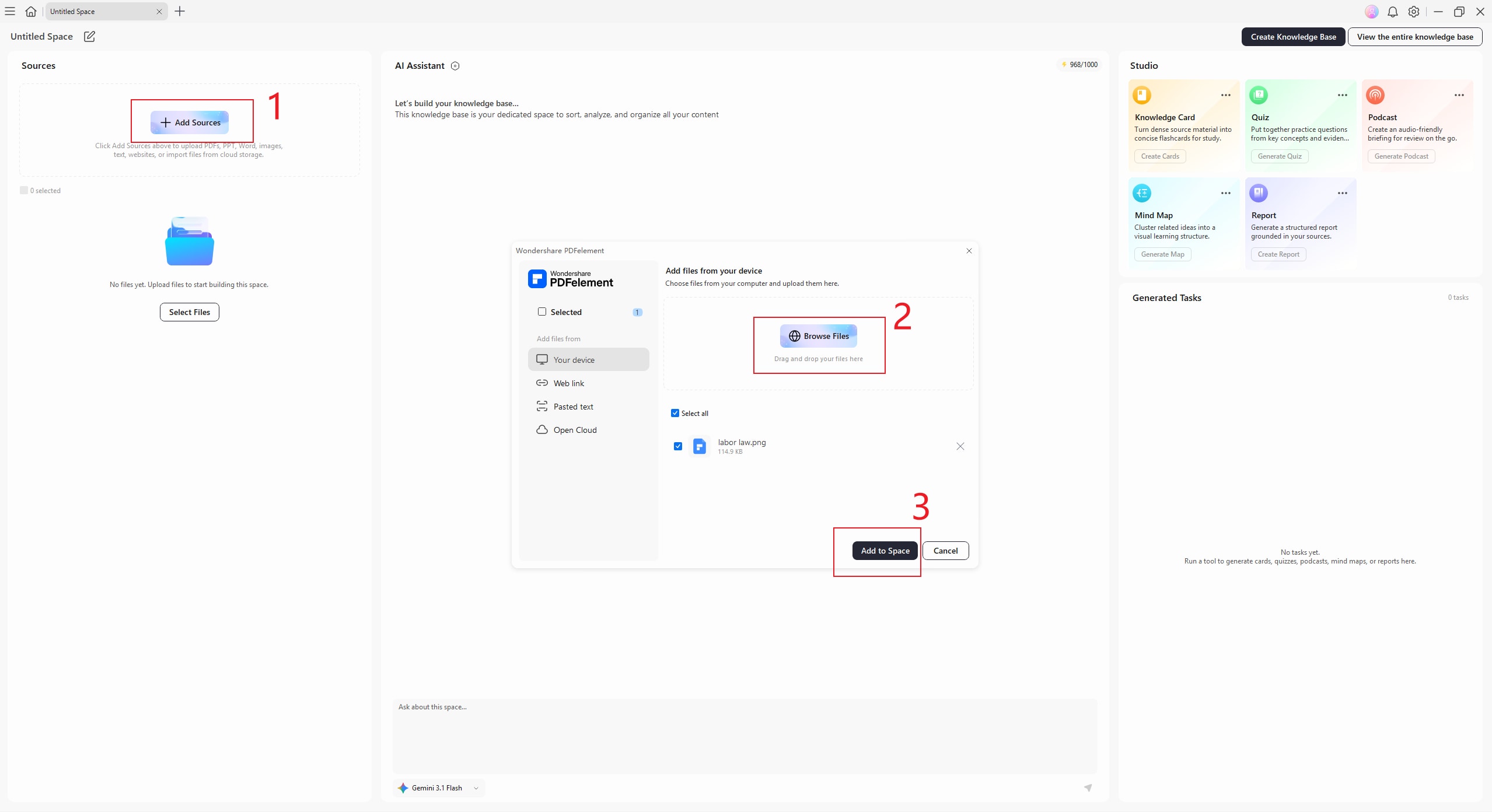
Step 2. Upload the Image
Click Add Sources to choose the image you want to summarize. And then,click Add to Space
Step 3. Review the AI-Generated Summary
Once the image is uploaded, AI will automatically begin analyzing its content and generating accurate summary.Instead of reading every detail manually, you can quickly understand the main ideas and important takeaways in just a few seconds.
Step 4. Chat with AI
After the summary is generated, you can continue interacting with AI by asking follow-up questions or providing prompts to refine the results. For example, you can ask AI to explain complex concepts, simplify the summary or translate the content. 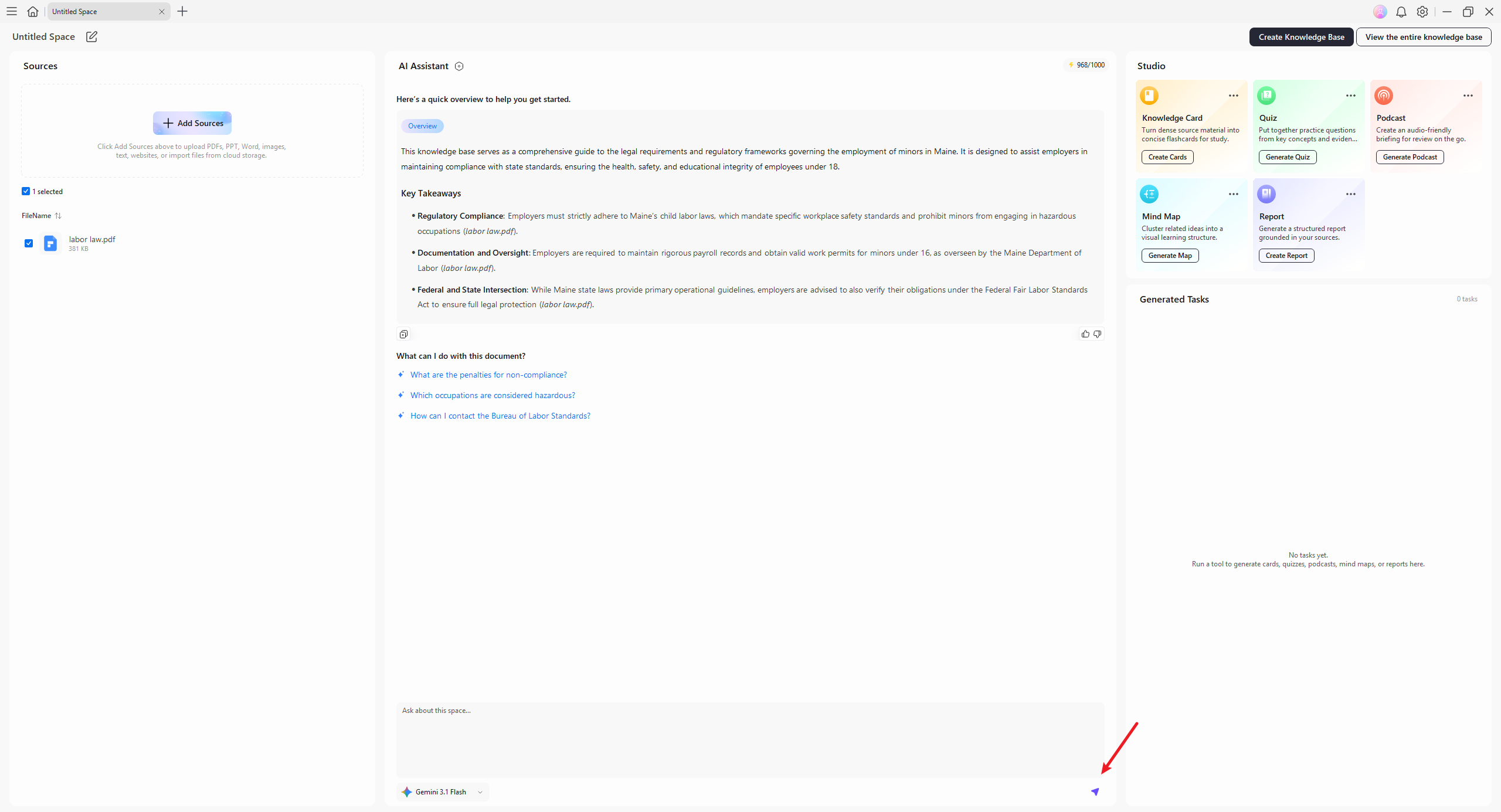
Step 5. Continue Creating More Learning Resources
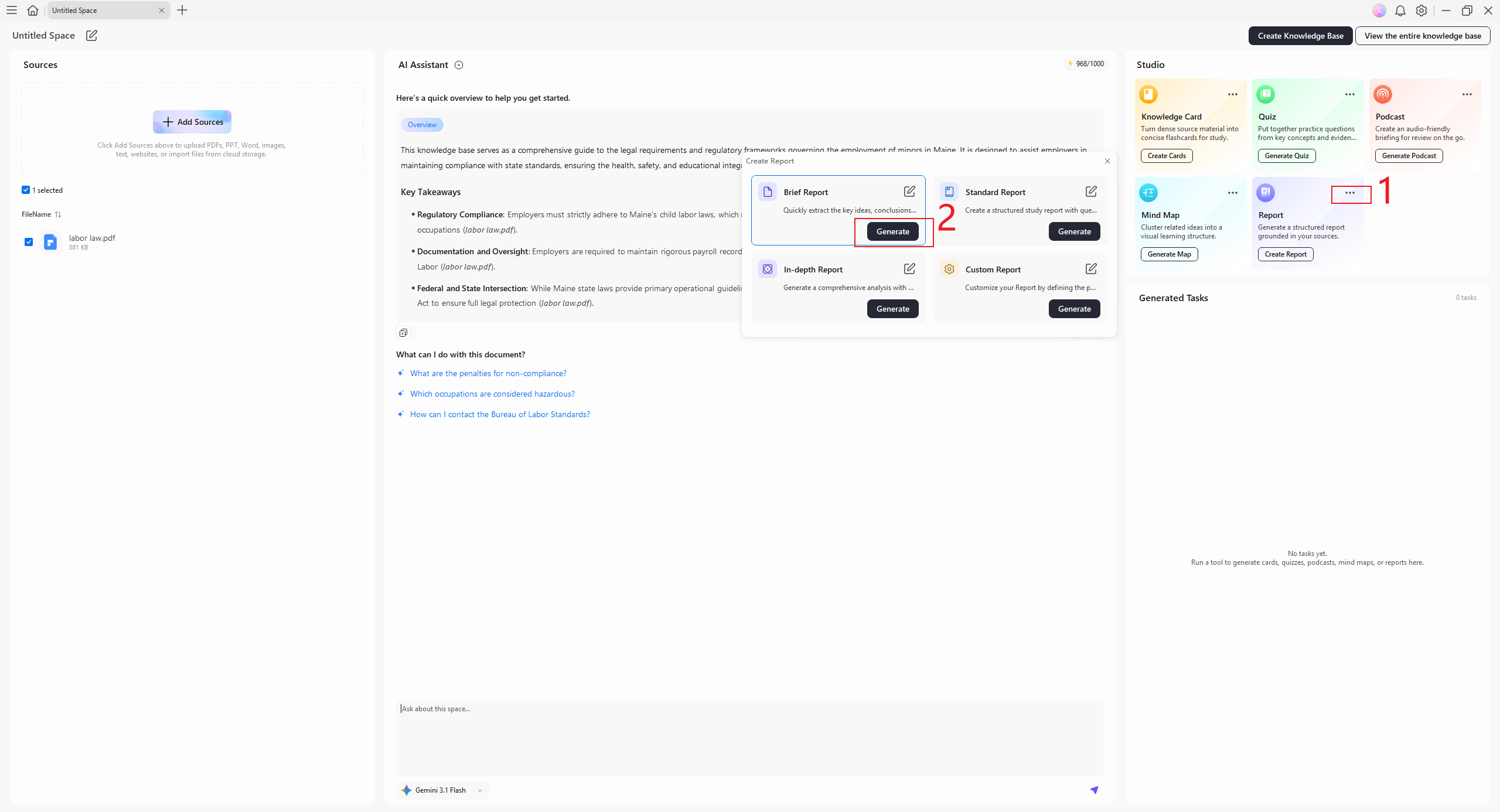
Beyond summaries, PDFelement can also transform the image into different learning formats, including Knowledge Cards, Mind Maps, Podcasts, Reports, and Quizzes, helping you study, review, or self-test.
Take the Report feature as an example. In the Studio section, click the three-dot menu in the upper-right corner of the Report card, select the report type you want to generate, and then click Generate to create your report.
Part 4. Why Choose PDFelement for Image Summarization?
While several tools offer capabilities to summarize PNG photos, a few stand out. Among them, PDFelement is famous for its exceptional performance, ease of use, and advanced features. Described below are a few factors why it’s the preferred choice for professionals and students alike:
- AI-Powered Accuracy: PDFelement leverages cutting-edge AI technology to ensure precise extraction and analysis of key information from images. Its algorithms are designed to recognize patterns, text, and structures accurately, delivering reliable summaries every time.
- User-Friendly Interface: The tool’s user-centric design makes it accessible for users of all skill levels. With simple navigation and clearly labeled functions, even beginners can efficiently summarize image content.
- Format Versatility: It supports a wide range of formats, including PNG, JPEG, and PDFs, allowing users to summarize visuals regardless of the source. This flexibility ensures a seamless experience across diverse applications.
- Additional Features: Its built-in OCR technology is a standout feature, enabling PDFelement to extract and summarize text. The tool shows excellent support for heavily text-based images with exceptional clarity and accuracy.
- Batch Processing Capability: For users dealing with extensive image file workloads, PDFelement's batch processing provides significant time and effort savings. It allows simultaneous summarization of multiple files, saving time and effort without compromising quality.


 G2 Rating: 4.5/5 |
 100% Secure
Part 5. Tips for Effective Image Summarization
To maximize the efficiency and accuracy of your efforts, it’s essential to adopt a few best practices. These tips ensure optimal results and a streamlined workflow when getting an image summary:
- Use high-quality images for better summarization results, as clarity enhances the AI’s ability to extract accurate information.
- Combine summarized images with detailed notes to create a comprehensive understanding of the content.
- Regularly update tools like PDFelement to access the latest AI improvements and advanced features.
- Ensure the file format is compatible with the tool to avoid errors during the summarization process.
- Pre-check images for excessive noise or distortions that could impact the accuracy of the results.
- Organize summarized content into categories or folders for quick reference and improved efficiency.
Conclusion
In short, an image summarizer is an indispensable tool in today’s information-driven world for efficiency and simplifying visual data processing. PDFelement emerges as the ultimate solution to offer unmatched accuracy, versatility, and ease of use. With its advanced features and user-based design, it ensures effortless summarizations for all your image needs. Don’t wait and download PDFelement today to experience the power of effortless image summarization firsthand.
G2 Rating: 4.5/5 |100% Secure


