

An AI study guide should do more than shorten a PDF. It should turn scattered course material into something you can actually revise from: a clear topic map, key concepts, definitions, examples, source references, review questions, flashcards, and quizzes. If your exam material is spread across lecture slides, textbook chapters, research readings, scanned handouts, and class notes, the goal is not to create five separate summaries. The goal is to build one study system around the material you are responsible for learning.
Quick answer
- Best workflow: organize only the materials for one exam or unit, identify the topics first, verify important points against the source, then turn the verified material into flashcards and quizzes.
- What a useful AI study guide should contain: topic overview, key concepts, definitions, examples, important relationships, source references, review questions, and self-test material.
- Why this is different from a PDF summary: a summary helps you understand what a document says; a study guide helps you decide what to learn, what to test, and what to review again.
- Best fit for PDFelement V13: students who want to keep course files, AI-assisted reading, source checking, flashcards, quizzes, and the original PDFs connected in one document-centered workflow.


 G2 Rating: 4.5/5 |
 100% Secure
In This Article
- What Should an AI Study Guide Include?
- AI Study Guide vs. PDF Summary
- Build the Right Source Set Before You Start
- Use the Read → Verify → Recall → Test Workflow
- A Better Prompt Sequence for Building a Study Guide
- Example: Turn a Week of Course Files into an Exam Pack
- How to Handle Scanned Handouts and Mixed File Types
- What AI Should and Shouldn't Do for Students
- Conclusion
- FAQs About Creating an AI Study Guide from PDFs

Part 1. What Should an AI Study Guide Include?
A useful AI study guide is a structured learning document, not just an AI-generated summary. It should help you move from “I read this” to “I know what I need to remember, I can find the source, and I can test myself on it.”
For most exam-prep workflows, the guide should include the following sections:
- Topic overview: the major units or themes covered by your course materials.
- Key concepts: the ideas that appear repeatedly or carry the most explanatory weight.
- Definitions and terminology: terms you need to recognize and use correctly.
- Examples, formulas, evidence, or cases: the material that shows how a concept works in practice.
- Connections between sources: where a lecture expands a textbook point, where a reading challenges another source, or where the same idea appears in several files.
- Source references: enough context to return to the original PDF when a statement needs to be checked.
- Review questions: questions that force you to explain or apply the material instead of only rereading it.
- Flashcards and quizzes: a second layer for recall practice after the guide itself has been checked.
The last three items are what separate a study workflow from a simple compression workflow. A concise summary may help you understand a chapter quickly, but an exam guide should also tell you what still needs verification and give you a way to find out whether you can recall the material without looking at the answer.
Keep the scope clean
Build one guide around one exam, course unit, paper, certification topic, or project. Mixing unrelated classes into the same study workspace makes it harder to tell which source supports which idea.
Part 2. AI Study Guide vs. PDF Summary: What's the Difference?
A PDF summary answers “What does this material say?” A study guide answers “What do I need to learn from this material, and how will I check that I know it?” Both are useful, but they solve different student problems.
| Task | PDF Summary | AI Study Guide |
|---|---|---|
| Main goal | Understand the material faster | Organize what you need to learn and review |
| Typical output | Main points and condensed explanations | Topics, concepts, definitions, examples, questions, and study tasks |
| Best use | First-pass reading or quick orientation | Exam preparation, revision, and repeated study |
| Source checking | Helpful but not always central | Important for verifying definitions, claims, formulas, and quotations |
| Active recall | Usually not built into the summary itself | Can lead directly to flashcards, review questions, and quizzes |
| Several course files | Often produces shorter versions of each file | Organizes the files around shared exam topics and learning goals |
If you only need a quick combined overview of several documents, use the existing guide on how to summarize multiple PDFs in PDFelement. The workflow on this page starts after that point: it focuses on turning course material into an exam-ready learning structure.
Part 3. Build the Right Source Set Before You Start
The quality of an AI study guide depends heavily on what you put into the study workspace. Do not begin by uploading every file in your semester folder. Start by defining the exam, unit, or assignment, then collect only the materials that belong to that scope.
Example: a midterm source set
- Weeks 1–6 lecture slides
- Two assigned textbook chapters
- One professor review sheet
- Required research readings
- Your own class notes
- A scanned worksheet with formulas or diagrams
The goal is not to summarize every file separately. The goal is to create one bounded source set around the exam and then ask questions that organize the material by topic.
Name files so the source remains understandable
File names such as Week 03 - Market Structures or Chapter 6 - Elasticity are much easier to verify later than names such as final_notes2.pdf. Clear source names also make prompts more precise when you ask the AI to compare a lecture with a textbook chapter or show where a definition came from.
Separate “must know” sources from optional reading
If your professor gives you required readings and optional extensions, do not treat every source as equally important. Mark the core materials first. Optional papers can still help explain a difficult concept, but they should not drown out the files that actually define the course.
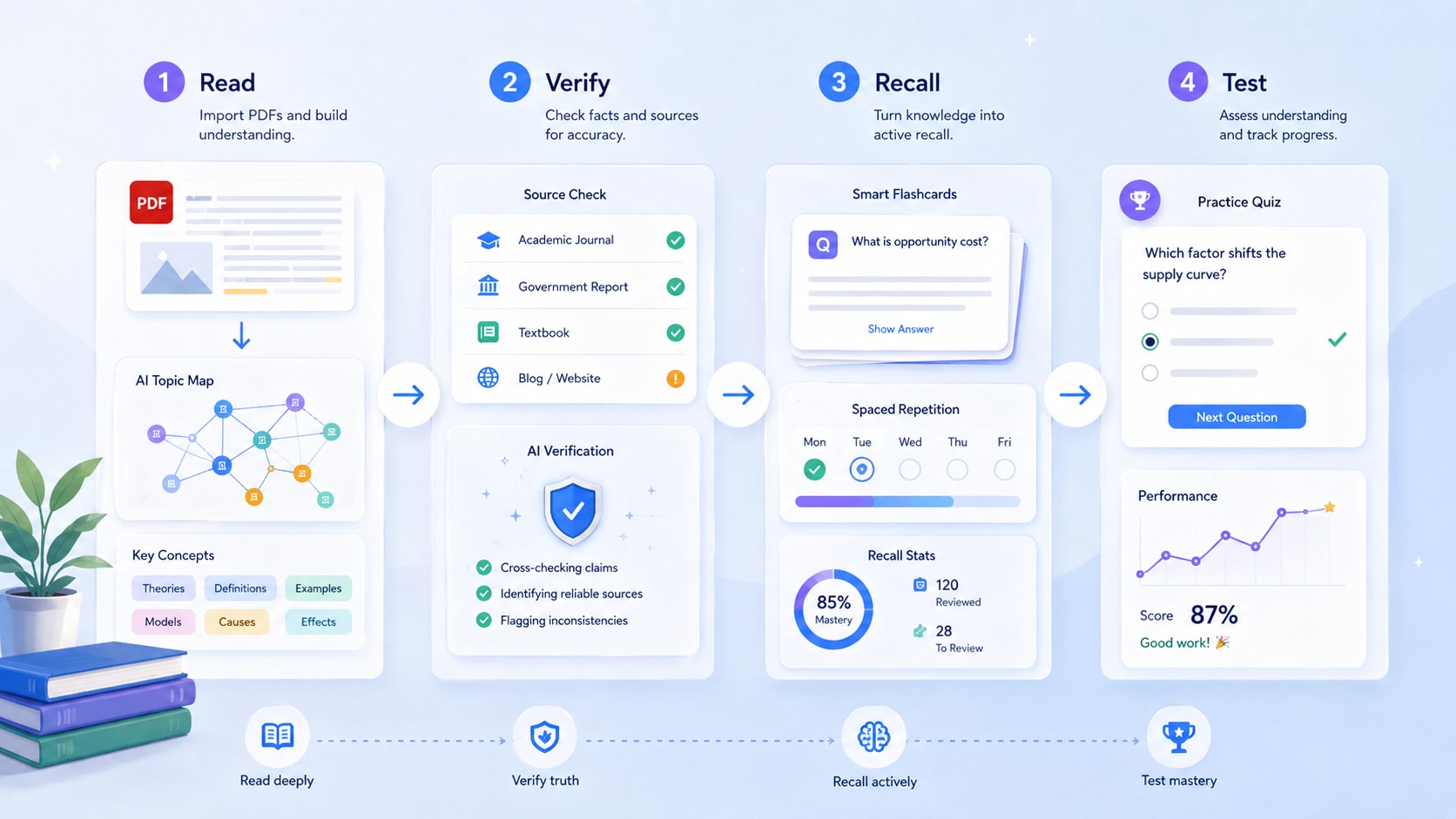
Part 4. Use the Read → Verify → Recall → Test Workflow
A strong AI study workflow has four stages: Read → Verify → Recall → Test. This prevents a common problem with AI study tools: generating polished notes quickly but never checking whether the notes reflect the source or whether you can remember the material later.
Step 1. Read: turn the source set into a topic map
Start by asking for the structure of the course material, not a giant summary. Good first questions include:
- What are the 8–10 major concepts covered across these materials?
- Which topics appear in both the lecture slides and assigned readings?
- Which concepts have a definition, example, formula, or case that I should keep together?
- Which sections look like background material rather than core exam content?
This creates the skeleton of the study guide before you fill it with detail.
Step 2. Verify: connect important points back to the source
Once the topic map looks right, ask for the source behind each major concept. Verification matters most for exact definitions, dates, numbers, formulas, case holdings, technical terminology, and anything you may later quote or paraphrase.
For a deeper source-checking workflow, link this section to your citation-focused article: how to summarize a PDF with citations.
Verification prompt
“For each topic in the study guide, show which course file supports it. If two sources explain the topic differently, keep the difference instead of merging them into one statement.”
Step 3. Recall: turn the verified guide into questions and flashcards
After the guide has been checked, convert key definitions, relationships, formulas, and examples into recall material. A good flashcard should test one clear idea. A good review question should make you explain, compare, calculate, or apply the material rather than simply recognize a sentence you just read.
Step 4. Test: use a quiz to find weak topics
Do not treat a generated quiz as the final output. Treat it as a diagnostic step. When you miss a question, return to the relevant study-guide section and original source, correct the misunderstanding, and generate a second round of questions that focuses more heavily on the weak topic.
Part 5. A Better Prompt Sequence for Building a Study Guide
Do not ask AI to “make me a study guide” and accept the first answer. Build the guide in stages so each output has one job and is easier to verify.
Prompt 1: Find the course structure
“Based only on these course materials, group the content into 6–10 exam topics. List the files that contribute to each topic. Do not write the full study guide yet.”
Prompt 2: Build each topic
“For each topic, give me the key concept, a concise definition, one important example or application, and the source where the information appears.”
Prompt 3: Find connections and differences
“Which ideas appear in more than one source? Show where the files reinforce each other and where they use different explanations, assumptions, or examples.”
Prompt 4: Create the exam study guide
“Turn the verified topics into a study guide with clear headings, key terms, concise explanations, examples, source references, and 2–3 review questions per topic.”
Prompt 5: Turn the guide into active recall
“Create flashcards from the definitions and relationships in this guide. Keep each card focused on one concept and avoid giving away the answer in the question.”
Prompt 6: Test weak points
“Create a 15-question practice quiz from the guide. Mix definition, comparison, application, and short-answer questions. Do not show the answers until I respond.”
This sequence also makes it easier to see where an error enters the workflow. If the quiz is wrong because the topic map was wrong, you can fix the source interpretation instead of endlessly regenerating the quiz.
Part 6. Example: Turn a Week of Course Files into an Exam Pack
Imagine you are preparing for an introductory economics midterm. Your folder contains six lecture PDFs, two textbook chapters, one professor handout, and your own revision notes.
Input: the source set
- Lecture 1–2: supply, demand, and equilibrium
- Lecture 3: elasticity
- Lecture 4: consumer choice
- Lecture 5–6: production and market structure
- Textbook chapters covering the same units in more depth
- Professor handout listing exam priorities
- Your notes with questions you marked during class
Output 1: the study guide
| Study guide section | What to include | Why it matters |
|---|---|---|
| Supply and demand | Definitions, graph shifts, equilibrium, one worked example | Builds the base for later topics |
| Elasticity | Formula, interpretation, determinants, example | Combines conceptual and calculation questions |
| Consumer choice | Core assumptions, budget constraint, utility example | Tests whether you can explain relationships, not just terms |
| Market structure | Comparison of competition types, assumptions, examples | Works well as a compare-and-contrast review section |
Output 2: flashcards
Use flashcards for compact units of knowledge: definitions, formulas, conditions, and “X vs. Y” distinctions. Avoid turning an entire paragraph into one card.
Output 3: quiz
Use the quiz to mix recall with application. For example, one question may ask for the definition of price elasticity, while another gives a price-and-quantity change and asks you to calculate or interpret the result.
Output 4: weak-topic review
After the first practice round, create a short list called Review Again. Put only the concepts you missed or could not explain clearly into that list. Your second study session should start there rather than rereading the full guide from page one.

Part 7. How to Handle Scanned Handouts and Mixed File Types
Real course material is rarely one clean set of text PDFs. You may have scanned worksheets, screenshots, Word notes, slide exports, or image-heavy textbook pages. Before building the guide, make sure the information is actually readable by the system you are using.
Run OCR before relying on scanned text
If a handout is image-based, OCR can create a searchable text layer. Review names, formulas, dates, symbols, and table values carefully because recognition errors in those areas can change the meaning of a study note.
Keep visual material connected to the explanation
A diagram, chart, or formula image may be important even when the surrounding text is short. When a visual is likely to appear in an exam question, add a note in the study guide telling you which page or source contains it so you can revisit the original.
Do not force every file into the same role
A lecture deck may define the exam scope, a textbook may provide the clearest explanation, and your notes may show which parts confused you. A useful guide keeps those roles visible instead of flattening every source into identical bullet points.
Part 8.What AI Should and Shouldn't Do for Students
AI is most useful when it helps organize, explain, retrieve, and test course material without replacing the student's own judgment.
| Good use of AI | What still needs your judgment |
|---|---|
| Group course materials into topics | Confirm the topics match the actual syllabus and exam scope |
| Explain difficult concepts in simpler language | Check the explanation against the original source when precision matters |
| Generate flashcards and review questions | Decide whether the questions reflect what your instructor expects |
| Find repeated ideas across documents | Distinguish repetition from actual importance |
| Create a practice quiz | Use the results to identify weaknesses rather than treating the score as an official assessment |
If your school or instructor has rules about AI use, follow those rules. A study guide can help you prepare, but graded work should still meet the academic-integrity requirements of the course.
Use the guide as a starting point, not the source of truth
For definitions, quotations, calculations, legal or technical wording, and any point that will appear in submitted work, return to the original document and verify it before reuse.
Conclusion
The best AI study guide from PDF material is not the longest summary. It is the one that gives your course files a clear structure, keeps important ideas connected to their sources, and turns verified material into something you can actively review.
A practical workflow is simple: build the right source set → map the topics → verify important points → create the study guide → generate flashcards → test yourself → revisit weak topics. PDFelement V13's document-centered AI workflow is designed to keep those stages close to the original PDFs instead of treating the study guide as a disconnected block of generated text.
If you only need a fast document overview, use the AI PDF Summarizer. If you are preparing for an exam, use the summary as only the first layer and build the rest of the study workflow around verification and recall.
G2 Rating: 4.5/5 |100% Secure
Frequently Asked Questions (FAQ)
-
Can AI make a study guide from a PDF?
Yes. An AI study workflow can extract key topics, definitions, examples, and review questions from a PDF and organize them into a study guide. The most useful guides also keep enough source context for you to verify important points before studying or reusing them. -
Can I create one study guide from several course PDFs?
Yes. Keep the files focused on one exam, unit, or project, then organize the guide by shared topics instead of producing a separate mini-summary for every file. Clear file names and source references make the final guide easier to check. -
What should an AI-generated study guide include?
A strong guide should include a topic map, key concepts, definitions, examples or formulas, important connections, source references, and review questions. For exam prep, add flashcards and quizzes only after the core material has been checked. -
Can AI turn a study guide into flashcards and quizzes?
Yes. Definitions and concept relationships can become flashcards, while broader topics can become multiple-choice, short-answer, comparison, or application questions. Review the generated material so the questions stay faithful to your course sources. -
How do I make an AI study guide more accurate?
Limit the source set to the material that actually belongs to the exam, use clear file names, ask the AI to show which source supports each major topic, and verify exact definitions, numbers, formulas, and quotations in the original document. -
Can I use scanned lecture notes to create a study guide?
Yes, but image-based notes may need OCR first. Check the recognized text carefully when the scan contains handwriting, formulas, symbols, tables, or low-quality images because recognition errors can affect the generated study material.


