

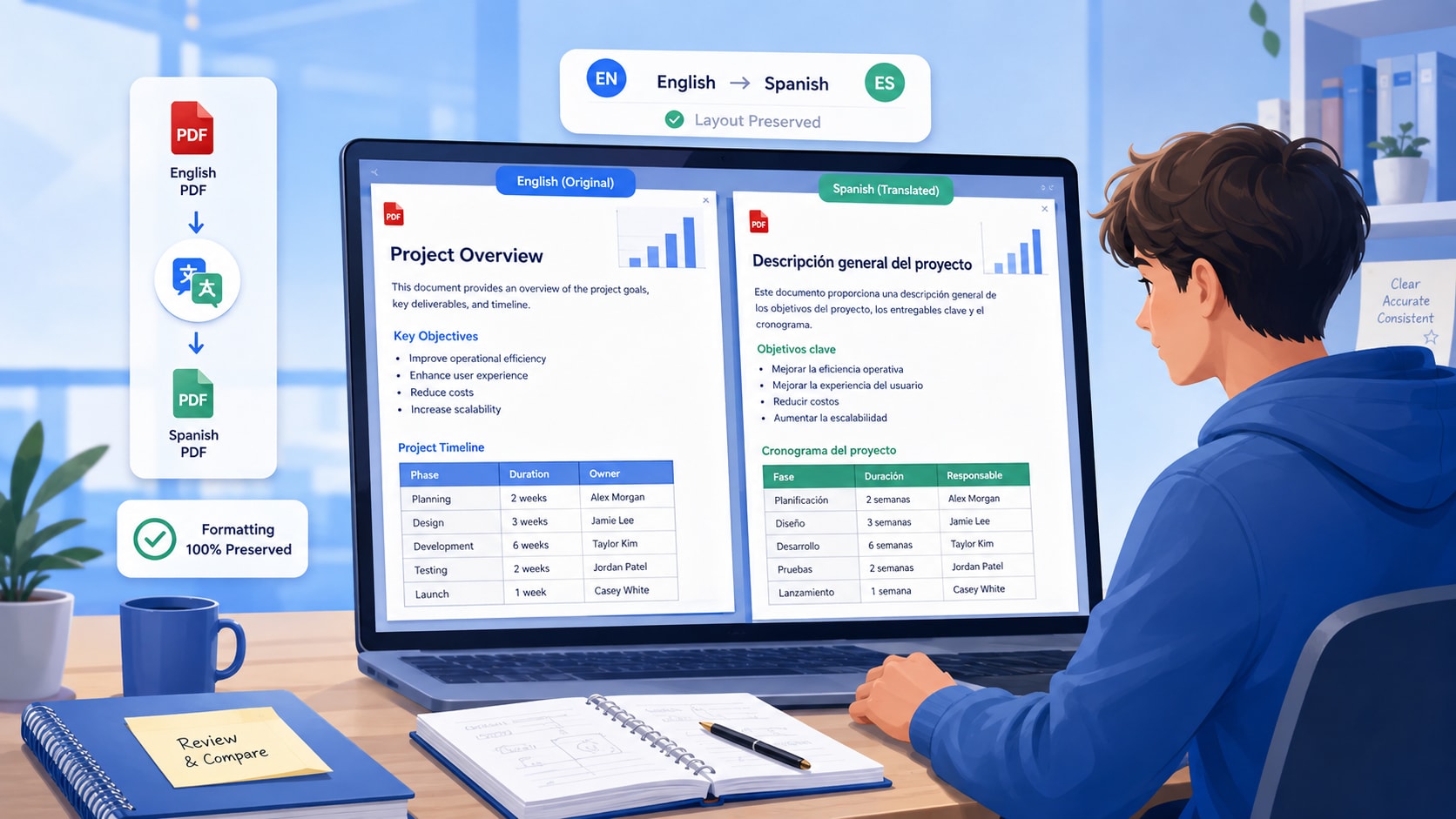
To translate a PDF to Spanish without losing formatting, treat translation as a document workflow rather than a text-copying task. Start with a clean text layer, translate the full document or only the pages you need, then check the layout elements most likely to shift when English becomes Spanish: headings, tables, numbered lists, columns, text boxes, footnotes, dates, units, names, and repeated terminology. If the PDF is scanned, run OCR before translation. If the wording matters for school, work, or an official document, keep the English and Spanish versions side by side while you review.
Quick answer
- For a normal formatted PDF: open the file → choose English to Spanish → translate the whole PDF or selected pages → review layout → verify names, numbers, and terminology → save the Spanish version separately.
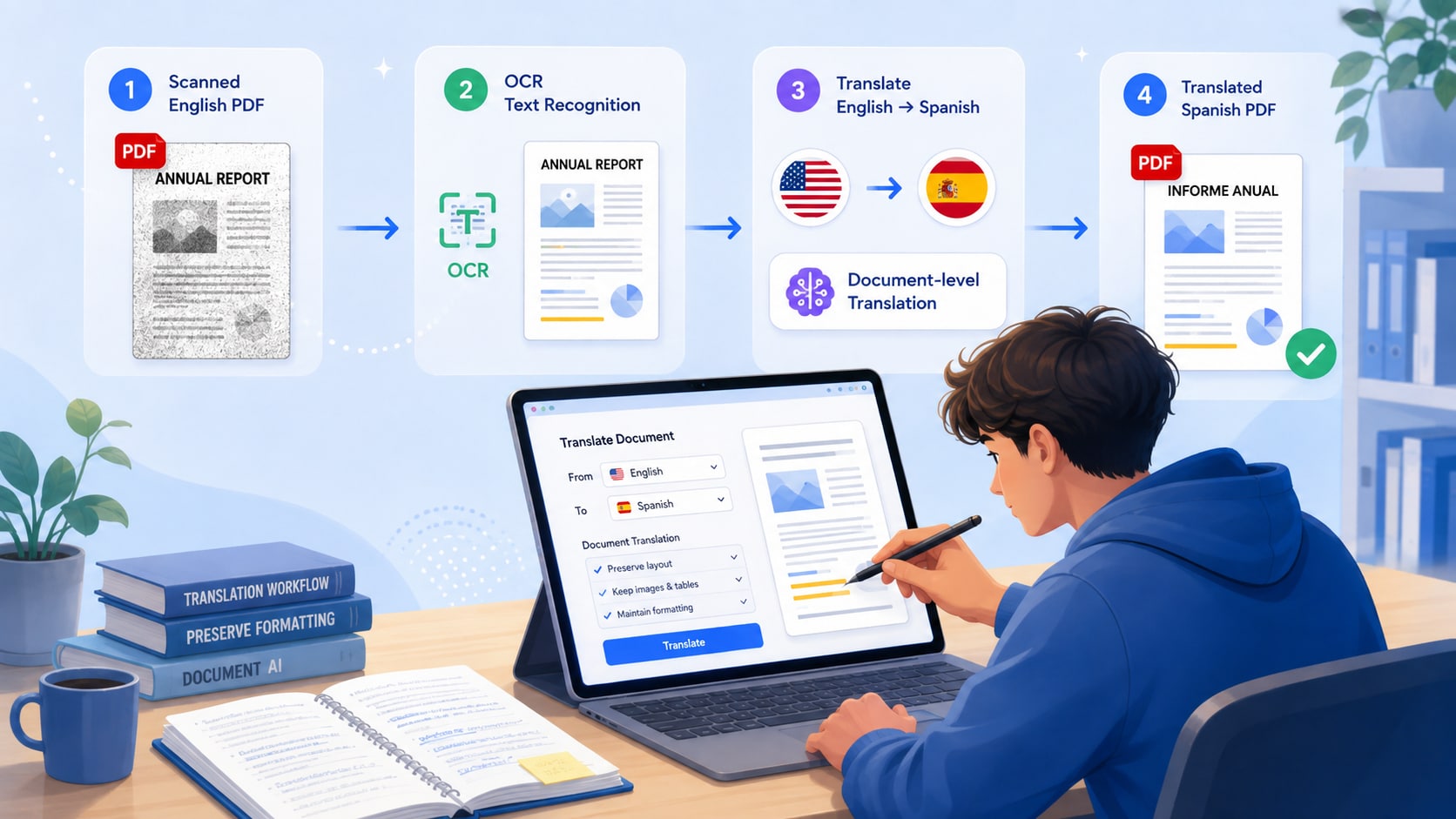
- For a scanned PDF: run OCR first, spot-check the recognized text, then translate. Translation quality cannot recover text that OCR failed to read correctly.
- When wording matters: translate. When you only need the gist, summarize. For a long foreign-language paper, summarize first for orientation, then translate the sections you need to study closely.
- For repeated technical terms: keep a small Spanish glossary so the same concept is not translated differently on different pages.


 G2 Rating: 4.5/5 |
 100% Secure
In This Article
- Translate or summarize: which one do you actually need?
- How to translate a PDF to Spanish in PDFelement V13
- What usually breaks when a PDF is translated?
- Student and research use cases
- Legal and official documents: use AI translation as a working draft
- Post-translation QA checklist
- Translate the whole PDF or only selected pages?
- Build a Spanish terminology checklist for repeated terms
- Conclusion
- Frequently asked questions
Part 1. Translate or Summarize: Which One Do You Actually Need?
Translation and summarization solve different problems. Translation preserves the meaning of the wording in another language. Summarization compresses the material so you can understand the main idea faster. Choosing the wrong task can create extra work, especially with long academic or professional PDFs.
| Choose... | When your goal is... | Example |
|---|---|---|
| Translate | Read, compare, quote, or reuse the actual wording in Spanish | A syllabus, article, form, policy, bilingual handout, or working contract draft |
| Summarize | Understand the main idea quickly without recreating the full wording | A long background reading you do not need to quote or reuse |
| Summarize + translate | Understand the structure first, then read selected sections closely in Spanish | A foreign-language research paper, report, or long textbook chapter |
If you are reading a long paper, one efficient sequence is to summarize the PDF with source references first, identify the sections that matter, and then translate those sections. If your goal is document translation rather than study orientation, continue with the workflow below.
Part 2. How to Translate a PDF to Spanish in PDFelement V13
This page focuses on the formatting-preservation workflow. For the broader product walkthrough and all translation modes, see the PDFelement PDF translation guide. If you only need a browser-based workflow, use the online AI PDF translator.
- Open the English PDF and test the text layer. Try selecting or searching a sentence. If the page behaves like an image, run OCR before translation so the document has searchable text.
- Choose English as the source language and Spanish as the target language. If the file contains more than one language, confirm the detected source language before translating a long section.
- Choose the translation scope. Translate the whole PDF when you need a reusable Spanish copy. Translate selected pages or passages when only one chapter matters or when terminology review is more important than speed.
- Choose the translation mode that fits the document. A fast mode is useful for everyday reading; a more precise mode is better when the wording is technical, formal, academic, or professional.
- Review the Spanish output next to the original. Check headings, paragraphs, tables, columns, numbered clauses, text boxes, footnotes, and page breaks instead of judging the result only by sentence fluency.
- Verify high-value details manually. Recheck names, dates, measurements, citations, formulas, product terms, legal wording, and any sentence that will be submitted or shared.
- Save the Spanish version as a new file. Keep the original English PDF so you can resolve wording or layout questions later.
Cluster note
If your search intent is simply “AI PDF translator” or “translate PDF documents,” use the AI PDF Translator feature page. This article is specifically about English-to-Spanish translation when layout, OCR, and post-translation review matter.
Part 3. What Usually Breaks When a PDF Is Translated?
A translation can be linguistically correct and still fail as a document. Spanish text often takes a different amount of space than the English source, so formatting review is part of translation quality, not an optional final polish.
Tables and columns
Spanish labels or explanations may be longer than the English originals. That can push text into a new line, change row height, or make a narrow column difficult to scan. Pay extra attention to dense comparison tables, schedules, forms, and multi-column research papers.
Numbered clauses and nested lists
The numbering may survive while the visual hierarchy becomes harder to follow. Check indentation, subclauses, cross-references, and bullets, especially when a policy or contract refers to “Section 4.2” or “Item (b).”
Headers, footers, and page references
Repeated headers, footers, section labels, and page references can become inconsistent after translation. If the PDF is used for research or formal review, confirm that translated section names still correspond to the correct pages and headings.
Text inside charts, graphics, and callout boxes
Some PDFs contain important wording inside diagrams, charts, screenshots, or design elements rather than normal text blocks. Review these areas separately because a translated body paragraph does not guarantee that labels inside an image or graphic were handled correctly.
Names, dates, units, abbreviations, and citations
These details can carry more risk than the surrounding prose. Check whether names or product terms were translated when they should remain unchanged, whether dates use an expected format, whether units are still correct, and whether bibliographic references were preserved faithfully.
Scanned pages and OCR errors
A translation system cannot reliably preserve wording it never recognized. If OCR merged two columns, misread a formula, or dropped a symbol, the Spanish output may look polished while still being wrong. Correct the recognized text before blaming the translation stage.
Part 4. Student and Research Use Cases
Research papers: summarize first, translate what you need
For a long foreign-language paper, translation does not always need to be the first step. A short summary can help you identify the abstract, methodology, findings, and discussion sections that matter most. Translate those sections closely, then return to the English source for quotations, terminology, and citations.
Study abroad and international courses
Translate syllabi, orientation documents, housing information, course handouts, or institutional guidance into Spanish while keeping tables and headings readable. For anything you must officially submit, check whether the institution requires a certified translation rather than an AI-generated working copy.
Bilingual class materials
Keep English and Spanish versions side by side instead of replacing the original. This makes it easier to compare terminology, mark unfamiliar phrases, and maintain a consistent vocabulary across several weeks of reading.
Technical or discipline-specific reading
Engineering, law, medicine, finance, and academic research often use repeated specialist terms. Before translating a long document, identify a few critical terms and decide how you want them handled in Spanish. A consistent term is usually more useful than a different “natural” translation on every page.
Part 5. Legal and Official Documents: Use AI Translation as a Working Draft
AI translation can speed up first-pass understanding, but it does not turn a document into a certified or authoritative translation. Contracts, immigration materials, certificates, court documents, medical forms, and other official records may require a qualified or certified translator when exact wording affects rights, obligations, deadlines, or filing requirements.
| Document type | Can AI help? | Human review needed? |
|---|---|---|
| Study handout | Yes, for comprehension and revision | Usually a light check for important terminology |
| Research article | Yes, for reading and section-by-section analysis | Yes, for quotations, terminology, numbers, and citations |
| Internal contract review | Yes, for first-pass understanding | Yes, especially for operative clauses and obligations |
| Immigration or certified filing | Only as a working draft | Yes; check the authority's certified-translation requirements |
High-stakes translation note
When exact wording has legal, academic, medical, or financial consequences, verify the Spanish translation with a qualified person and the original source. A readable AI translation is not the same as an authoritative translation.
Part 6. Post-Translation QA Checklist
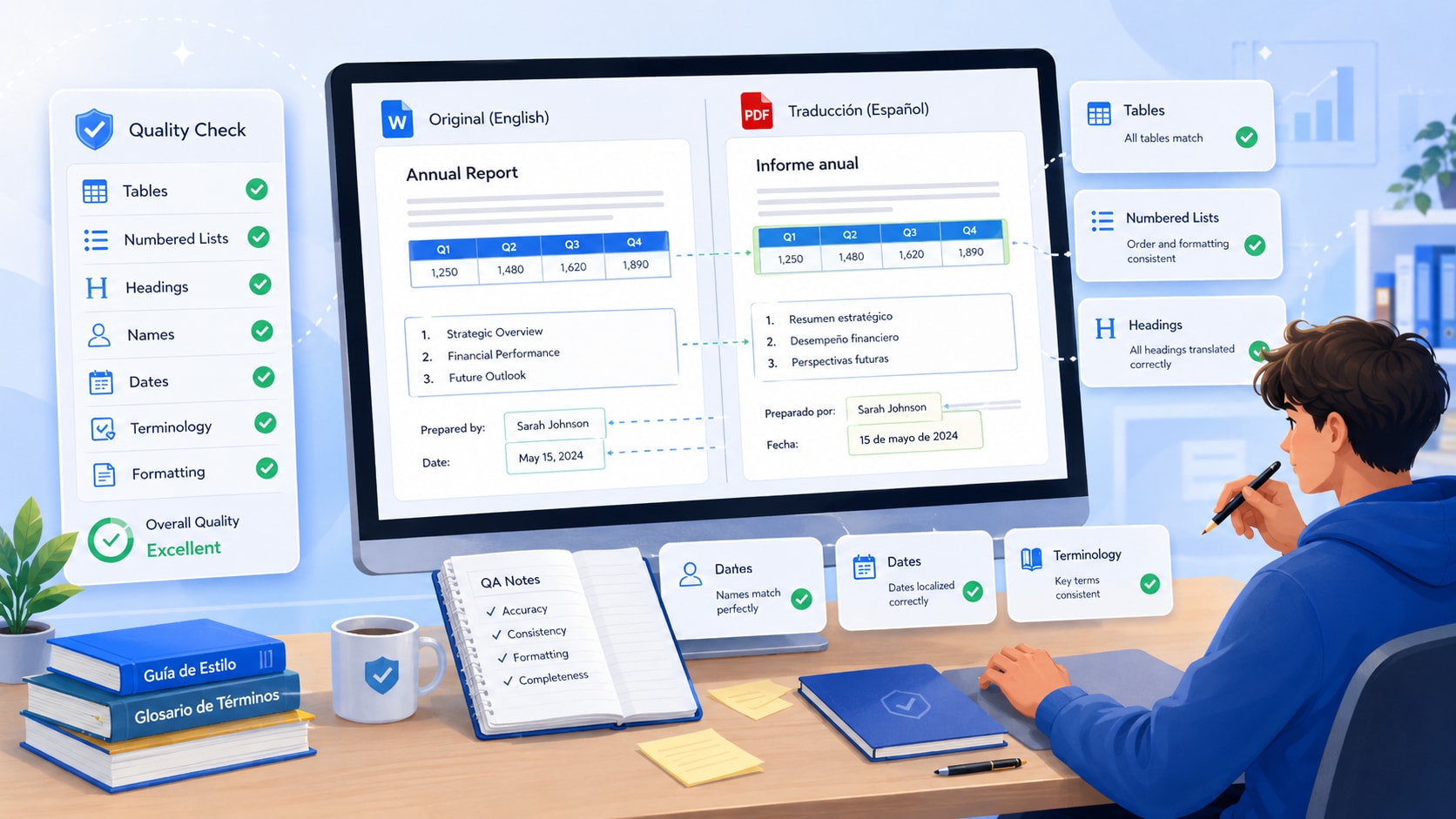
Do two separate checks after translation: one for language and one for layout. Combining them into one quick read makes it easy to miss a fluent sentence sitting in the wrong table cell or a correct heading attached to the wrong section.
Language check
- Are names, dates, units, references, and proper nouns correct?
- Are repeated technical terms translated consistently?
- Do qualifiers such as “may,” “must,” “only,” “except,” and “unless” preserve the original meaning?
- Were abbreviations expanded, translated, or left unchanged appropriately?
- Do quotations and cited titles still match the source?
Layout check
- Can you still identify the same headings and sections as in the English PDF?
- Do tables, bullets, numbered clauses, and columns remain readable?
- Do page breaks separate sections in sensible places?
- Are headers, footers, callout boxes, captions, and footnotes still aligned?
- Does text inside diagrams or charts still make sense?
- If the document was scanned, did OCR preserve the text accurately before translation?
Fast QA rule
Check at least one normal paragraph, one dense table or list, one page with visual elements, and one page containing names or numbers before trusting the rest of a long translated PDF.
Part 7. Should You Translate the Whole PDF or Only Selected Pages?
Translate the whole PDF when the Spanish version needs to stand on its own. Translate selected pages when you only need a few sections and want tighter control over terminology and QA.
| Translate the whole PDF when... | Translate selected pages when... |
|---|---|
| You need a reusable Spanish copy for repeated reading or internal sharing | Only one chapter, appendix, or section matters |
| The document structure itself is important | You need to review terminology closely before translating the rest |
| Readers need to move through the document in the same order as the original | The PDF is long and you are still deciding which sections are relevant |
| You need side-by-side comparison across most of the file | You want to keep the translation and review workload manageable |
For a large academic or professional document, selected-page translation can be the better first step. Once you confirm that the terminology and formatting look right, you can expand the same approach to the remaining pages.
Part 8. Build a Spanish Terminology Checklist for Repeated Terms
Terminology consistency is one of the easiest translation problems to miss because every individual sentence may still sound natural. If the same technical term appears throughout a report, paper, policy, or training manual, record the preferred Spanish wording before you review the full translation.
A simple glossary can include:
- Source term: the original English term.
- Preferred Spanish term: the wording you want used consistently.
- Do not translate: brand names, product names, acronyms, or proper nouns that should remain unchanged.
- Context note: a short explanation when the translation depends on the field or audience.
| English term | Spanish preference | Review note |
|---|---|---|
| stakeholder | parte interesada | Keep the same term throughout the report |
| compliance | cumplimiento normativo | Use the regulatory wording in formal contexts |
| PDFelement | PDFelement | Product name; do not translate |
This is especially useful for research, legal, medical, technical, and business PDFs where the same concept may appear dozens of times. Consistent terminology also makes later search, comparison, and review easier.
Conclusion
The most useful way to translate a PDF to Spanish is not to chase a perfect sentence-by-sentence translation in isolation. The better workflow is to preserve the document as a usable document: OCR scans first, choose the right translation scope, keep the Spanish result aligned with the English source, review layout separately from language, and maintain consistent terminology across repeated sections.
If you need a broad AI translation product, use the PDFelement AI PDF Translator. If you need the exact product steps, use the PDF translation guide. If you specifically need an English PDF translated into Spanish while preserving formatting, OCR quality, and terminology, use the workflow on this page.
G2 Rating: 4.5/5 |100% Secure
People Also Ask
-
Can I translate a PDF to Spanish and keep the original formatting?
A PDF-aware translation workflow can preserve much of the original structure, but you should still review tables, columns, text boxes, lists, footnotes, and page breaks because Spanish text can take a different amount of space than the English source. -
How do I translate a scanned PDF to Spanish?
Run OCR first so the scanned page has searchable text, then spot-check names, numbers, formulas, and table values before translating. If OCR reads the source incorrectly, the Spanish translation may also be wrong even when the sentence sounds natural. -
Should I translate the whole PDF or only selected pages?
Translate the whole PDF when you need a reusable Spanish copy or consistent page-by-page review. Translate selected pages when only one section matters, when the file is very long, or when you want to validate terminology and formatting before processing the rest. -
Is translation better than summarization for a foreign-language paper?
Translate when the wording matters. Summarize when you only need the main idea. For research, a practical sequence is to summarize for orientation, identify the sections you actually need, and then translate those sections for close reading or source verification. -
Can I use AI translation for a legal or official PDF?
Use AI translation for first-pass understanding or an internal working draft. When exact wording affects legal rights, official filings, medical decisions, financial obligations, or certification requirements, verify the result with a qualified professional and follow the receiving authority's rules. -
How can I keep technical terms consistent in a translated PDF?
Create a short glossary before final review. Record the English term, the preferred Spanish equivalent, and any terms that should remain untranslated. Then search the Spanish PDF for repeated terminology and correct inconsistent variants before sharing the document. -
Can I translate only part of a PDF into Spanish?
Yes. Translating selected pages or passages is often more efficient when you only need one chapter, appendix, clause, or research section. It also makes terminology and layout review easier before you decide whether the rest of the document needs translation.
Related Reading: PDF Translation Cluster
- AI PDF Translator - translate complete PDF documents with AI
- Online AI PDF Translator - translate PDFs in the browser
- How to Translate a PDF in PDFelement
- English to Spanish Translation: Methods and Tools
- How to Summarize a PDF with Citations Before Translating Key Sections


