

In this article
Are you struggling to attach a massive PDF document to an email, or facing an upload limit on a web portal? A high-quality PDF resizer is the ultimate solution to your file size woes. Whether you are dealing with graphic-heavy presentations, scanned legal documents, or extensive reports, reducing your PDF's file size can save storage space and streamline sharing.
In this comprehensive guide, we will explore the best PDF resizer tools available today, covering both robust pdf resizer software for your desktop and convenient online pdf resizer app solutions.


 G2 Rating: 4.5/5 |
 100% Secure
What is a PDF Resizer and How Does It Work?
A PDF resizer is a specialized software program or online utility designed to take a large PDF file and re-render its internal content so the resulting output file size is significantly smaller than the original. For instance, a 5MB document containing multiple high-resolution images can often be compressed to under 500KB without a noticeable drop in visual quality.
The Science Behind PDF Compression
When you use a pdf resize software, the tool scans the document for elements that are consuming the most space. It then applies complex algorithms to optimize these elements. This includes removing redundant metadata, subsetting embedded fonts (keeping only the characters actually used in the text), and most importantly, downsampling images.
Lossless vs. Lossy Compression
- Lossless Compression: This method reduces the file size without any loss of data. It usually involves optimizing text and vector graphics, restructuring the internal PDF code, and removing invisible junk data.
- Lossy Compression: This is applied to images and graphics. The software reduces the pixel dimensions and applies compression techniques (like JPEG compression) to visual elements. While some data is discarded, a good pdf resizer ensures the quality remains perfectly suitable for screen viewing.
Desktop vs. Online PDF Resizers: Which Do You Need?
Before diving into our list of the top tools, it's essential to decide between an online tool and a dedicated desktop application.
Online PDF Resizers are incredibly convenient. They require no downloads, use fewer local system resources, and can be accessed from any device. They are perfect for on-the-go resizing. However, they require a stable internet connection and may pose security risks for highly confidential files.
Offline/Desktop PDF Resizers offer maximum security since your files never leave your computer. They utilize your system's hardware to process massive files or batches of documents quickly. If you handle heavy PDF workflows daily, a pdf resizer free download of a reliable desktop app is the way to go.
Top Desktop PDF Resizer Software
For professionals dealing with sensitive information or massive files, desktop software is unparalleled. Here are the top offline solutions.
#1 Wondershare PDFelement
Wondershare PDFelement is a powerhouse PDF editor that has quickly become the go-to utility for professionals and casual users alike. As a top-tier pdf resizer software, it offers pocket-friendly pricing, advanced document management tools, and a host of features including PDF creation, OCR, batch processing, and forms management.
G2 Rating: 4.5/5 |100% Secure
Available for both Mac and Windows, it provides a native OS experience with intuitive interfaces.
Step 1Import the PDF
Launch PDFelement and use the File → Open menu to import the PDF.
Step 2Access Compression Tool
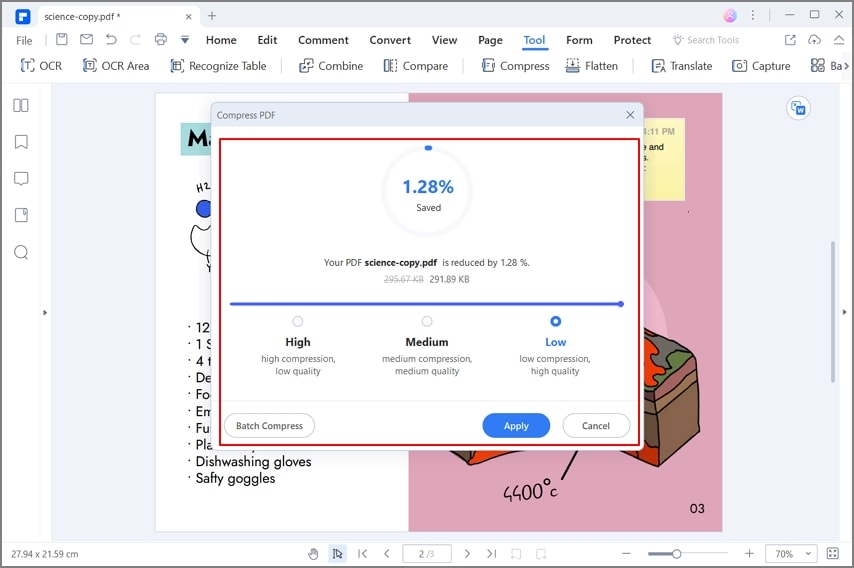
Click the Tool tab at the top and then click on the Compress menu item in the toolbar below it.
Step 3Select Compression Level
In the Compress PDF window, select your desired compression level (High, Medium, or Low) and click Apply.
Step 4Save Optimized PDF
Save the optimized PDF once it renders and opens up in a new tab.
#2 Foxit PDF Editor
Foxit PDF Editor (formerly PhantomPDF) is a comprehensive PDF editing tool with an extensive array of features for file conversion, annotations, and PDF resizing. The optimization tool comes with both basic default settings and advanced tools to control parameters like image downsampling and color schemes.
Step 1Open Document
Launch Foxit PDF Editor and open the PDF document.
Step 2Navigate to Optimizer
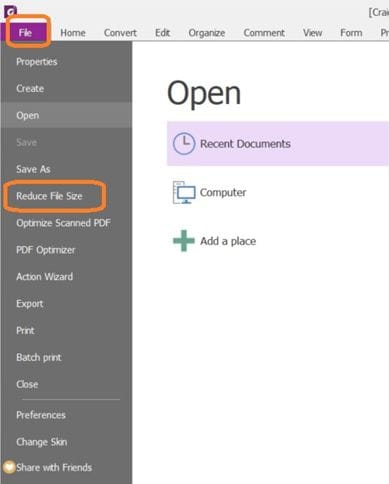
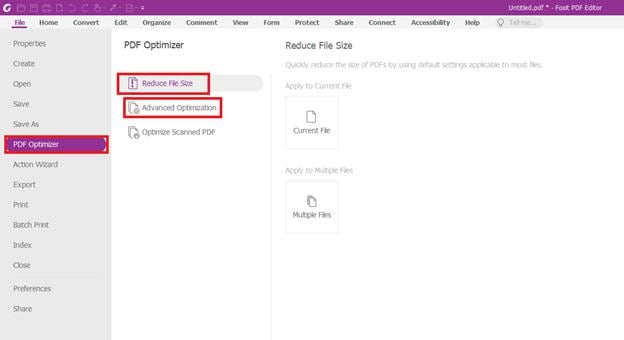
Click the File menu and select PDF Optimizer -> Reduce File Size.
Step 3Apply Optimization
Select Reduce File Size to use default settings or click on Advanced Optimization to access granular compression features. Choose Current File to apply the settings.
#3 Nitro PDF Pro
Nitro PDF Pro is another leading alternative for Windows and Mac users. It focuses heavily on business productivity and includes a highly capable PDF optimizer designed to shrink bloated files created by scanners or CAD programs.
Step 1Optimize PDF
Open your document in Nitro PDF Pro, navigate to the File tab and select Optimize PDF.
Step 2Choose Profile
Choose from predefined settings (Web ready, Office ready, Print ready) or use the Custom option. Apply the optimization and save your new file.
Top Online PDF Resizer Apps
If you need a quick fix without installing software, these online pdfresizer platforms are your best bet.
#4 Wondershare HiPDF
Wondershare HiPDF is a comprehensive web-based PDF suite. Its powerful compression engine uses advanced algorithms to give you maximum file size reduction with minimal loss of quality. Even on high compression settings, image resolution remains crisp for web viewing.
Step 1Import File
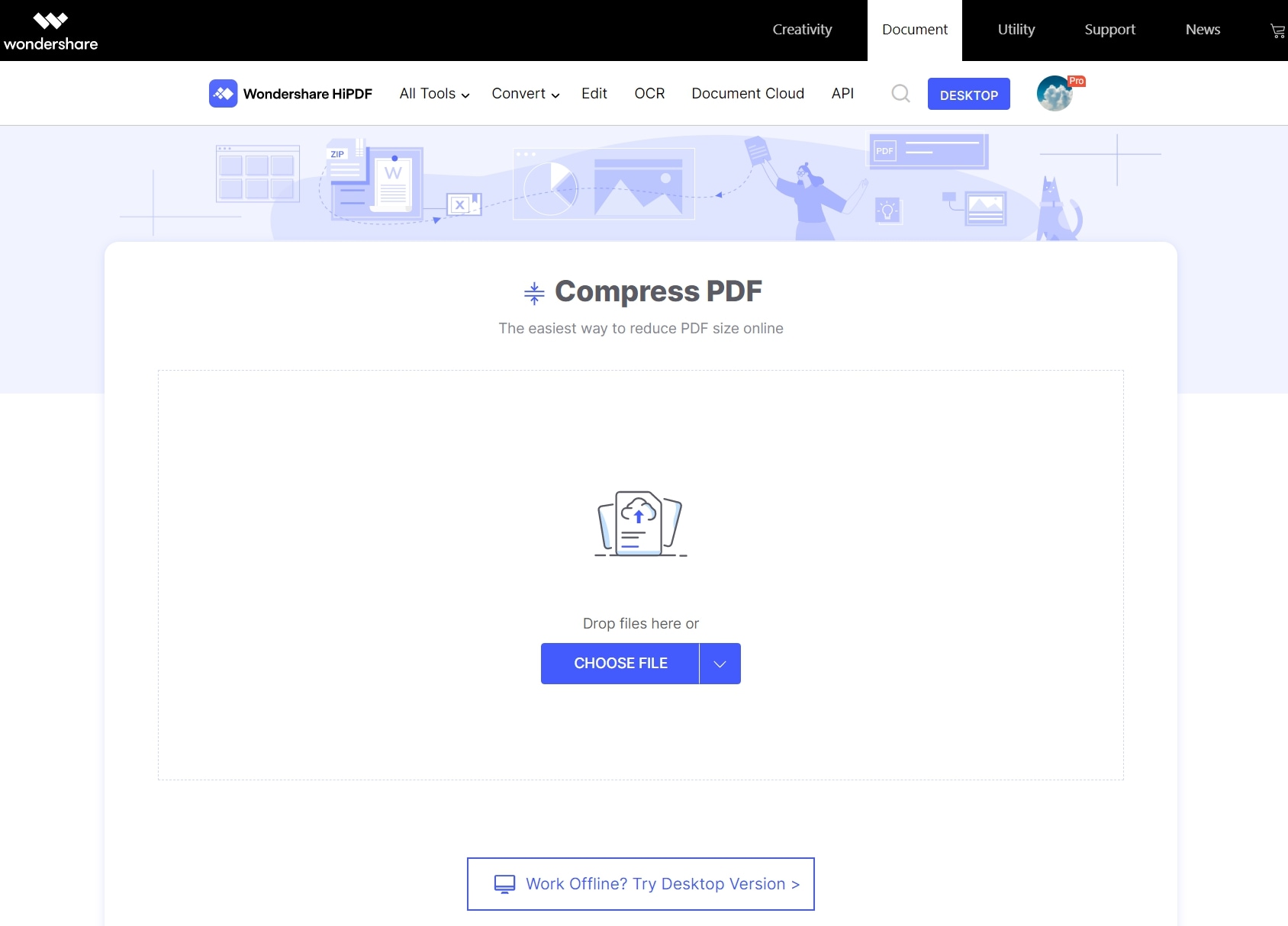
Head to the HiPDF Optimize PDF web page and import a file with a simple drag and drop action.
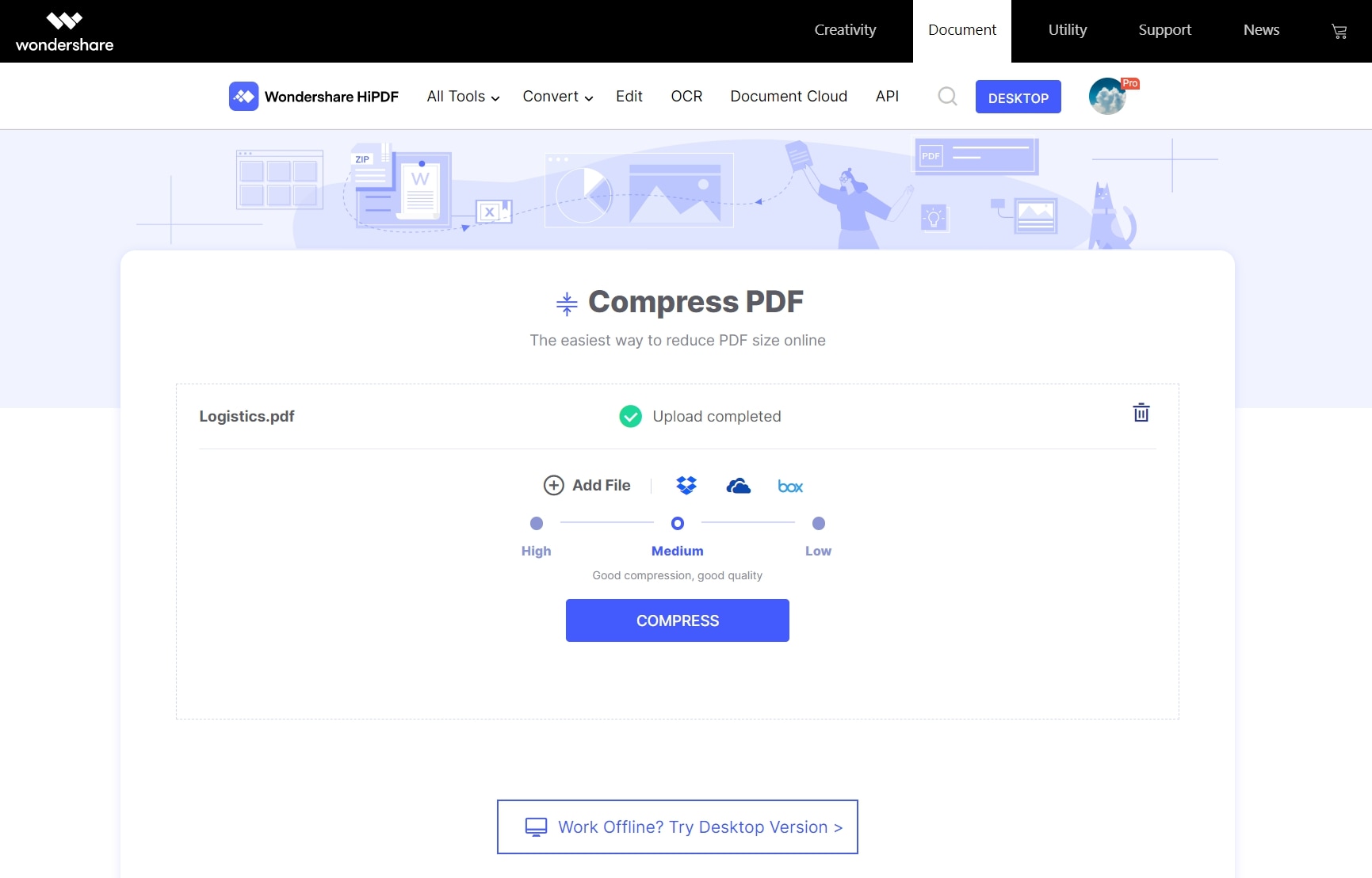
Step 2Select Level
Use the presets to select a compression level and click the Compress button.
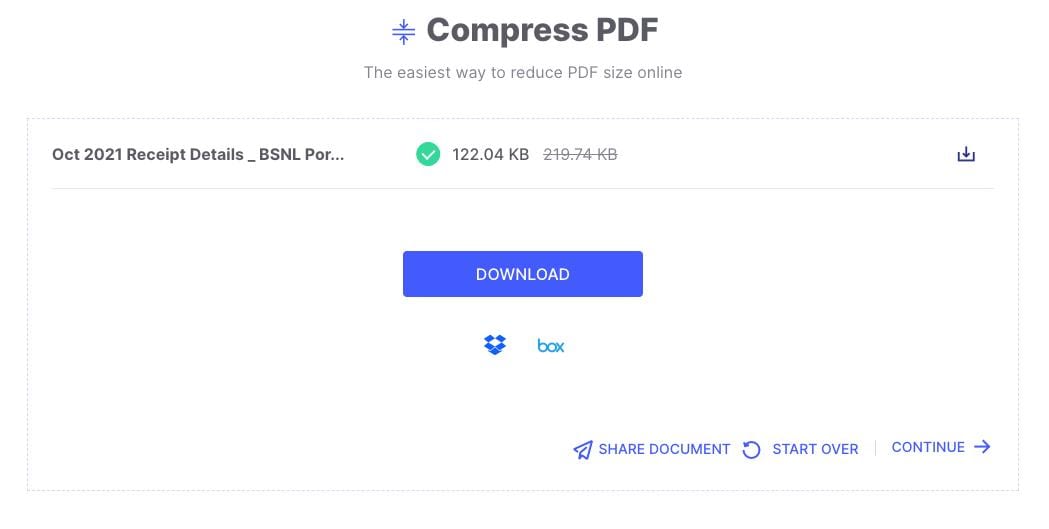
Step 3Download Result
Save the output file to your local folder.
#5 Smallpdf
Smallpdf is one of the most recognizable names in online document management. It offers a colorful, incredibly easy-to-use interface. The basic compression is free, making it a great quick-stop solution for everyday users.
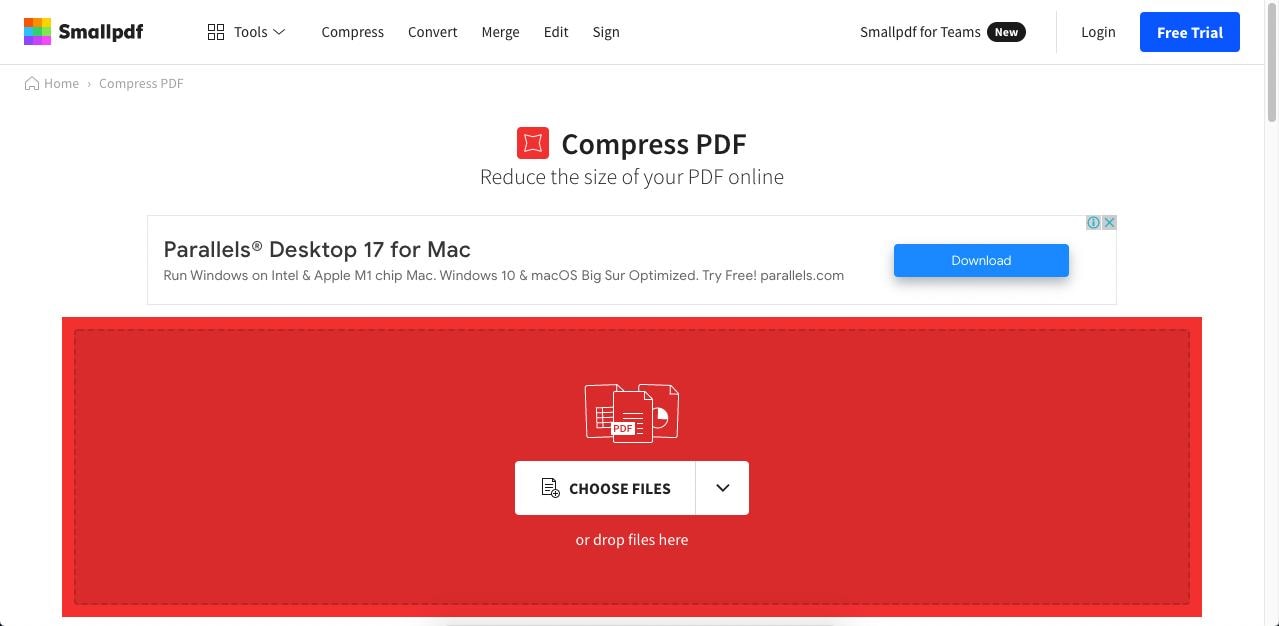
Step 1Upload File
Open the Smallpdf compression web page and drag and drop a PDF file to upload it.
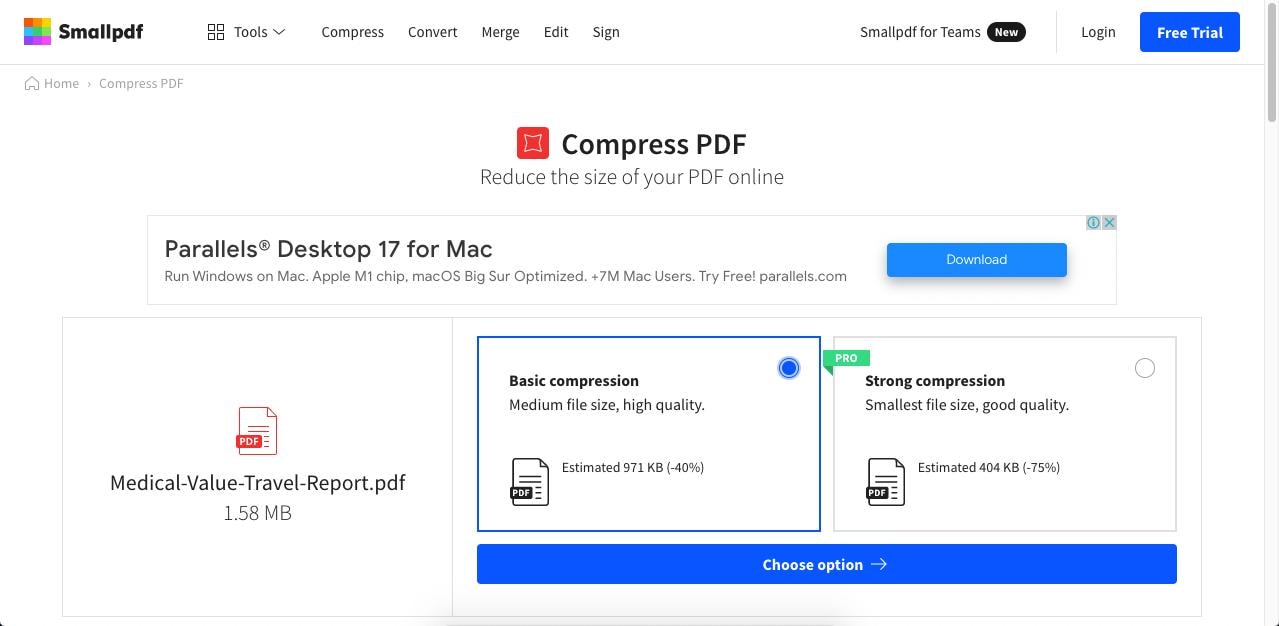
Step 2Compress
Choose Basic compression for the free option and click Compress.
Step 3Download
Click the Download button to save your file.
#6 Sejda PDF
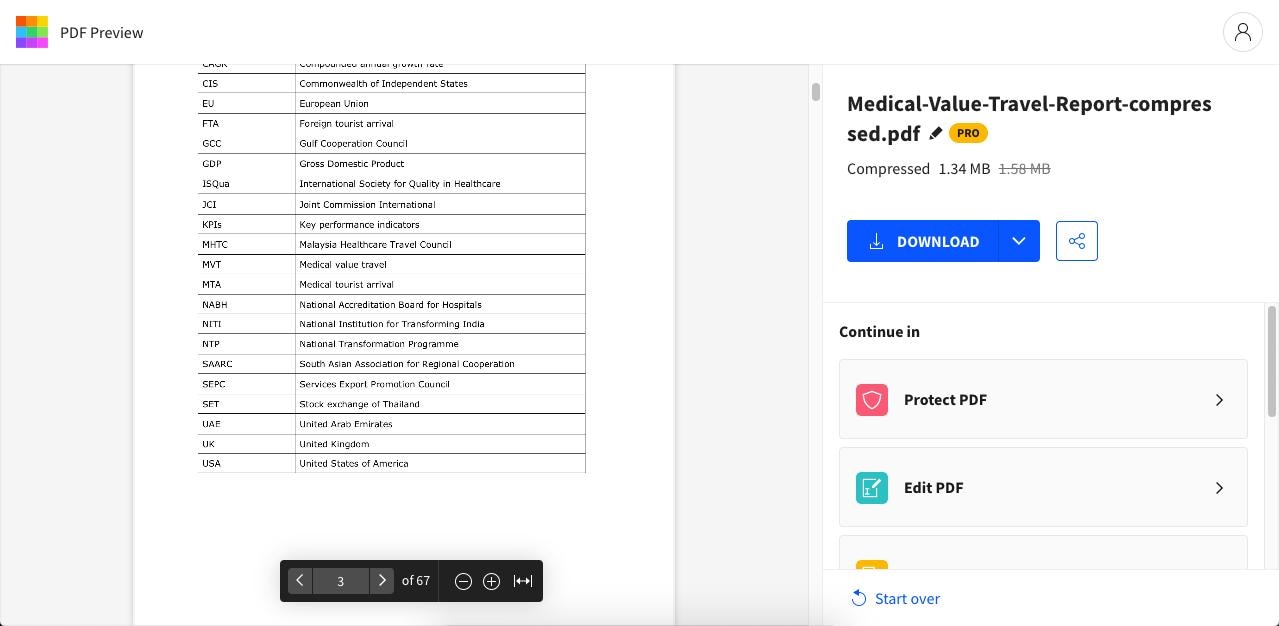
Sejda PDF stands out because its free tier is unusually generous, allowing documents up to 100MB or 200 pages. It offers both basic resizing and advanced options where you can explicitly set image quality and resolution.
Step 1Upload Document
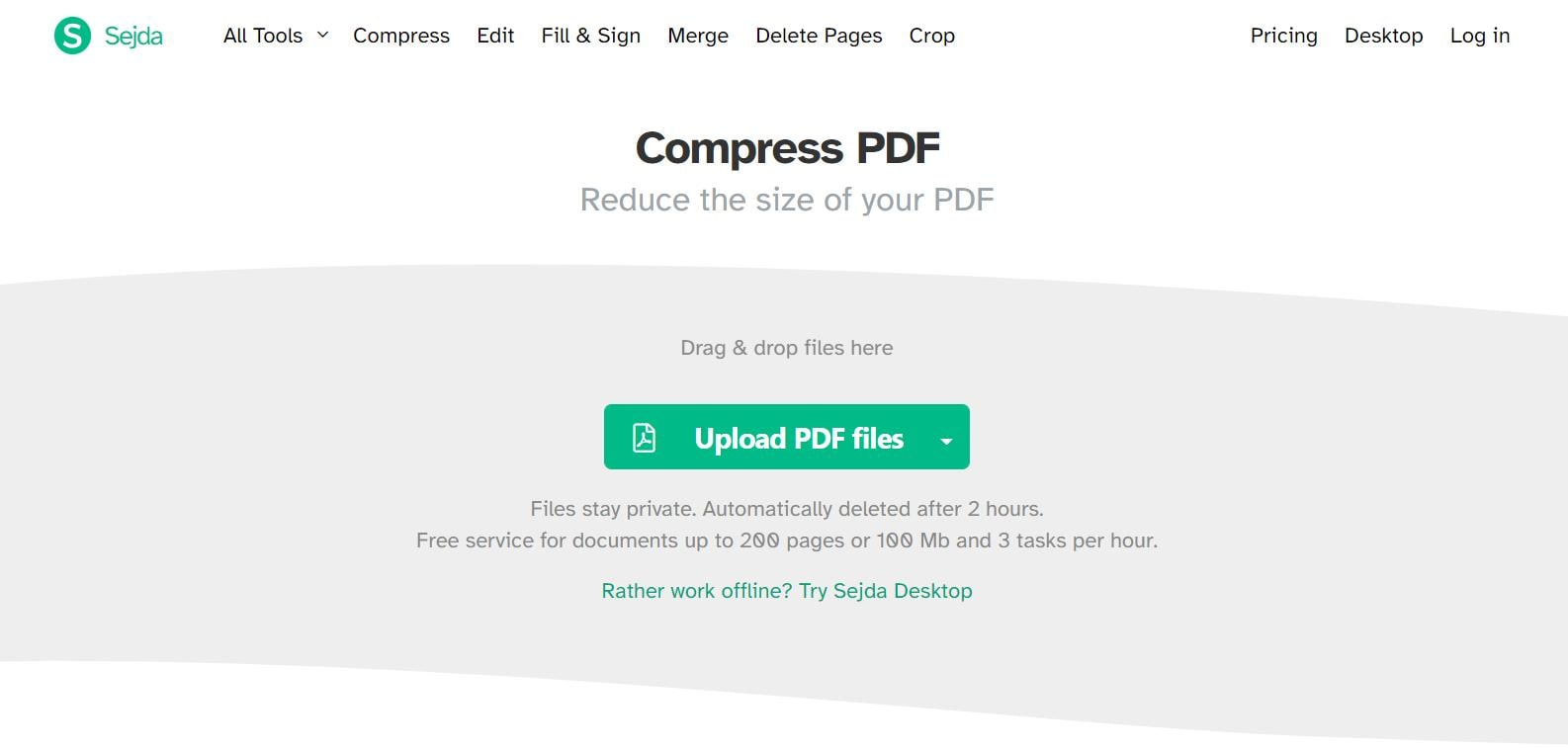
Step 2Change Settings
Click the Compress PDF button or use More Options to change default settings.
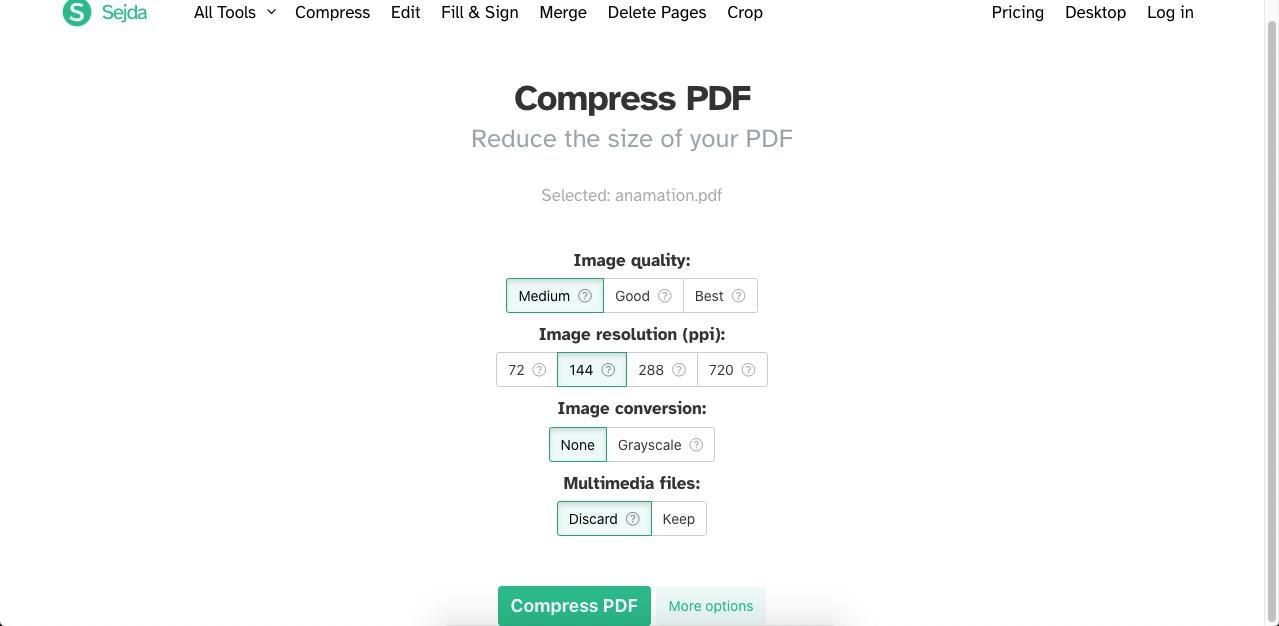
Step 3Download
#7 Adobe Acrobat Online
Adobe invented the PDF format, so it is no surprise their online tool is highly effective. The Acrobat online compressor is a stripped-down, easy-to-use version of their massive desktop software.
Step 1Upload File
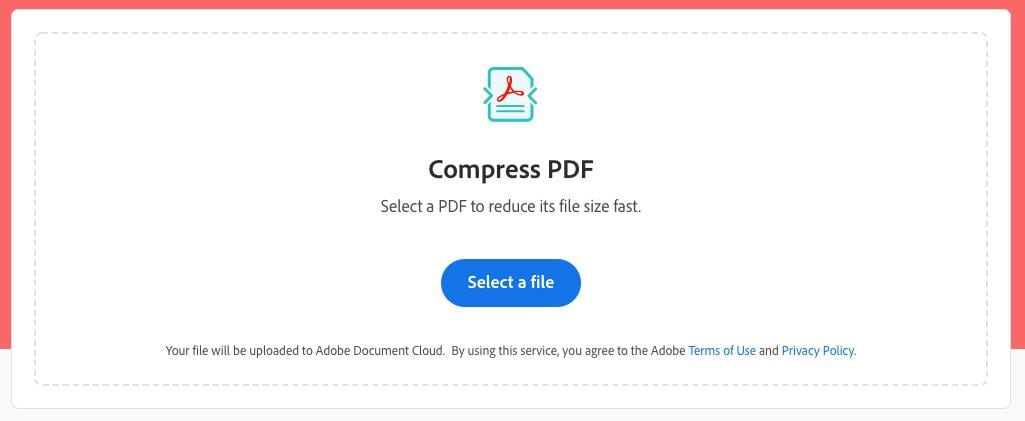
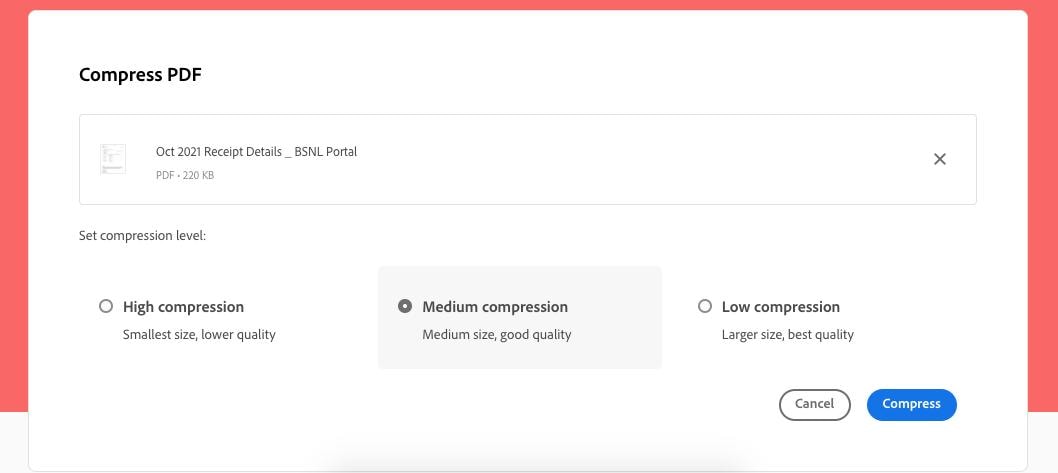
Step 2Choose Level
Choose a compression level and hit Compress.
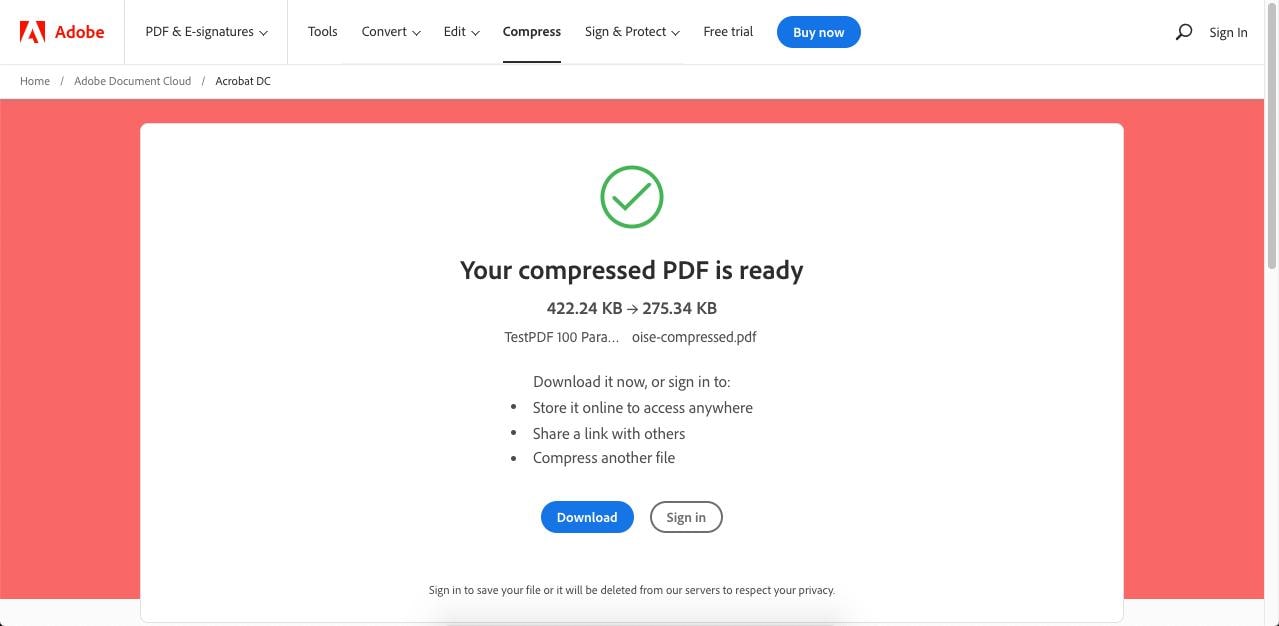
Step 3Download Result
#8 iLovePDF
iLovePDF is a wildly popular free suite of PDF tools. Its compressor is highly efficient, offering three distinct levels of compression (Extreme, Recommended, Less Compression) to help users balance quality and file size perfectly.
Summary Comparison Table
| Tool | Platform | Best Feature | Pricing Model |
|---|---|---|---|
| PDFelement | Windows, Mac, iOS, Android | Advanced batch compression & editing | Freemium / Paid License |
| Foxit PDF Editor | Windows, Mac | Granular image DPI controls | Paid License |
| Nitro PDF Pro | Windows, Mac | Office-ready optimization profiles | Paid License |
| HiPDF | Web-based | High-quality retention on web | Free / Subscription |
| Smallpdf | Web-based | Easiest user interface | Free / Subscription |
| Sejda PDF | Web-based / Desktop | Generous free file size limits (100MB) | Free / Subscription |
| Adobe Online | Web-based | Industry-standard rendering | Freemium / Subscription |
| iLovePDF | Web-based | Direct Cloud Storage integration | Free / Subscription |
G2 Rating: 4.5/5 |100% Secure
Best Practices for Resizing PDFs Without Losing Quality
Frequently Asked Questions (FAQs)
-
Why is choosing the right PDF resizer important?
Choosing the correct pdf resizer app ensures that your output quality is not adversely affected. Aggressively compressing a 500KB file to 50KB means high-resolution images will be heavily downsampled. A top-tier tool uses smart algorithms to prioritize text clarity while efficiently scaling down images, ensuring the document remains legible and professional. -
What system resources are required for PDF resizing?
Online tools require minimal local resources—just a modern web browser and a stable internet connection. Desktop software, however, relies on your CPU and RAM. Processing a 1GB architectural plan with complex layers will require a multi-core processor and ample RAM to avoid crashes during the compression process. -
Is it safe to use a free online PDF resizer?
For general documents, yes. Reputable online tools like HiPDF and Smallpdf use secure HTTPS connections and automatically delete your files from their servers within 1-2 hours. However, for highly sensitive legal, medical, or financial documents, utilizing offline pdf resizer software like PDFelement is the safer choice to guarantee data privacy.
Conclusion
Whether you need to shrink an invoice to send via email or optimize a massive e-book for web distribution, there is a pdf resizer built for the job. Online tools like Wondershare HiPDF and Smallpdf provide ultimate convenience, while desktop powerhouses like Wondershare PDFelement and Foxit PDF Editor offer unmatched security, batch processing capabilities, and deep customization.
Evaluate your workflow, assess your privacy needs, and choose the best pdf resizer that fits your requirements. For the perfect balance of affordability, powerful features, and ease of use, Wondershare PDFelement remains a top recommendation for all your document management needs.



