

PDFelement V13, ChatGPT, and NotebookLM can all help students work with PDFs, but they are built around different bottlenecks. NotebookLM is strongest when you already have a source set and want answers grounded in those materials. ChatGPT is strongest when the hard part is explanation, reasoning, brainstorming, or drafting. PDFelement V13 becomes most useful when the PDF itself still needs work after the AI answer—OCR, translation, annotation, editing, conversion, citation checking, or study outputs tied to the same document workflow.
Quick answer
- Is NotebookLM better than ChatGPT for studying from your own PDFs? Usually, when source grounding and citations matter most. NotebookLM is designed around a notebook of sources and can turn them into cited answers, study guides, flashcards, quizzes, and other study outputs.
- Is ChatGPT better than NotebookLM for explaining difficult concepts? Usually, yes. ChatGPT is more flexible when you want alternative explanations, examples, tutoring-style conversation, brainstorming, or help turning verified notes into an outline or draft.
- Where does PDFelement V13 fit? Use it when the PDF itself is part of the job. It keeps AI reading connected to OCR, PDF editing, translation, annotation, conversion, source checking, and study outputs instead of treating the document as a one-time upload.
In this article
- Is NotebookLM or ChatGPT better for studying from PDFs?
- Where does PDFelement V13 fit if you already use ChatGPT or NotebookLM?
- Which tool should you start with for citations, scans, research, study outputs, translation, and cost?
- What do price, file limits, and privacy mean for students?
- What do price, file limits, and privacy mean for students?
- Frequently asked questions
Part 1. Is NotebookLM or ChatGPT better for studying from PDFs?
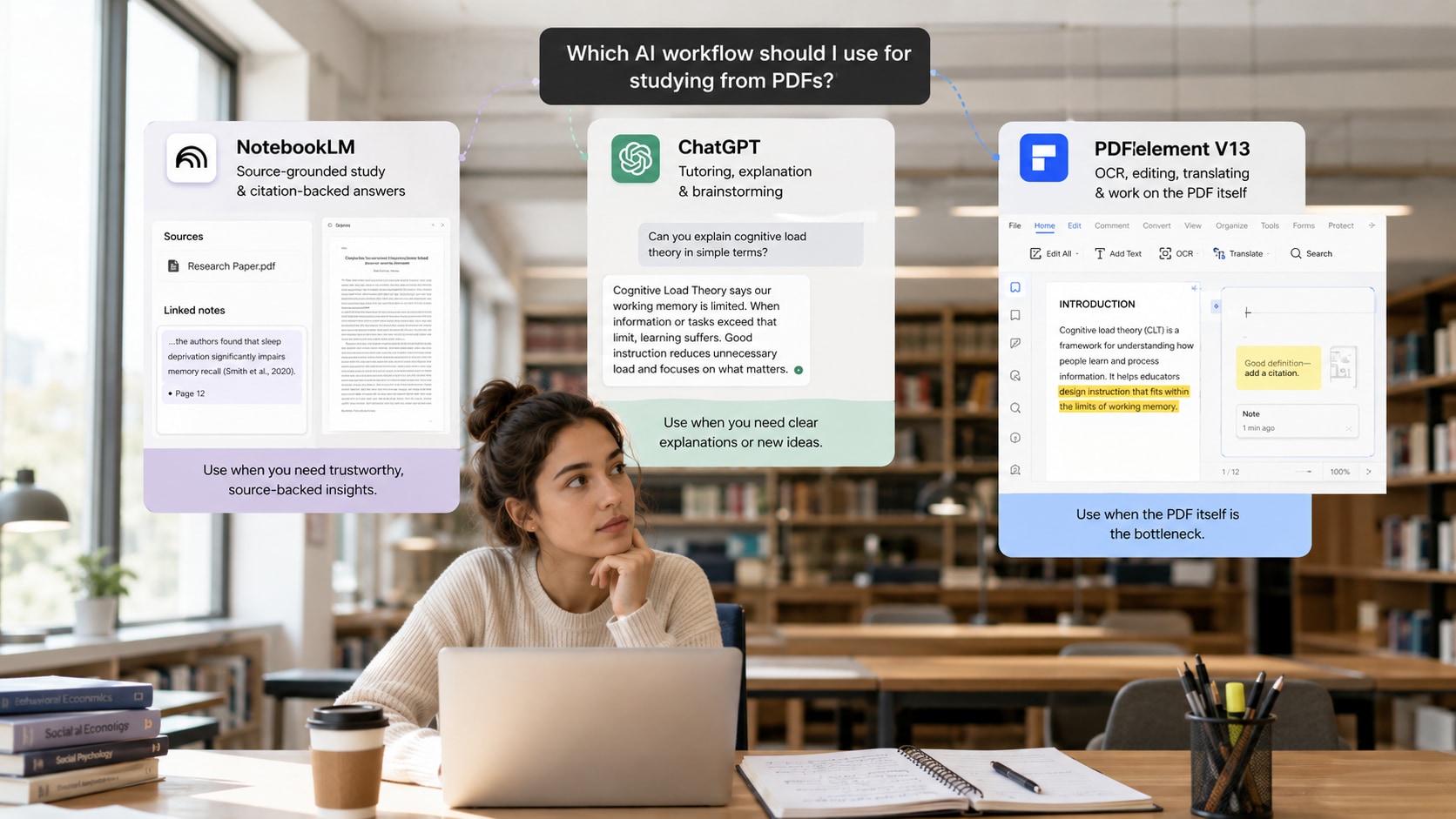
The answer depends on whether your bottleneck is source control or explanation. If you already have lecture slides, research papers, class notes, or a reading pack and want the AI to stay anchored to those materials, NotebookLM is usually the cleaner starting point. If you understand where the information comes from but need a better explanation, analogy, practice conversation, or draft, ChatGPT is usually more flexible.
Choose NotebookLM when you want answers tied closely to your own sources
NotebookLM is built around the source set. You add PDFs and other supported materials to a notebook, then ask questions within that context. This makes it particularly useful for long-tail student tasks such as “Which AI is best for studying from lecture PDFs?”, “Which AI gives citations from my uploaded documents?”, or “How can I compare several research papers without losing the source trail?”
For exam preparation, the advantage is not simply summarization. The source collection can also support study guides, flashcards, quizzes, and other learning outputs. If your question is “What do my assigned sources actually say?”, that source-first design is the main reason to start here.
Choose ChatGPT when you need tutoring, reasoning, or a new explanation
ChatGPT becomes more useful when the source is no longer the only problem. A student may understand a definition but still need it explained in simpler language, compared with a real-world example, challenged with counterarguments, turned into a practice scenario, or connected to a draft outline. That is where a general-purpose conversational assistant has an advantage.
For example, after you verify a difficult concept in the original reading, you can ask ChatGPT to explain it at three levels of difficulty, create an analogy, role-play an oral exam, or help structure an essay around already-verified evidence.
What if you only need a PDF summary?
If your intent is specifically “Which AI PDF summarizer should I use?”, use the established comparison instead of this page: Best AI PDF Summarizers 2026: Tried and Tested. This page owns a different intent: deciding how PDFelement, ChatGPT, and NotebookLM fit into the wider PDF study workflow after basic summarization.
| Student question | Better starting point | Why |
|---|---|---|
| “What do my course PDFs actually say, and where?” | NotebookLM | Source-grounded notebook workflow with citations back to the source material. |
| “Can you explain this theory another way?” | ChatGPT | Flexible tutoring, reasoning, analogies, examples, and conversational follow-up. |
| “I need to work with the PDF after the AI answer.” | PDFelement V13 | The document remains editable, searchable, translatable, annotatable, and convertible. |
Part 2. Where does PDFelement V13 fit if you already use ChatGPT or NotebookLM?
PDFelement V13 is most useful when the AI task and the PDF task are the same workflow. ChatGPT and NotebookLM are excellent at working with information from a PDF. PDFelement adds value when you also need to work on the PDF itself.
Can PDFelement V13 handle scanned PDFs better for document work?
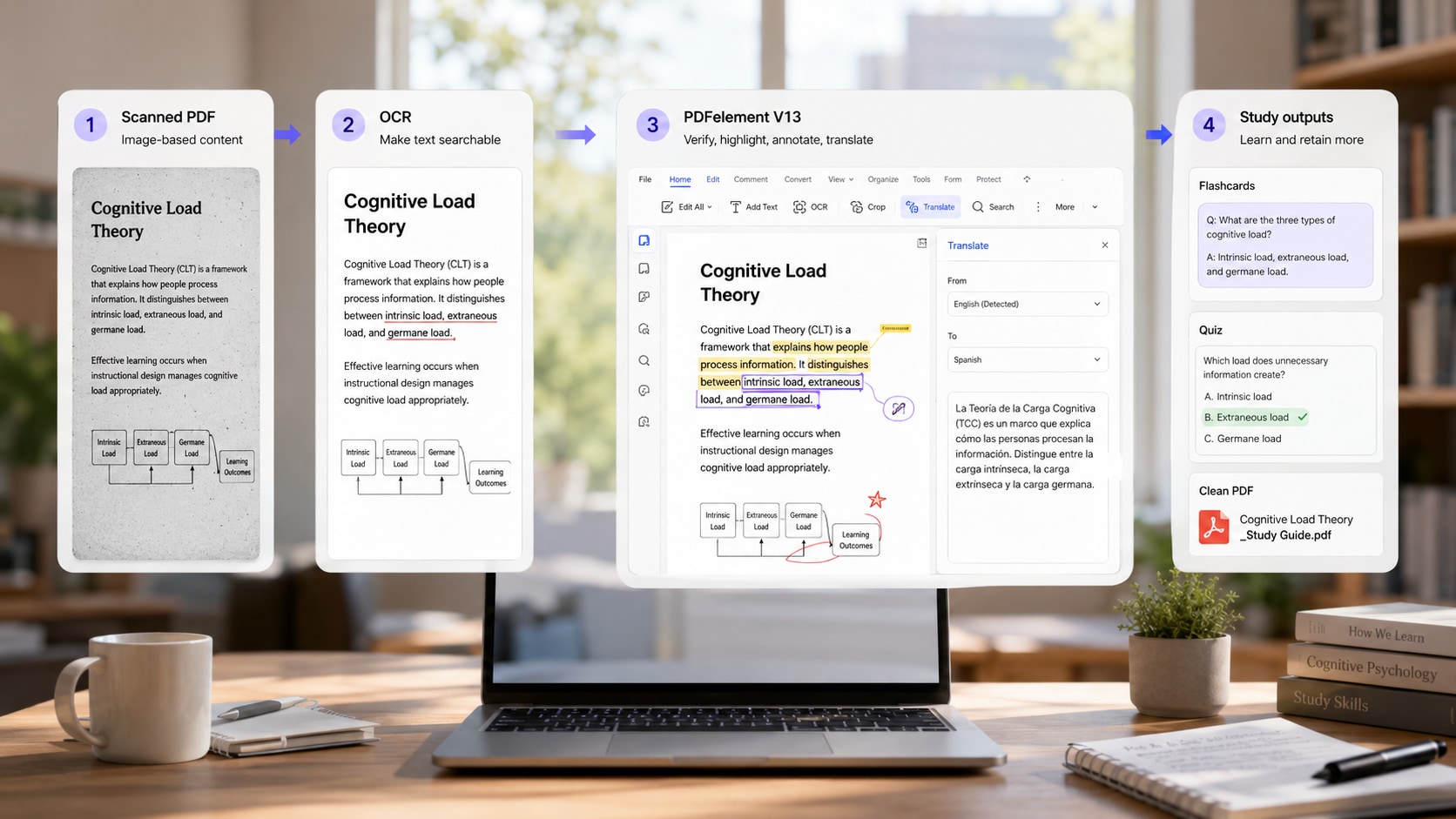
Scanned lecture notes, image-based readings, forms, and old reports create a different problem from a clean digital PDF: the text first has to become reliably searchable. PDFelement includes OCR in the PDF workflow, so a student can recognize the text, review the output, then continue into summarization, question answering, translation, annotation, or editing without rebuilding the file in another tool.
If scanned material is central to your task, this is a practical distinction. AI output can only be as reliable as the text or visual information the system can access. Names, formulas, tables, dates, and multi-column layouts deserve a manual spot-check before you rely on a generated answer.
What does V13 add beyond “chat with PDF”?
V13's study value is the connection between source files and downstream study tasks. Instead of stopping after one answer, the same document-centered workflow can continue into AI Knowledge Space, source-backed answers, verification, Flashcards, Quiz, Podcast, Mind Map, Report, OCR, translation, annotation, editing, and conversion. That matters when the student task is not just “tell me what this PDF says,” but “help me turn this material into something I can study, verify, revise, and submit.”
Do I need PDFelement if I already have ChatGPT?
Not for every task. If you mainly need brainstorming, tutoring, or drafting, ChatGPT may be enough. PDFelement becomes more useful when you repeatedly switch from AI output back to the document: correcting OCR, highlighting a cited passage, translating a section while preserving the PDF structure, editing the file, converting it, adding comments, or preparing the final document for submission.
Do I need PDFelement if I already have NotebookLM?
Again, not for every task. NotebookLM is an excellent source-study environment. PDFelement is complementary when those same files still need document operations. A research folder can live in NotebookLM for source-grounded synthesis while the original PDFs remain in PDFelement for OCR, annotation, translation, editing, and final document work.
Have a real PDF that still needs work after the AI answer?
Try the same source in PDFelement V13 when the task includes OCR, source checking, translation, annotation, editing, or conversion—not just chat. This is the fastest way to tell whether a PDF-native workflow removes steps from your own study process.


 G2 Rating: 4.5/5 |
 100% Secure
Part 3. Which tool should you start with for citations, scans, research, study outputs, translation, and cost?
The broad question “Which AI is best for PDFs?” overlaps several existing PDFelement search intents and is too vague to guide a real decision. Match the tool to the specific student task instead, then use the dedicated PDFelement page for the deeper how-to or comparison intent.
| Long-tail student question | Best starting point | What to know |
|---|---|---|
| Which tool should I use when PDF citations matter? | NotebookLM | Source-grounded answers and citation traceability are central to the notebook workflow. For graded work, still open the source before quoting or paraphrasing. |
| Which tool should I start with for scanned PDFs? | PDFelement V13 | OCR and PDF-native cleanup can happen before the AI step, then continue into editing, translation, annotation, or study outputs. |
| Which tool should I use to study research PDFs? | NotebookLM + PDFelement | NotebookLM is strong for grounded synthesis across papers; PDFelement is useful when the PDFs also need OCR, annotation, translation, or editing. |
| Which tool should I use for source-based flashcards and quizzes? | NotebookLM or PDFelement V13 | Both support dedicated study outputs. Choose based on whether you also need PDF-native document work. |
| Which AI is better for explaining difficult concepts? | ChatGPT | Flexible conversational reasoning, alternative explanations, examples, and tutor-style follow-up are the main advantage. |
| Which tool is better for translating a formatted PDF? | PDFelement V13 | Translation sits inside the PDF workflow, which matters when layout, OCR, annotations, or post-translation editing still need attention. |
| Which tool is better for turning verified notes into an essay outline? | ChatGPT | Once evidence is already checked, open-ended organization and drafting become the main task. |
| Which option makes the most sense on a student budget? | Depends on the job | Gemini Notebook Standard can be used free with a Google account, ChatGPT has a Free tier and paid plans, and PDFelement combines PDF software with separate AI usage options. Compare the cost of the workflow you actually need, not just the monthly headline price. |
Which tool should you use when source citations are the priority?
If source traceability is the deciding factor, NotebookLM is the clearest starting point of the three. Its product model is built around user-provided sources and cited answers. PDFelement's source-backed workflow is more attractive when citation checking needs to stay connected to a PDF that you are also editing, annotating, or translating.
Need citation-backed notes for an assignment?
A source marker helps you verify an AI answer, but it is not the same as an APA, MLA, or Chicago citation. Use the dedicated workflow to trace claims back to the PDF before you quote or paraphrase them.
Can ChatGPT read images and charts inside a PDF?
Do not assume every ChatGPT plan handles PDFs in the same way. OpenAI documents Visual Retrieval for PDFs in supported Enterprise workflows, while other document-upload workflows can rely primarily on extracted text. If diagrams, scanned pages, charts, or image-based tables are central to your assignment, check the current plan behavior before treating the upload as fully multimodal.
Which tool is better for making a complete exam study pack?
If the course material is already organized and source grounding matters most, NotebookLM is a strong starting point. If the same exam pack also depends on scanned handouts, PDF annotation, original-file editing, or a document-centered sequence of Flashcards, Quiz, Mind Map, Podcast, and Report outputs, PDFelement V13 has a different advantage.
Building an exam pack from several course files?
Move beyond one summary. Build a source set, map the topics, verify important points, then turn the checked material into a study guide, flashcards, quizzes, and weak-topic review.
Which tool is better for translating a research paper?
ChatGPT can translate and explain text, and NotebookLM can help you study multilingual sources, but neither is primarily a layout-preserving PDF translation environment. If the task is specifically to translate a formatted PDF and keep working with the file, a PDF-native translation workflow is the cleaner fit.
Need the translated PDF—not just translated text?
Use the formatting-preservation workflow when headings, tables, lists, scanned pages, terminology, and page structure still need to remain usable after translation.
Part 4. Can you use PDFelement, ChatGPT, and NotebookLM together?
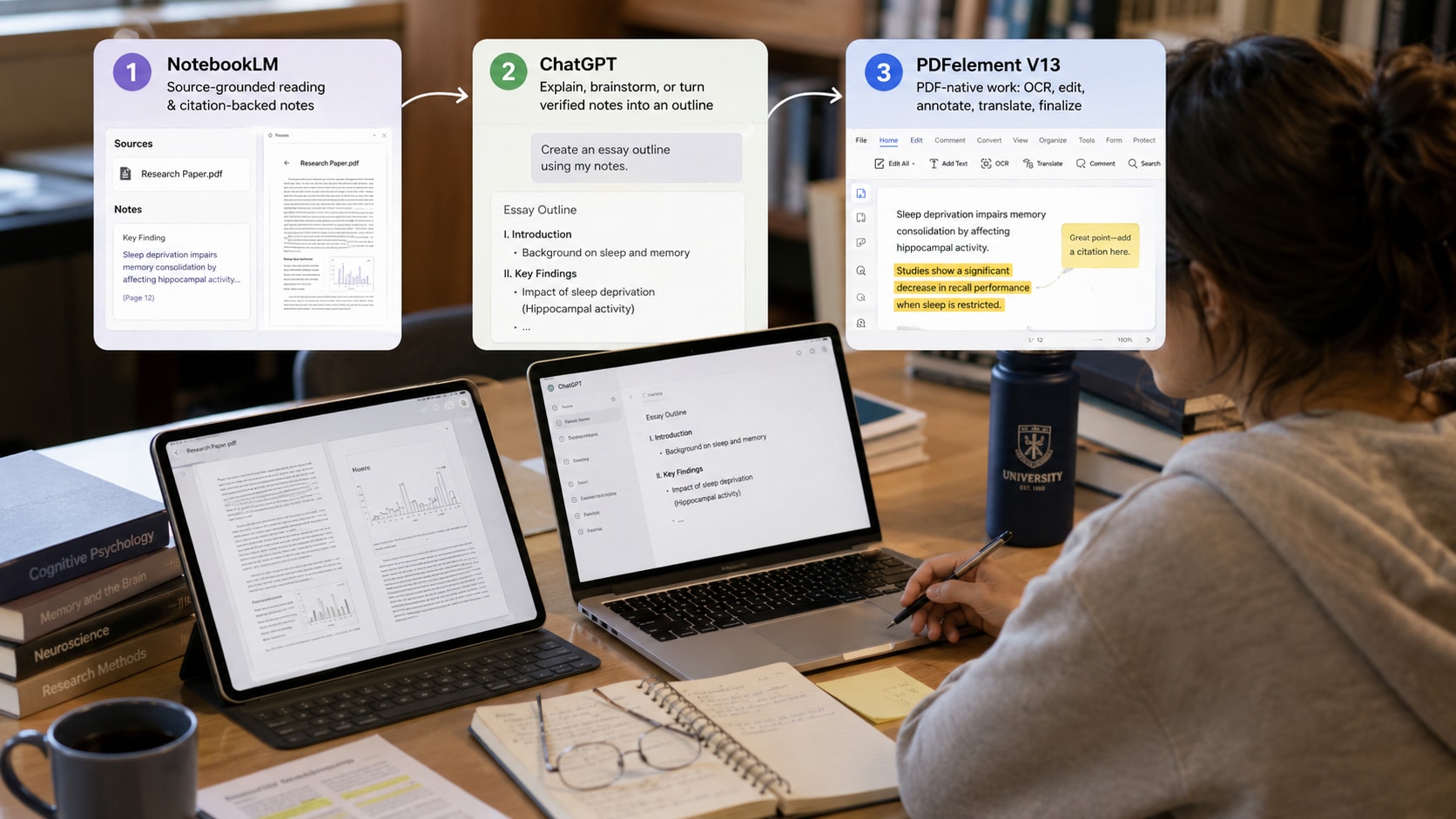
Yes—and for many students, the best answer is not choosing one tool for every stage. A hybrid workflow works well when each product handles the part of the job it is best shaped for.
Workflow A: Research paper → citations → essay outline
- Prepare the PDF in PDFelement: run OCR if needed, highlight key sections, and make sure the text is readable.
- Study the paper in NotebookLM: ask source-grounded questions, compare claims across papers, and follow citations back to the evidence.
- Verify the original source: open the relevant page or passage before moving evidence into your notes.
- Use ChatGPT for structure: turn verified notes into an outline, counterargument map, or alternative explanation without asking it to invent evidence.
- Return to PDFelement for final document work: annotate, translate, edit, convert, or prepare the final PDF as needed.
Workflow B: Scanned lecture pack → study guide → practice quiz
- Use PDFelement OCR to make scanned handouts searchable.
- Keep the relevant course files together and identify the major topics.
- Verify definitions, formulas, and numbers against the source.
- Create a study guide, Flashcards, or Quiz in PDFelement V13 or NotebookLM.
- Use ChatGPT as a tutor for the concepts you still cannot explain clearly.
Workflow C: Foreign-language PDF → understanding → bilingual notes
- OCR the PDF if it is scanned.
- Use PDFelement to translate the document or selected pages while keeping the original file available for comparison.
- Use NotebookLM when you want grounded questions across the translated and original research set.
- Use ChatGPT when you want a difficult term, theory, or passage explained in simpler language.
Simple decision rule
If the bottleneck is the source, start with NotebookLM. If the bottleneck is understanding or drafting, start with ChatGPT. If the bottleneck is the PDF file itself, start with PDFelement V13.
Part 5. What do price, file limits, and privacy mean for students?
Price, source limits, and data handling can change which tool makes sense even when the feature list looks similar. The figures below were checked against current official documentation on August 26, 2026. Plan limits and pricing can change, so verify the current account page before making a long-term decision.
Which is cheaper for students: NotebookLM, ChatGPT, or PDFelement?
There is no universal cheapest option because the three products charge for different kinds of value. Gemini Notebook Standard can be used free of charge with a Google account, while paid Google AI plans mainly increase limits and premium access. ChatGPT also has a Free tier; ChatGPT Plus is currently listed at US$20/month for broader model and tool access. PDFelement is PDF software with separate plan choices, and its current AI add-on is listed at US$3.99/month for 1,000 AI uses; base software pricing varies by platform, license, and promotion.
For a student, the better budget question is therefore: What would I otherwise need a second tool for? If you only need source-grounded study, a free notebook may be enough. If you use AI across many non-PDF tasks, a general assistant may justify a paid plan. If you repeatedly need OCR, editing, translation, annotation, conversion, and AI on the same PDFs, a PDF-native subscription may replace several separate workflow steps.
How many PDFs or sources can each tool handle?
| Tool | Current documented limit to check | What it means for students |
|---|---|---|
| Gemini Notebook Standard | Up to 50 sources per notebook; up to 500,000 words and 200MB per source. Standard access currently includes 100 notebooks and 50 chats per day. | Well suited to a bounded course or research source set. Paid Google AI plans raise source and usage limits. |
| ChatGPT | Files uploaded to a conversation have a 512MB hard limit per file; text/document files are capped at 2M tokens per file. Upload-rate and Project file limits vary by plan. | Large individual files may fit, but a semester-scale source library needs plan-aware Project and upload management. |
| PDFelement AI | Current AI Help Center guidance lists documents under 100MB and under 260 pages for AI Chat/Summarize/Translate, with multi-document chat supporting up to 10 documents. | Best when the source set is smaller but the files themselves need OCR, editing, translation, annotation, or other PDF operations. |
Limits are plan- and feature-dependent and may change. Treat the table as a decision checkpoint, not a permanent specification.
Which tool is safer for private or unpublished PDFs?
Do not choose a privacy winner based only on the product name. The account type, data controls, institution policy, and the exact feature you use matter more.
- Gemini Notebook: Google states that notebook files, chats, and generated content are not used directly to train its foundational AI models unless you provide feedback. Workspace and Education accounts receive additional enterprise-grade protections described in Google's documentation.
- ChatGPT: for individual accounts, OpenAI states that content—including uploaded files—may be used to improve models when Improve the model for everyone is enabled. Users can turn that setting off in Data Controls. Business and Enterprise offerings have different data-use commitments.
- PDFelement: Wondershare states that AI features collect inputs such as files and instructions, and its AI agreement says features including Summarize PDF and Translate PDF upload PDFs to the user's personal PDFelement Cloud before processing. Check the current AI agreement and privacy policy before using confidential material.
For unpublished research, restricted course packs, personal records, legal files, or institution-controlled material, follow your school or organization's rules first. If the document is not permitted to leave a managed environment, do not upload it simply because an AI tool can technically accept the file.
Does the tool actually cover the entire source set?
A polished answer does not prove that every page, slide, or uploaded source received equal attention. When an exam or paper depends on comprehensive coverage, ask the system to identify the files or sections supporting each major topic. If an important topic is missing, return to the source set before generating more study material.
Are citations the same as academic references?
No. A source citation inside an AI tool helps you verify where an answer came from. APA, MLA, Chicago, and other academic styles identify the publication in your submitted work. Use AI source markers for checking; use the original publication details for formal citation.
Can AI-generated quizzes replace your course assessment?
No. A generated quiz is a diagnostic study aid. It can help you find weak topics, but it does not know exactly what your instructor will assess unless the relevant material and expectations are present in the source set. Use the score to decide what to review next, not as a prediction of your real exam grade.
Should I trust a summary of a scanned or visual-heavy PDF?
Only after checking the source quality. OCR errors, multi-column layouts, diagrams, formulas, and image-based tables can all change the information the AI receives. Spot-check the extracted text and the original page whenever an exact number, symbol, label, or definition matters.
Ready to test the workflow on your own PDF?
Use one real assignment file and compare source → answer → verification → next action. If the file still needs OCR, translation, annotation, editing, or conversion after the AI response, that is the point where PDFelement V13 should save you the most switching.
G2 Rating: 4.5/5 |100% Secure
Frequently Asked Questions (FAQ)
-
Is NotebookLM better than ChatGPT for studying from PDFs?
NotebookLM is usually the better starting point when you want answers grounded in your own PDFs with source citations. ChatGPT is usually better when you want broader explanations, tutoring-style conversation, examples, brainstorming, or drafting after the source material has already been checked. -
Is PDFelement better than ChatGPT for PDF files?
PDFelement is better suited to PDF-native tasks such as OCR, editing, annotation, translation, conversion, and continued work on the original file. ChatGPT is stronger for open-ended reasoning and general conversation. They solve different parts of the PDF workflow rather than replacing each other completely. -
Which tool should I use to study multiple research papers?
NotebookLM is a strong choice when the main task is source-grounded comparison and synthesis across several papers. PDFelement becomes useful when those PDFs also need OCR, annotation, translation, editing, or document-level processing before or after the research step. -
Which tool should I use when PDF citations matter?
NotebookLM is designed around source-grounded answers with citations back to the material you provide. Whatever tool you use, open the source before quoting or paraphrasing it, and build the formal academic citation from the original publication rather than treating an AI source marker as an APA or MLA reference. -
Can ChatGPT read a scanned PDF?
PDF handling depends on the plan and upload context, and image-heavy or scanned files deserve extra checking. If the scan has no reliable text layer, running OCR in a PDF-native tool before analysis can make the content easier to search, verify, translate, and reuse. -
Which tool can turn PDFs into flashcards and quizzes?
NotebookLM and PDFelement V13 both support dedicated study outputs such as flashcards and quizzes. ChatGPT can generate similar material through prompting. Choose based on whether you mainly need source-grounded study, flexible tutoring, or a PDF-native workflow that also includes OCR, editing, and translation. -
Which tool should I use to translate a PDF and keep the formatting?
A PDF-native translator is the better fit when page structure, tables, OCR, or post-translation editing still matter. ChatGPT is useful for translating or explaining text, but layout-preserving PDF translation is not its primary product role. -
Which is cheaper for students: NotebookLM, ChatGPT, or PDFelement?
Gemini Notebook Standard and ChatGPT both provide free access, while paid tiers raise limits or add broader capabilities. PDFelement combines PDF software plans with AI usage options. Compare the cost of the complete workflow you need rather than choosing only by the lowest monthly price. -
Which tool can handle the most PDFs or sources?
Gemini Notebook is designed around source collections and currently allows 50 sources per notebook on Standard access. ChatGPT file and Project limits vary by plan, while PDFelement AI currently supports multi-document chat with up to 10 documents and focuses more heavily on PDF processing around those files. -
Which AI tool is safest for private PDFs?
There is no universal privacy winner. Check the exact account type and data controls: Google documents different protections for Gemini Notebook and Workspace/Education accounts, ChatGPT lets individual users control model-improvement use through Data Controls, and Wondershare documents cloud processing for specific PDFelement AI features. -
Can I use PDFelement, ChatGPT, and NotebookLM together?
Yes. A practical sequence is PDFelement for PDF preparation and document work, NotebookLM for source-grounded study and citations, ChatGPT for explanation or drafting, then PDFelement again when the final PDF needs editing, annotation, translation, conversion, or submission.
Related Reading
- Best AI PDF Summarizers 2026: Tried and Tested — broad summarizer comparison intent.
- AI Tools to Summarize Research Papers — research-paper summarization intent.
- How to Summarize a PDF with Citations — source verification and citation workflow.
- How to Create an AI Study Guide from PDFs for Exams — exam-prep workflow rather than generic summarization.
- How to Translate a PDF to Spanish Without Losing Formatting — formatting-preservation translation use case.
- AI PDF Editor — commercial PDF-native AI workflow hub.
Sources and Verification References
- Wondershare PDFelement AI Help Center
- Wondershare PDFelement AI PDF Editor
- Google NotebookLM Help — sources and limits
- Google NotebookLM Help — flashcards and quizzes
- OpenAI — Visual Retrieval with PDFs FAQ
- OpenAI — File Uploads FAQ
- OpenAI — ChatGPT Plus pricing and plan overview
- OpenAI — Data Controls FAQ
- Google Gemini Notebook — plans, source limits, and data handling
- Google Gemini Notebook — privacy and terms of use
- Wondershare PDFelement — AI usage limits and add-on details
- Wondershare PDFelement — AI Agreement and cloud-processing notice
- Wondershare — PDF Solutions Privacy Policy


