
How to Convert XFA to PDF Easily and Quickly
Want to convert XFA to PDF? This article explains how to convert XFA to PDF file as well as how to create XFA forms easily.
 100% Secure |
 Powered by AI
 Home
>
PDF Converter
> How to Convert XFA to PDF Easily and Quickly
Home
>
PDF Converter
> How to Convert XFA to PDF Easily and Quickly
What is an XFA PDF file? XFA, XML Forms Architecture, is a set of proprietary XML specifications. XFA forms were built to enhance the processing of web forms and starting from PDF 1.5 specifications, these interactive and dynamic forms can also be used in PDF files.
The main reason people use XFA forms is that they offer better visual quality. However, PDFs with XFA forms are not supported by many PDF readers. If you want to convert XFA to PDF, here are two ways for you to flatten XFA and convert XFA PDF to normal PDF.
Wondershare PDFelement: Flatten XFA to PDF
The first way to convert XFA to PDF is using Wondershare PDFelement - PDF Editor Wondershare PDFelement Wondershare PDFelement. This PDF editor can open PDFs with XFA forms, fill in XFA forms, and allow you to convert XFA PDF to a normal PDF. You can also use the PDF editor to create an interactive form by yourself, too.
One of the basic principles PDFelement is built on is simplicity. We pride ourselves on being able to deliver simple and easy ways for the most complicated tasks. Free download PDFelement to have a try.


 G2 Rating: 4.5/5 |
 100% Secure
Step 1: Open XFA PDF
Click on the "Create PDF" box and select the XFA files you want to open. Even a simpler option is to just drag and drop any XFA files into PDFelement.
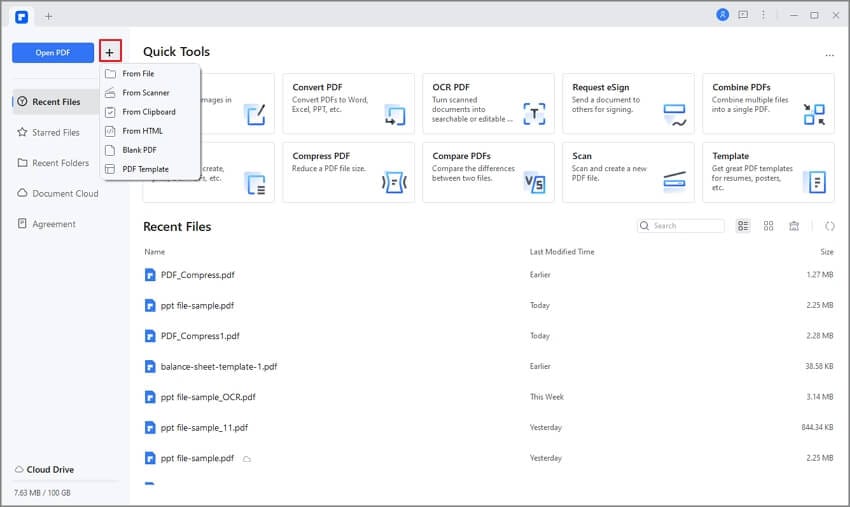
Convert XFA to Standard PDF
Step 2: Fill XFA-Based PDF Forms
You can now click "Highlight Fields" to fill in XFA-based PDF forms. You can also submit the XFA-based PDF forms after you fill them.
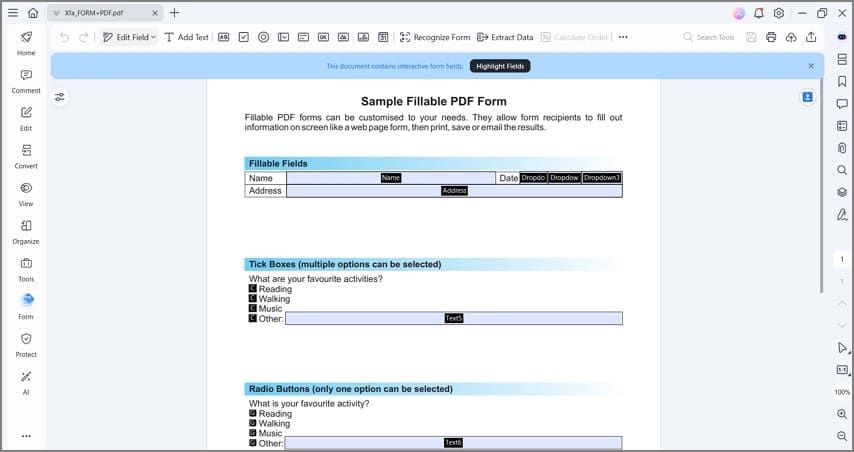
Convert XFA Form to PDF
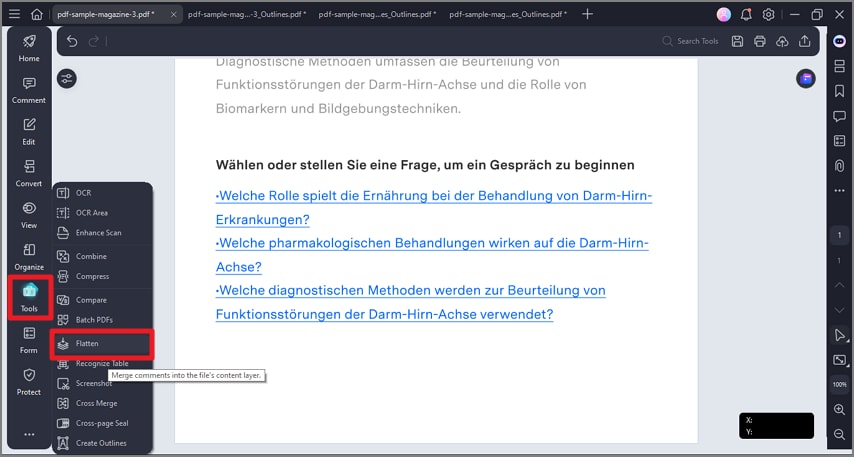
Step 3: Convert XFA to PDF
To convert XFA PDF to a normal PDF, click Tools > Flatten. The XFA form will be converted to a PDF file that you can open with any PDF reader.
Tip: With PDFelement, you can also convert a XFA form to PDF by printing. Just open the XFA PDF in the program and click the Print button.
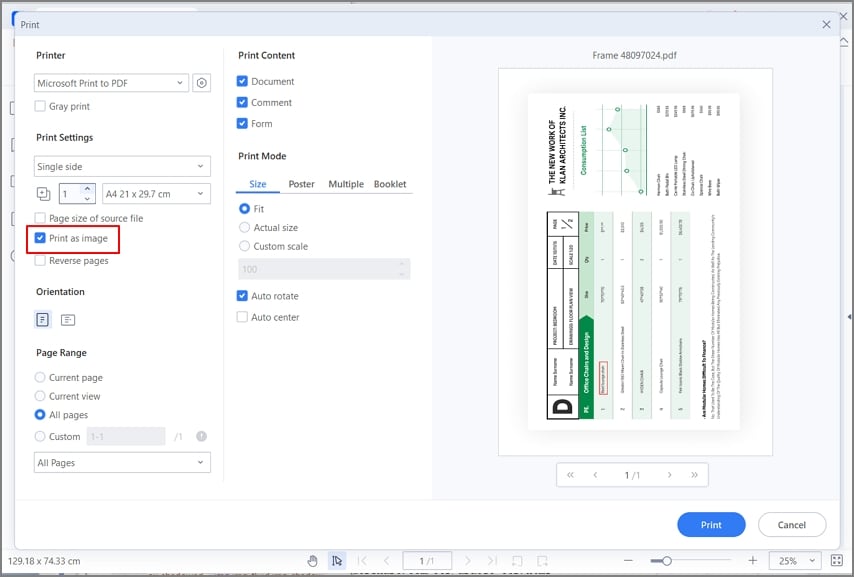
XFA to PDF
Even more, with Wondershare PDFelement - PDF Editor Wondershare PDFelement Wondershare PDFelement you will get control over your PDF files like never before. In addition to being able to convert XFA to PDF, you can also create an XFA form, and much more. With that in mind, let’s take a look at the basic and advanced features of PDFelement.
First and foremost, PDFelement is one of the few PDF tools that can open, read, and recognize XFA-based PDF forms automatically. Opening, reading, and filling out an XFA-based PDF form is one of the new features of the product. We recognize the need users have to convert XFA to PDF, and we deliver on the task. Other features include:
- Editing graphic-based objects. You get all the tools for editing graphic-based objects such as crop, rotate, mirror, and much more.
- Add any file attachments in a PDF document for enriching your PDFs.
- Support for a multi-tiled display that will make working within your PDF document easier and simpler operation.
- All the basic features like creating, converting, viewing, and annotation for PDF documents.
G2 Rating: 4.5/5 |100% Secure
Online XFA to PDF Converter: Convert XFA PDF to Normal PDF Online
You can use an online XFA flattener to convert XFA PDF to a normal PDF. However, an online XFA to PDF converter won't allow you to convert files larger than 20 MB. And you can't open and fill in an XFA form with an online tool, too.
To convert XFA PDF to static PDF online, here are the steps to follow.
Step 1. Go to an iText online PDF Flattener. Click and select your XFA PDF to upload it.
Step 2. After uploading the file, toggle on Flatten XFA and click the button.
Step 3. After the conversion is complete, download the converted PDF file to your computer.
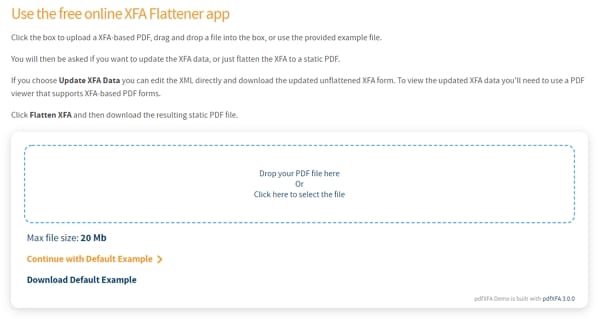
Convert XFA to Standard PDF Online
Convert XFA to PDF with Google Chrome: Print XFA to PDF for Free
If you want to print XFA to PDF for free, using a browser like Google Chrome is a simple workaround. This method works best when the XFA PDF can be opened and displayed properly in the browser. Once it opens, you can use Chrome's built-in Print feature to save it as a standard PDF file.
To convert XFA to PDF with Google Chrome, follow these steps.
Step 1. Open your XFA PDF in Google Chrome. You can drag the file into a Chrome window or right-click the file and choose to open it with Chrome.
Step 2. If the file displays correctly, click the Print icon or press Ctrl + P on Windows or Command + P on Mac.
Step 3. In the Destination section, choose Save as PDF instead of a physical printer.
Step 4. Adjust the layout, pages, and scale settings if needed, then click Save to export the file as a normal PDF.
Keep in mind that this method depends on whether Chrome can render the XFA content correctly. If the form does not display properly in the browser, you may need to use a dedicated PDF tool instead.

Print XFA to PDF with Google Chrome
FAQs about Converting XFA to PDF
What is an XFA form?
An XFA form is a type of interactive PDF form built with XML Forms Architecture technology. It is designed to handle dynamic fields, automated calculations, and layouts that can change based on the data a user enters. XFA forms are often used for official documents, business workflows, and government forms. The main issue is that they are not supported well by many standard PDF viewers, which makes them harder to open, fill out, print, or convert than regular PDF forms.
Which is the best XFA to PDF converter?
One of the best XFA to PDF converters for most users is PDFelement because it is easier for beginners and gives you more control when working with PDF files. It can help you open, manage, and convert PDFs in a more user-friendly way. Another useful option is iText PDF Flattener, especially if you want an online tool focused on flattening XFA PDF files into standard PDFs.
- PDFelement: A strong choice for users who want a simple interface, broader PDF tools, and an easier workflow for editing, converting, and managing documents.
- iText PDF Flattener: A practical option if your main goal is to flatten an XFA form into a normal PDF online without installing desktop software.
Is there a free online XFA to PDF converter?
Yes, there are free online XFA to PDF converter options, but they usually work best for smaller files and basic conversion tasks. Two commonly mentioned tools are iText PDF Flattener and XFA PDF to Normal PDF on speedtesting.herokuapp.com.
- iText PDF Flattener: A simple online tool that can flatten XFA PDF files into standard PDFs for easier viewing and sharing.
- Herokuapp XFA PDF to Normal PDF on herokuapp.com: Another web-based option that can convert XFA PDFs to regular PDF format without requiring desktop installation.
These tools are convenient for quick jobs, but if you need better compatibility, larger file support, or more reliable handling of complex forms, desktop software is usually a better choice.
How to create XFA forms?
You can use Adobe Forms Designer to create XFA forms. Some prior experience is needed, but every user can do it by using the guidelines. When you start Adobe Forms Designer, you can create a new form from scratch, use a template to create a form, or open an existing one. When you are creating a new XFA form, there are a few things you need to pay attention to.
- The design and layout are some of the most important aspects of the XFA form. The design should result in a readable, logically laid out, easy-to-use, and uncluttered form.
- Naming is an important aspect, and you should use naming specific to the organization. Follow simple and standardized naming conventions.
- In order to save time for future projects, it is a good idea to create templates and reusable forms. When you are starting a new form, these templates will help you accelerate the process.
- Scripts and calculations enhance the functionalities of the forms and make sure you provide a rich user experience. Some developers prefer to use scripting, while others use the enhancements of the features in the Designer.
- Last, but not least, pay attention to accessibility. You need to follow the accessibility standards so that your form is enhanced for users with disabilities.
In order to make your experience and answer the question of how to convert XFA to PDF, let’s talk about some bonus tips.
- When you create XFA forms, add interactive features that PDF supports.
- You might notice problems like code lost and field name problems when converting, but the form is editable as PDF and you can then change the fields using editing features.
- As mentioned, little editing can save you a lot of time for the simple conversion of XFA to PDF.
- Always keep a master document. Save multiple versions of the XFA document in PDF for different users. But always keep a master document.
Free Download or Buy PDFelement right now!
Free Download or Buy PDFelement right now!
Try for Free right now!
Try for Free right now!


Audrey Goodwin
chief Editor