

Making a podcast once required more time, equipment, skills, and careful planning. You needed microphones, a quiet space, editing software, and knowledge to use everything. These requirements made podcast creation difficult for people with limited time available.
Today, text-to-podcast tools can turn written documents into spoken audio. The result works well for listening while driving, cooking, exercising, or working. This guide explains how these tools work and which content converts best.


 G2 Rating: 4.5/5 |
 100% Secure
In this article
Part 1. What a Podcast Actually Is
A podcast is an audio show people can listen to anytime online. People use podcasts to learn about topics through spoken audio content. However, a text-to-speech podcast turns written words directly into spoken audio automatically.
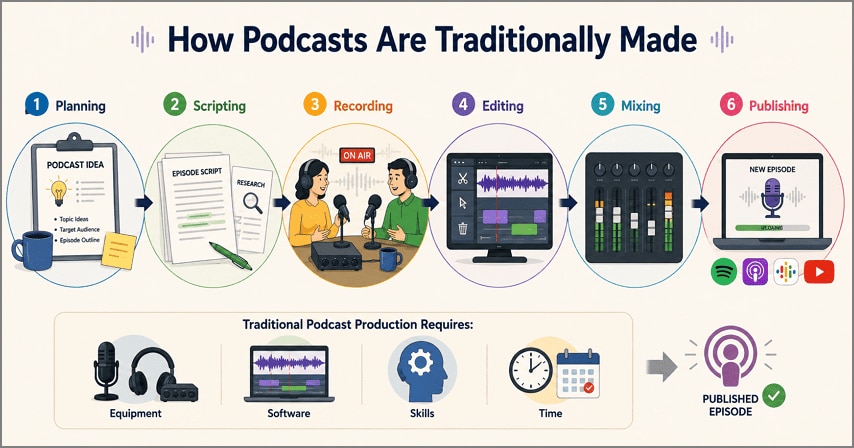
How Podcasts Are Traditionally Made
Making a traditional podcast takes more work than most people usually expect. Creators must prepare their content before they can start recording the episode. After recording, they must edit the audio and fix any sound problems. Spotify for Creators also describes recording, editing, and publishing as core parts of podcast production. Even a half-hour podcast can take an entire afternoon to finish properly.
Part 2. How AI Turns Text into a Podcast
Instead of handling every production step manually, text-to-podcast AI processes content differently. The table below explains 5 stages used to turn documents into podcast audio:
| Stage | What It Does | Missing It Sounds Like |
| Read | Extracts the text, including headings and captions | Whole sections silently omitted |
| Understand | Works out the argument and how sections relate | Points delivered in the wrong order |
| Summarize | Separates main claims from supporting detail | An hour of audio for a ten-minute idea |
| Rewrite | Converts written sentences into spoken phrasing | Long clauses that lose you halfway |
| Generate Speech | Performs the script, often as two hosts | A flat single voice with no emphasis |
Text to Podcast vs. Text to Speech
Both create audio from text, which often makes their labels confusing. Below we have the main differences between these 2 audio approaches:
- Text to Speech: Screen readers receive written words and produce sound without interpreting content. Citations, page numbers, and footnote markers are spoken exactly as written.
- Podcast Generator: Podcast generators rewrite text first, removing repetition and signposting structure. Sentences become easier for listening, changing the original document wording.
Part 3. Why Turning Text to Speech Podcast with AI Works
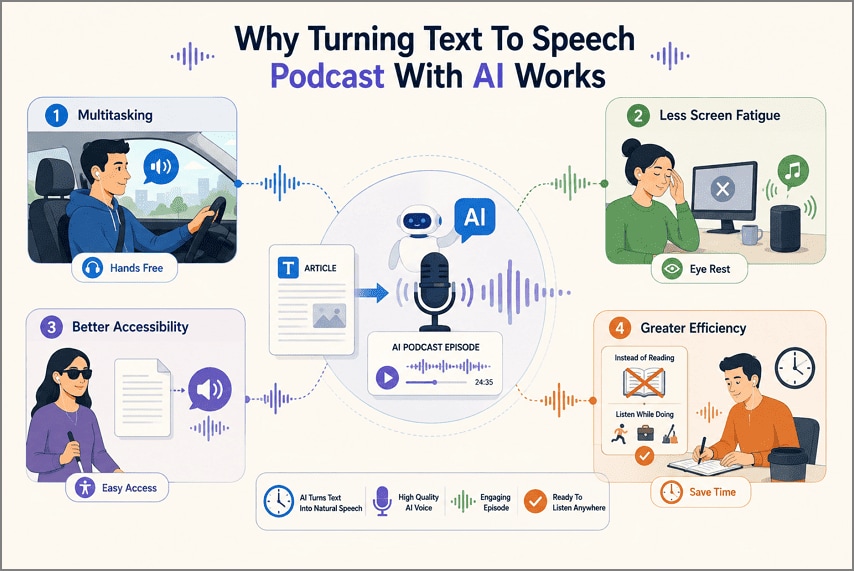
Knowing how the conversion happens does not explain why anyone bothers, since reading beats listening for speed. The case for a text-to-speech podcast rests on when the listening happens:
- Multitasking: Hands and eyes stay busy during a drive or workout, but hearing does not, and audio fills that gap.
- Less Screen Fatigue: Eyes that have worked all day get a break, which matters more on long documents.
- Better Accessibility: Readers with visual impairments or reading difficulties reach the same material without the barrier a page presents.
- Greater Efficiency: Time already committed to something else absorbs the reading, so nothing new has to be scheduled.
The Text Types That Convert Best
Source quality matters when you turn text into a podcast because structure shapes listening. Now, let's explore the text types that produce better audio results:
- Research Papers: Abstract, method, and findings follow a predictable order that translates into spoken sections.
- Reports: Executive summaries and recommendations are written to be understood, which suits audio well.
- Blog Posts: Conversational writing needs the least rewriting, already resembling speech on the page.
- News Articles: Inverted pyramid structure puts the important material first, where a listener needs it.
- Study Notes: Definitions and key points repeat naturally in audio, which is how repetition helps memory.
Part 4. How to Turn Text to Podcast with Wondershare PDFelement
Many tools accept limited input types, creating problems when source materials arrive differently. This is where PDFelement brings document handling and AI tools together for users. Its AI Space creates summaries, notes, mind maps, quizzes, flashcards, and podcasts easily.
Documents and pasted text both work as sources within the same AI workspace. Its text-to-podcast AI keeps original documents available for checking unclear audio. Next, look at the steps below to create podcast audio using PDFelement.
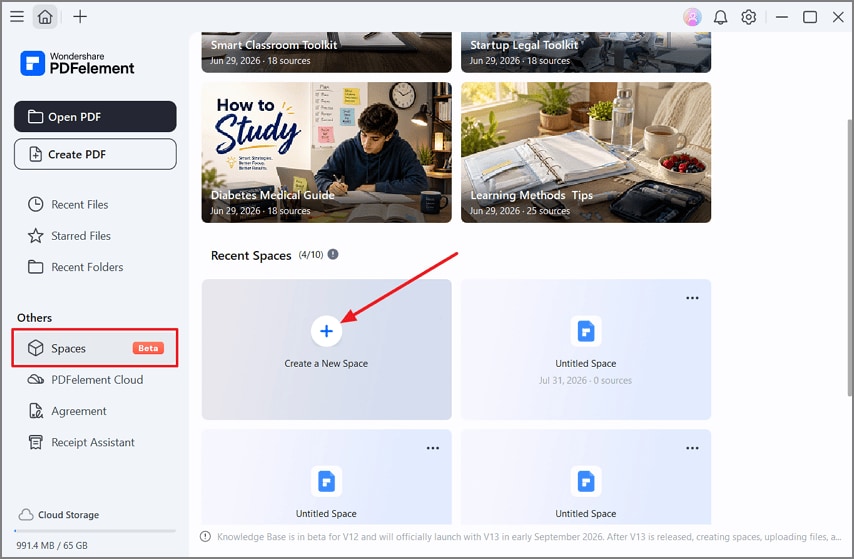
Step 1. Make a New Space in PDFelement
Once you open PDFelement, press the “Spaces” option in the left side panel and choose “Create a New Space.”
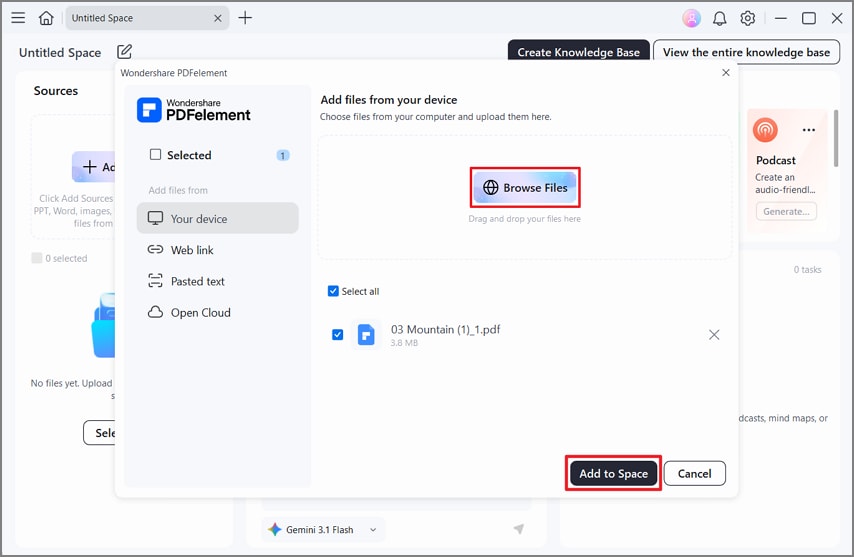
Step 2. Import Your PDF to Space
Afterward, press the “Browse Files” option and select the PDF file you want to add. Next, press the “Add to Space” button.
Step 3. Choose the Podcast Type and Length
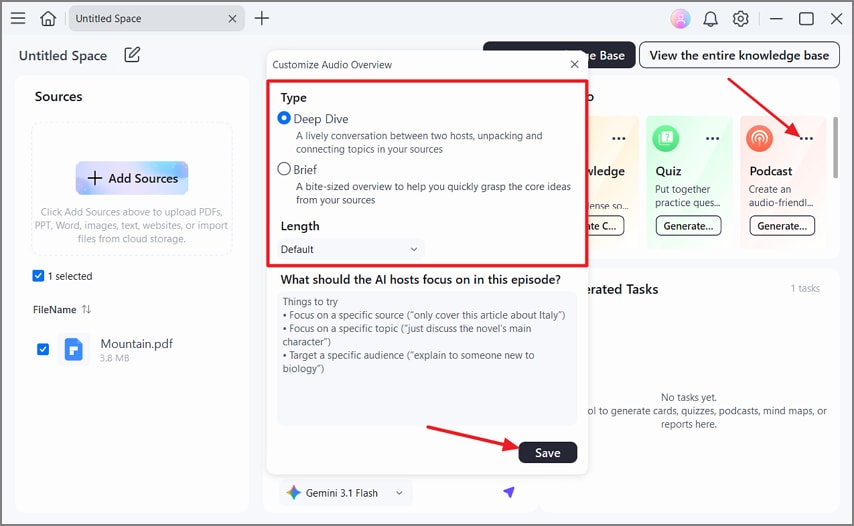
If needed, you can ask questions via the chat feature to clear your queries. After that, head to the “Studio” section and press the “Three-dots” icon on the “Podcast” option. Choose the “Type” and “Length” before pressing “Save.” Once done, click the “Generate” button.
Step 4. Review the Generated Podcast
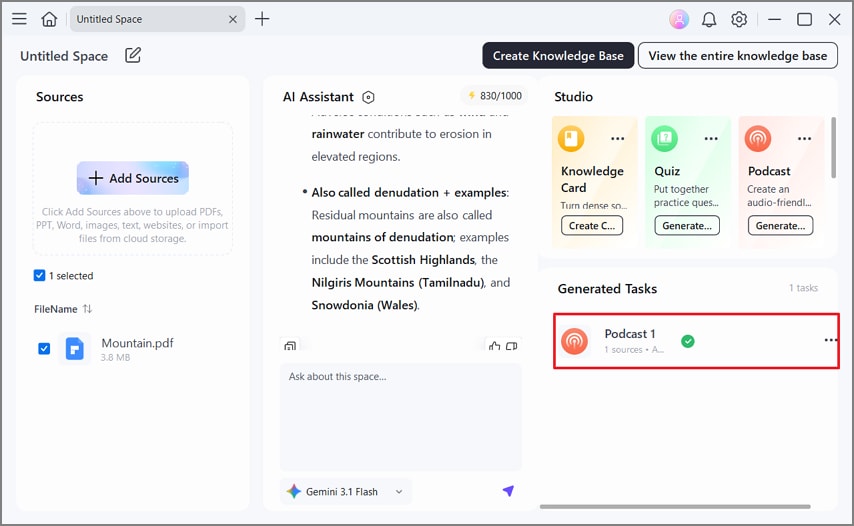
Once the podcast is generated, access it under the “Generated Tasks” section and press it to open and review it.
Why Choose PDFelement for Text to Podcast
Creating podcast audio alone does not determine how useful a tool becomes. Let's now see what makes PDFelement practical for everyday podcast creation tasks:
- Multiple File Formats: PDFs, pasted text, and other formats can all serve as source material.
- Comprehension Before Generation: The AI understands meaning first and builds episodes around the main argument.
- Natural Delivery: Voices use natural emphasis and pacing to make longer audio easier to follow.
- AI Study Materials: One upload can create summaries, mind maps, quizzes, flashcards, and other learning materials.
- A Single Workspace: Reading, listening, annotating, and reviewing happen together without switching between separate tools.
Spotify notes that podcast hosting platforms can distribute finished shows across major podcast applications.
G2 Rating: 4.5/5 |100% Secure
Part 5. Common Mistakes to Avoid
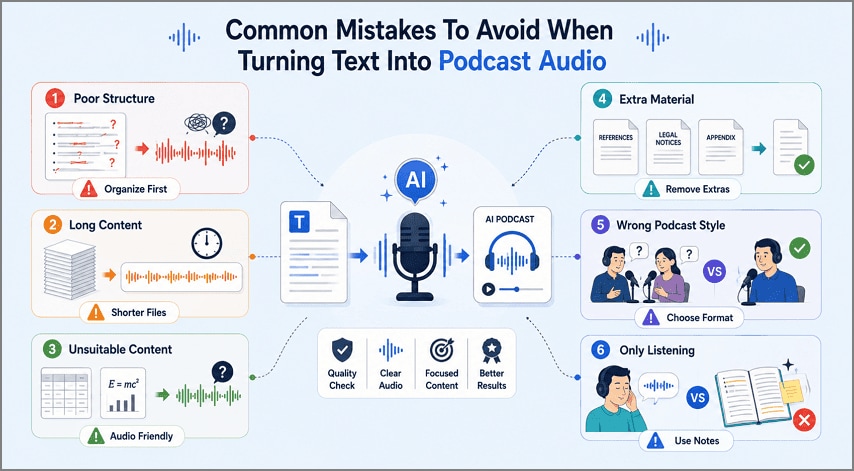
Poor source material can cause problems when you turn text into podcast audio. Below are the common mistakes that can make generated podcast audio less useful:
- Poor Structure: Text without clear headings can make the podcast difficult to follow.
- Long Content: Very long documents without sections can produce lengthy podcasts with weak direction.
- Unsuitable Content: Tables and formulas often lose important meaning when converted into spoken audio.
- Extra Material: Reference pages and legal notices may become distracting when included in audio.
- Wrong Podcast Style: Using two hosts for technical instructions can make important steps harder to understand.
- Only Listening: Relying on audio can leave important study details understood later.
Frequently Asked Questions
What is text-to-podcast AI?
Software reads your document and finds important information for the podcast. It rewrites that information for natural listening instead of reading everything.
Can I turn a PDF into a podcast?
Yes, PDFelement can turn PDF documents into podcast audio using its AI. Scanned PDFs need OCR first because AI requires readable text for processing. Adobe explains that scanned PDFs contain image data until OCR converts their contents into searchable text.
Can I paste text instead of uploading a file?
Pasting works as well as uploading in PDFelement, which helps when the source is a web page or an email.
Do I need any skills to turn text to podcast with PDFelement?
No special skills are needed because PDFelement handles the podcast creation process. Import your content, then choose the style and generate your podcast.
Final Takeaway
In summary, text-to-podcast tools make podcast creation much easier for everyone. They remove difficult recording and editing work that once required special skills beforehand. Good source material also helps create clearer audio that remains easy to follow. If you want simple podcast creation, we recommend using PDFelement for the process.
G2 Rating: 4.5/5 |100% Secure




