

Reading the same PDFs repeatedly creates familiarity without helping important information stay in memory for long. Meanwhile, manually writing flashcards demands valuable study time that many learners cannot spare today. Instead, a PDF to flashcard workflow converts important concepts into practical review cards using AI.
Active recall strengthens memory by requiring answers instead of repeated reading through familiar study materials alone. This guide explains creating AI flashcards from PDFs for faster, smarter, and more effective revision sessions.


 G2 Rating: 4.5/5 |
 100% Secure
In this article
Part 1. What Is a PDF to Flashcard Generator?
A PDF to flashcard generator converts documents into review cards using artificial intelligence every time. Instead of manual work, AI identifies important concepts, definitions, facts, and formulas from uploaded documents.
Users can create flashcards from PDF files without reading every page repeatedly during revision sessions. Each generated card presents one idea, making review easier and memory recall much more effective. Different card formats help learners study information using methods matching their subjects and learning goals.
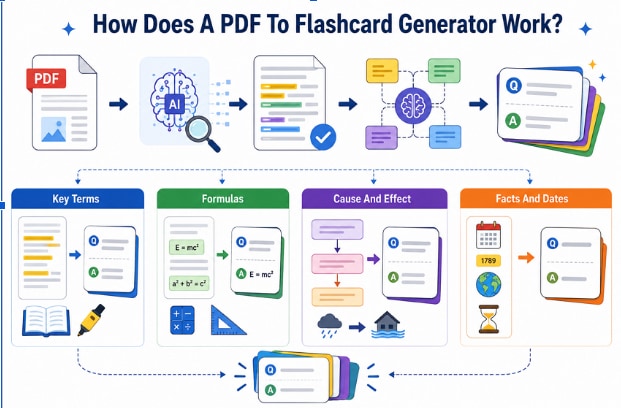
How Does a PDF to Flashcard Generator Work?
Now, let's understand which information AI selects before creating useful flashcards from your uploaded PDF.
- Key Terms: AI converts important terms and definitions into simple question-and-answer flashcards for easier revision everywhere.
- Formulas: Mathematical formulas, rules, and procedures become memorable cards for faster review before important examinations.
- Cause and Effect: AI turns connected events into questions that strengthen understanding through active recall during studying.
- Facts and Dates: Important names, numbers, and dates become simple review cards that improve long-term memory retention.
Part 2. Why Flashcards From PDF Beat Rereading
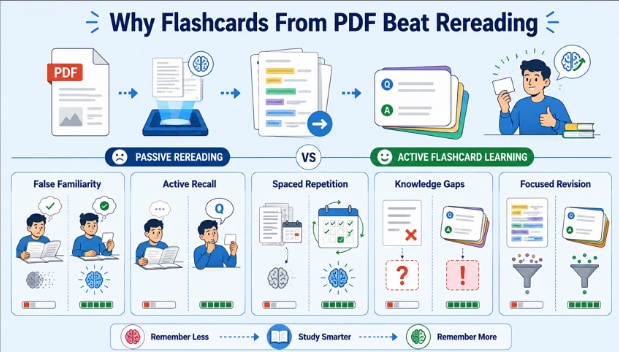
Rereading feels productive but often leaves important information forgotten soon after every study session ends. According to UNESCO, decades of learning research continue improving teaching methods and learning outcomes through evidence-based practices. The reasons below explain why flashcards from PDF improve learning and strengthen memory over time:
- False Familiarity: Reading repeatedly creates familiarity without proving you can remember information during exams later.
- Active Recall: Answering questions from memory strengthens learning far better than reading the same material repeatedly. The U.S. Institute of Education Sciences reports that retrieval practice helps learners retain information longer than passive review methods such as rereading.
- Spaced Repetition: Reviewing cards over time improves long-term memory instead of encouraging short-term recognition only afterward.
- Knowledge Gaps: Incorrect answers reveal weak areas needing additional practice before important exams or assessments.
- Focused Revision: Flashcards reduce unnecessary rereading and focus attention on information requiring stronger memory and understanding.
Part 3. Use Cases for Flashcards From PDF
Flashcards help anyone remember important information across study, work, and professional training situations. The examples below show where people make flashcards from PDF files for better learning outcomes.
Study Use Cases
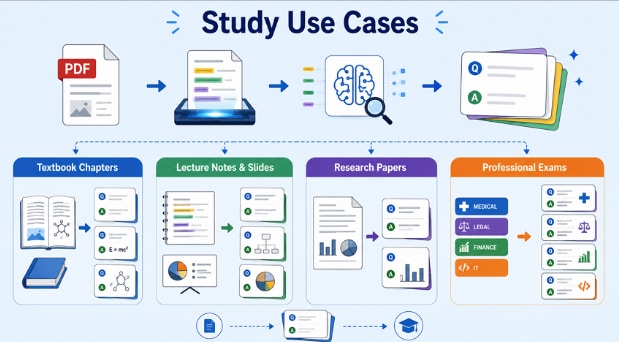
Academic material is the obvious fit because it is information-dense, organized, and designed for learning. Each of the following converts into useful review cards with minimal manual effort:
- Textbook Chapters: Turn chapter summaries, key terms, formulas, and definitions into easy review cards.
- Lecture Notes and Slides: Convert class notes and presentation slides into flashcards for exam preparation.
- Research Papers: Create cards covering research questions, methods, findings, limitations, and important terminology.
- Professional Exams: Generate flashcards for anatomy, legal concepts, compliance rules, finance terms, and IT certification topics.
Work and Training Use Cases
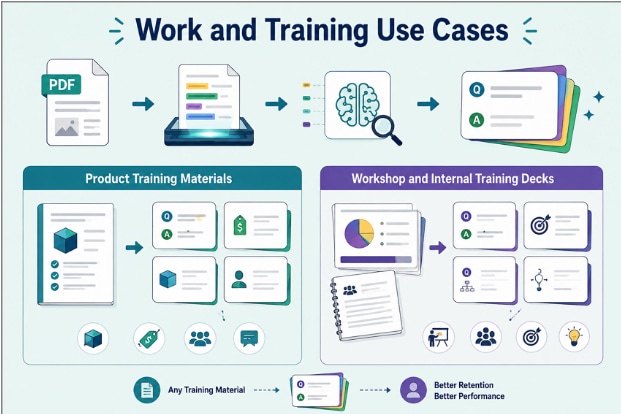
The same approach works for workplace learning because employees must remember information long after training ends. Review cards make training materials easier to revisit and retain over time.
- Product Training Materials: Turn product features, pricing rules, use cases, and objection handling into review cards.
- Workshop and Internal Training Decks: Convert training handouts and presentation decks into flashcards for ongoing knowledge reinforcement.
Part 4. PDFelement: The Best AI Flashcard Generator From PDF
Creating flashcards manually from lengthy PDFs takes unnecessary time and interrupts productive study sessions every day. This is where PDFelement simplifies the process by extracting important information from PDF documents. Its AI Sidebar identifies key concepts, definitions, and facts while keeping the original PDF always accessible nearby.
Built-in editing tools organize extracted text into clear question-and-answer formats before creating effective flashcards for revision. OCR converts scanned PDFs into readable text, ensuring AI extracts accurate information from every uploaded page. Some versions include adaptable templates supporting organized study materials before generating flashcards for consistent review sessions.
How to Turn PDF into Flashcards Step by Step
Careful setup improves flashcard quality and creates more useful study cards from every uploaded document. Follow the steps below to turn a PDF into flashcards using PDFelement's AI features:
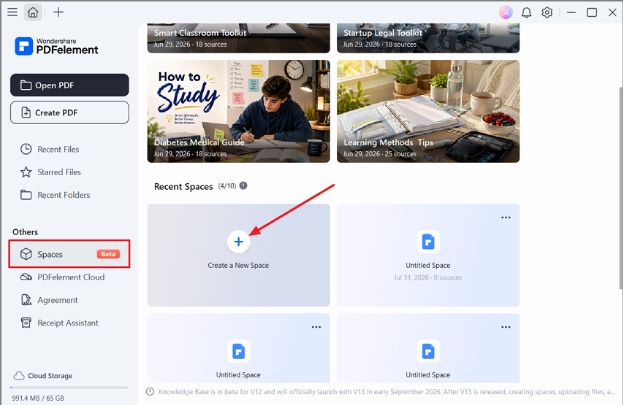
Step 1. Create a New Space in PDFelement
After you enter PDFelement, press the “Spaces” option in the left side panel and choose “Create a New Space.”
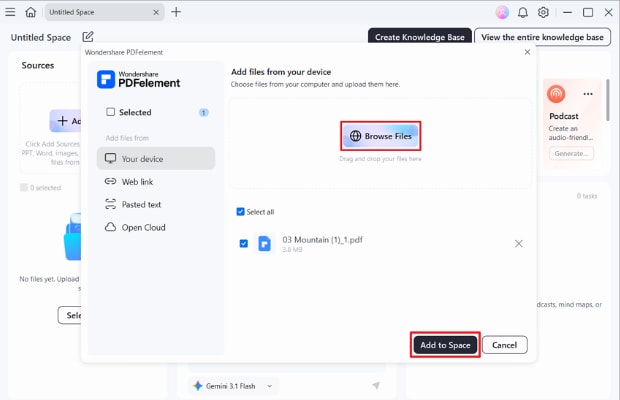
Step 2. Add Your PDF to Space
Next, press the “Browse Files” option and choose the PDF file you want to add. Next, press the “Add to Space” button.
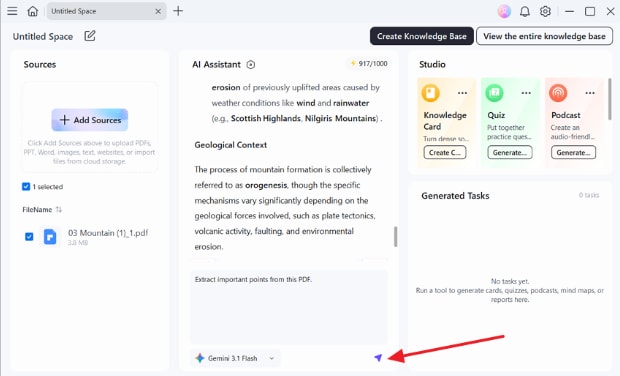
Step 3. Chat with The PDF
Afterward, type your queries or questions about the PDF in the chat section. Click “Send” to get the response.
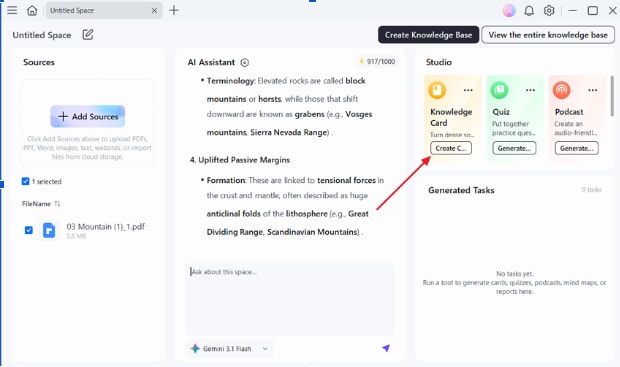
Step 4. Create Flashcards from AI Response
After that, press the “Create” button in the “Knowledge Card” section to convert the AI response to flashcards.
Step 5. Review the Generated Flashcards
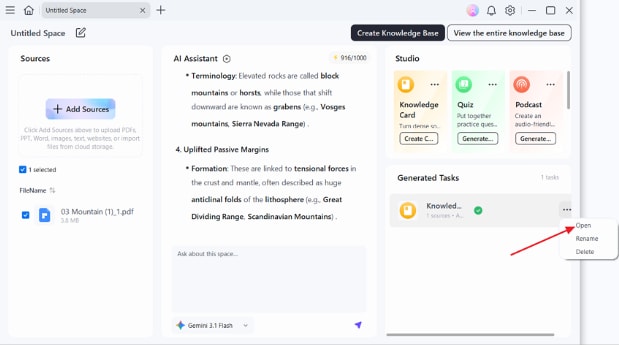
Lastly, access the “Generated Tasks” section. Press “Three-Dots” and choose “Open” to open and read the generated flashcards.
Why Choose PDFelement
Reliable tools process scanned PDFs and image-based documents before creating flashcards. Now, let's explore the essential features used to generate flashcards from PDF files.
- AI Summaries and Explanations: Summarize, explain, and pull key points before any cards exist.
- OCR for Scanned Files: Image-based readings become selectable text, which card generation depends on.
- Editing Before Generating: Highlight, edit, and reorder the file so the AI works from clean material.
- Cross-Platform Access: Windows, Mac, iOS, and Android reach the same documents.
G2 Rating: 4.5/5 |100% Secure
Part 5. Choosing Between Q&A, Definition, Cloze, and Multiple-Choice Cards
Different flashcard formats improve learning by matching questions with specific types of study material. Choosing suitable formats helps create flashcards from PDF documents that improve understanding and memory retention. The table below compares each flashcard type with its most suitable learning purpose and content:
| Card Type | How It Works | Best Suited To |
| Question and Answer | A direct prompt with a full response | Concepts, processes, and reasoning |
| Definition | A term on one side, its meaning on the other | Vocabulary and terminology |
| Cloze | A sentence with one element removed | Formulas, sequences, and exact wording |
| Multiple Choice | One prompt with several plausible options | Exam practice and similar terms |
Frequently Asked Questions
What is the best PDF to flashcards tool?
PDFelement suits most users, since it combines card generation with OCR, editing, and AI summaries in one application. Dedicated study apps work too, though they rarely handle the source document.
Can I turn a scanned PDF into flashcards?
Yes, once OCR converts the page images into selectable text. Accuracy depends on scan quality, so faint or handwritten pages may need correcting.
Are AI-generated flashcards accurate?
AI-generated flashcards remain reliable for definitions and stated facts across most study materials today. Always verify interpretations, figures, and graded content against the original PDF page before examinations.
How many flashcards should I make from one PDF?
Generally, 20 to 30 strong flashcards per chapter provide better learning than weaker alternatives. Every flashcard requires repeated review, making smaller high-quality sets more effective than larger collections overall.
Final Takeaway
Effective studying depends on reviewing information through active recall instead of repeated reading. A PDF-to-flashcard workflow transforms important concepts into review cards for faster learning and retention. Different flashcard formats help learners remember definitions, facts, formulas, and concepts more every session. PDFelement combines AI, OCR, and organization tools, making flashcard creation simple from any PDF document.
G2 Rating: 4.5/5 |100% Secure


